Instagram DM permission approval: Real Client Case Study
A development team was building a web-based chat connector that syncs website conversations into Instagram Direct Messages for an Australian business client. The integration worked end-to-end in testing — but the app kept stalling in Meta App Review, and the reason had nothing to do with the code.
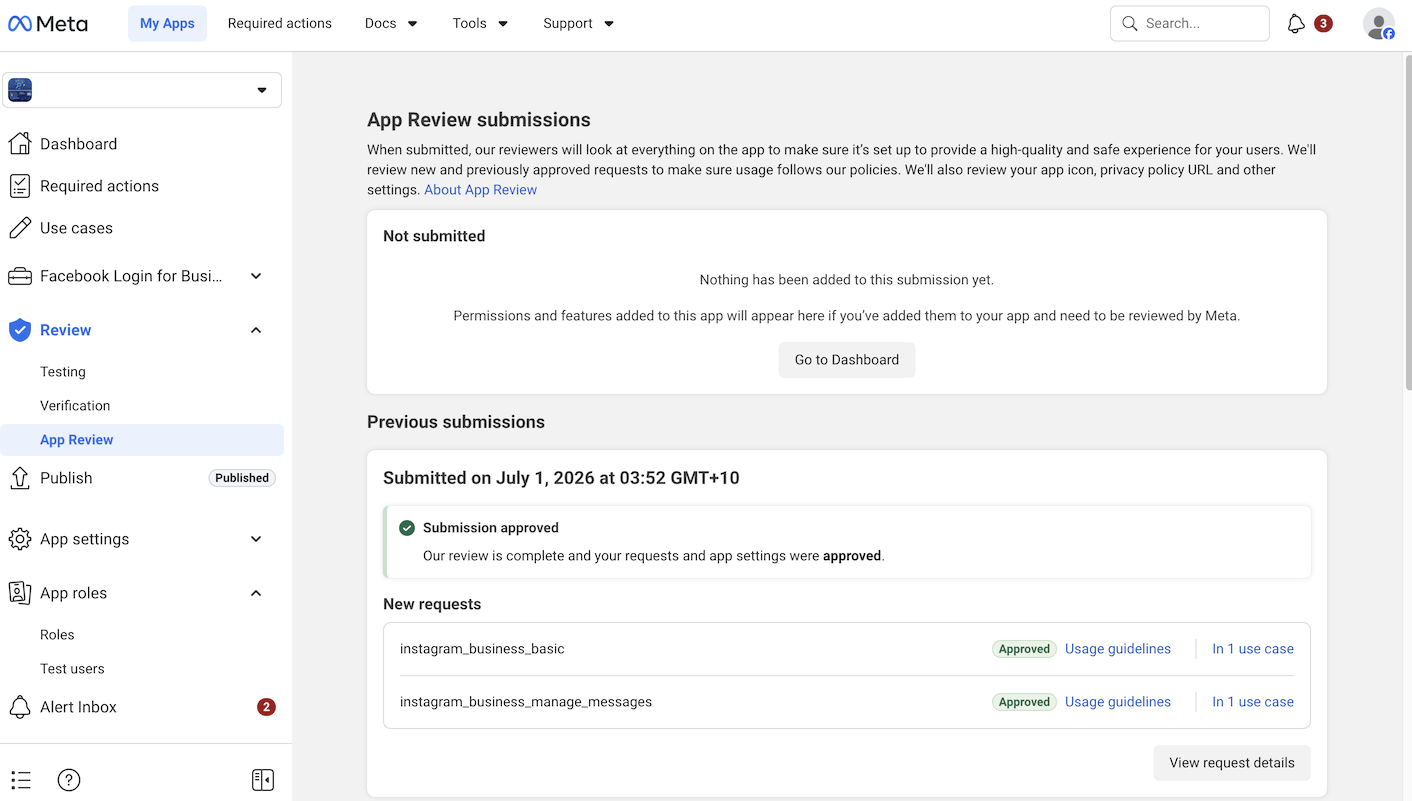
Instagram DM Permissions Requested
2 Permissions
instagram_business_basic
Base dependency required for any Instagram Business API access
instagram_business_manage_messages
Send and receive Instagram Direct Messages through the app
The First Rejection — “No Evidence of Delivery”
The reviewer’s note looked simple on the surface: a message was sent from the app, but the recording never showed it actually arriving inside Instagram. Meta’s screencast guidelines require both sides of a permission’s real-world use — the send action and the receive confirmation — to appear in the same recording, or in back-to-back clips of the same test.
A working feature and a working recording are two different things. The client’s original screencast proved the app fired a message; it did not prove Instagram received it. That distinction is exactly what a reviewer is trained to look for, and it’s one of the most common ways a technically correct integration still gets rejected.
The Complications We Had to Solve
Business Verification Was a Hard Dependency
The connector app had to be linked to a Meta-verified Business Manager before submission was even possible. This wasn’t optional — Meta blocks messaging permission review entirely for apps not tied to a verified business.
Privacy Policy Domain Mismatch
The client’s existing privacy policy lived on their main business domain, while the connector itself ran on a separate subdomain. Meta expects the privacy policy referenced in the app to align with the domain the integration actually runs on — a mismatch here can stall review on its own, independent of the permission evidence issue.
Mid-Review Access Handoff
Developer access to the app changed hands partway through the review cycle. Any admin/developer role change on an app under review has to be handled carefully so it doesn’t reset or flag the pending submission.
How It Was Fixed
1
Diagnosed the exact reviewer note against Meta’s official screencast and permissions documentation to confirm this was a recording-evidence issue, not a functionality or scope issue.
2
Re-planned the recording so the send action and the message actually appearing inside Instagram’s own web or mobile interface were both captured in one continuous flow.
3
Resolved the domain mismatch by putting a privacy policy in place under a domain Meta would accept as consistent with the connector.
4
Managed the developer access change mid-cycle without disrupting the pending review, and resubmitted.
Result
instagram_business_basic — Approved
instagram_business_manage_messages — Approved
~4 weeks from first rejection to final approval
Common Reasons This Permission Gets Rejected
No delivery evidence in the screencast — the recording shows the app sending a message but never shows it landing inside Instagram’s own interface.
App not linked to a verified Business Manager before submission.
Privacy policy hosted on a domain that doesn’t match the app or connector being reviewed.
Wrong permission requested for the actual use case, adding an avoidable review cycle.
Key Lessons From This Project
A working feature isn’t the same as a compliant recording. Reviewers only see what the screencast shows them — if delivery isn’t visibly proven on both sides, the permission gets rejected regardless of whether the integration actually works.
Business Verification is a prerequisite, not an afterthought. Messaging permissions won’t clear review without a verified Business Manager already in place.
Domain consistency matters. Privacy policy, app domain, and the actual integration surface all need to line up in the reviewer’s eyes.
Access changes mid-review need care. Swapping developer or admin roles on an app that’s actively under review can create avoidable complications if not handled correctly.
If your integration needs Instagram API approval and setup support, or you’re stuck on a Meta Business Verification requirement, our Meta Business Verification service covers that dependency end-to-end.