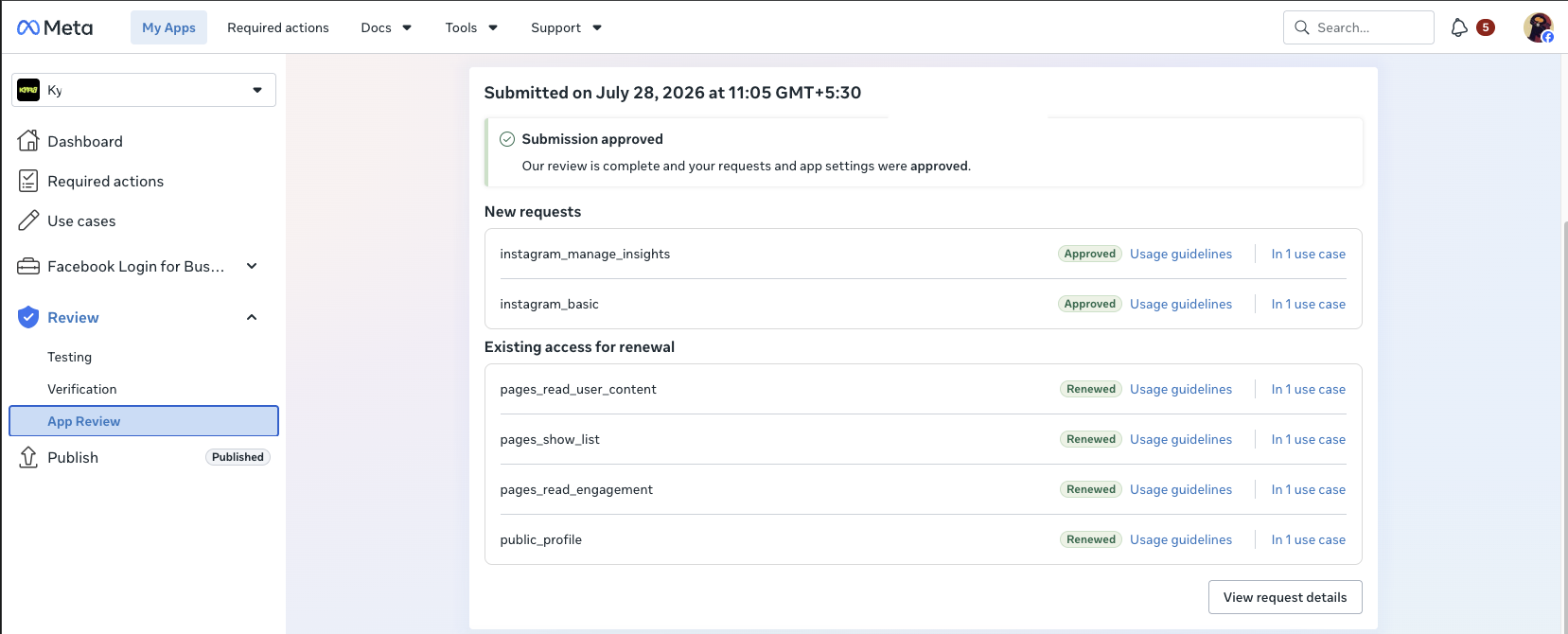
5 Meta Permissions Approved for a Facebook & Instagram Page Reporting SaaS
The founder of a reporting SaaS — a tool that pulls a business's Facebook Page posts and engagement data, plus Instagram account and insights data, and reports it back to that business inside the product — needed 5 Meta permissions approved. The app's Business Manager was already verified through an earlier, separately-approved review, so this project could go straight into permission-level preparation.
Here is what the permission set covered, what the submission actually required, and how it was carried through Meta's review to a full approval.
The starting situation
A read-focused permission set
Five permissions spanning Facebook Pages and Instagram together — posts, engagement, comments and Instagram insights — all needed for one reporting feature.
Verification already in place
The app's Business Manager was already verified from an earlier approved review, so the project moved straight into permission prep instead of starting from zero.
A live connected account required
Filing needed admin access to the client's Facebook app plus a real Page and Instagram account already connected — not a placeholder setup.
Filing access changed mid-project
Partway through the review, access to the account managing the app had to move to a second Facebook user without disrupting the submission already in motion.
What actually had to be approved
A Page-and-Instagram reporting feature needs a specific combination of permissions to pull and display metrics back to end users:
Each permission has to be justified on its own and demonstrated inside the live product — a reporting tool has to actually show a reviewer real Page and Instagram data being pulled and displayed, not just claim it can.
How the project was handled (high level)
Verification check
Confirmed the app's Business Manager was already verified from a prior approved review before requesting any new permissions.
Access & scope setup
Admin role was added on the app, and the requested permission list was checked against Meta's current permissions reference to confirm nothing needed was missing.
Technical readiness wait
After the requested permissions were connected to the app, Meta enforces a short technical waiting window before a submission can be filed. That time was used to finish usage descriptions and screencasts.
Submission and monitoring
The request covering all 5 permissions was filed as one submission and tracked through Meta's review queue.
Access continuity
When the client's own Facebook account access changed mid-review, admin access was re-established on a new account so the in-progress submission stayed intact.
The result
All 5 permissions approved. pages_show_list, pages_read_engagement, pages_read_user_content, instagram_basic and instagram_manage_insights came back approved — the client's reporting product could pull and display real Page and Instagram metrics for end users.
What reporting & analytics apps need before they submit
- Read-only permissions like pages_read_engagement and instagram_manage_insights still need real posts and real engagement data on screen — an empty test account gives a reviewer nothing to check.
- Business Verification and Business Manager status need to be confirmed before requesting Advanced Access, not discovered partway through.
- Admin access to the app needs a fallback plan — losing access to your own Facebook account mid-review is more common than most first-time founders expect.
- Meta's technical waiting period after connecting new permissions is easy to miss, and rushing past it can add days to the timeline instead of saving them.
If your SaaS needs to pull and report Facebook Page or Instagram data for your users, this is exactly the kind of Meta App Review project we handle. See our Facebook App Review service or our Instagram App Review service for more.