Meta Business Verification Rejected: Legal Name / Address Mismatch Expert Diagnosis
When Meta Business Verification is rejected for a legal name / address mismatch, the failure is almost never “Meta randomly hates our PDF.” It is a document-to-field integrity check: the legal business name and official mailing address (or phone path) you typed in Business Settings must match what appears on accepted official documents — character for character where it matters. This article diagnoses Meta Business Verification rejected for legal name or address mismatch using Meta Business Help Center practice on official documents. It does not invent App Review Rejection Guide quotes; Business Verification lives in Business Suite / Business Manager, adjacent to but separate from permission App Review.
What this rejection actually means
Business Verification confirms that the Business Manager entity is a real, identifiable business. Meta’s help center instructs you to enter legal name, address, phone, and website so they exactly match the legal entity, then upload official documents when automated matching fails. Documents must validate the legal name and the business’s official mailing address or phone number. When reviewers cannot reconcile what you typed with what the paper (or scan) shows, verification fails — often with language about insufficient or mismatched documents rather than a cinematic policy essay” rejection.
That mismatch blocks Advanced Access prerequisites, WhatsApp Business API tier progress, and Tech Provider onboarding, which still requires a verified business. Neighboring work: Meta Business Verification service, Facebook App Review service, and patterns in case studies.
WHAT failed
Entered legal name and/or address (or phone) did not match accepted official documents, or the wrong document type was used to prove legal name.
WHY it matters
Unverified businesses stall Advanced Access, client onboarding, and partner programs that gate on Business Verification status.
WHAT they expected
Exact legal-entity fields plus paired documents that prove name with address or phone not brand names, incomplete scans, or utility-only name proof.
Reviewer psychology: registry truth beats brand story
Document reviewers are not your branding agency. They compare strings and seals. “Acme Labs” on the website versus Acme Laboratories Private Limited on the certificate without a clear relationship note fails. Suite 4B” missing from Business Settings while present on the tax document fails. Cropped pages that hide the registered address fail. A crisp utility bill that shows an address but not the legal business name fails the name step Metas document guidance is explicit that utility bills are for address/phone pairing and are not acceptable for legal business name verification.
That psychology is why “upload everything we have without aligning Business Info fields wastes cycles. Fix the entity string first; choose documents that cover the required pair (legal name + address, or legal name + phone); then submit once with readable, unaltered scans.
Technical nuances that trip capable teams
Across hundreds of Business Verification recoveries, legal name / address mismatch failures cluster around:
- Brand / DBA entered as legal name — marketing name in Business Info; incorporation name on documents.
- Suffix and punctuation drift — Ltd vs Limited, Pvt. vs Private, LLC commas, bilingual renderings.
- Address line incompleteness missing floor, unit, PIN/ZIP, or transliteration differences across registry vs utility bill.
- Utility bill used to “prove” legal name accepted for address/phone when the legal name is present; not a substitute for name verification documents.
- Tax ID / GST / EIN document vs display name — ID numbers match but the printed legal name does not match what was typed.
- Website / email domain mismatch — personal Gmail, parking page, or HTTP-only site when Meta expects a loading HTTPS site consistent with the entity.
- Partner uploaded docs for the wrong Business Manager — Tech Providers / ISVs uploading on a client’s behalf when the business must self-verify with authorized representatives.
- Treating BV rejection like App Review rewriting permission screencasts while Business Settings still hold a mismatched legal string.
Official references (Business Verification practice not Rejection Guide inventions):
- Verify your business in Meta Business Suite
- Upload official documents to verify your business — document types; utility bill limits for legal name lank" rel="noopener">Upload official documents to verify your business document types; utility bill limits for legal name
- Business Verification (Developer docs) — Advanced Access / app connection context
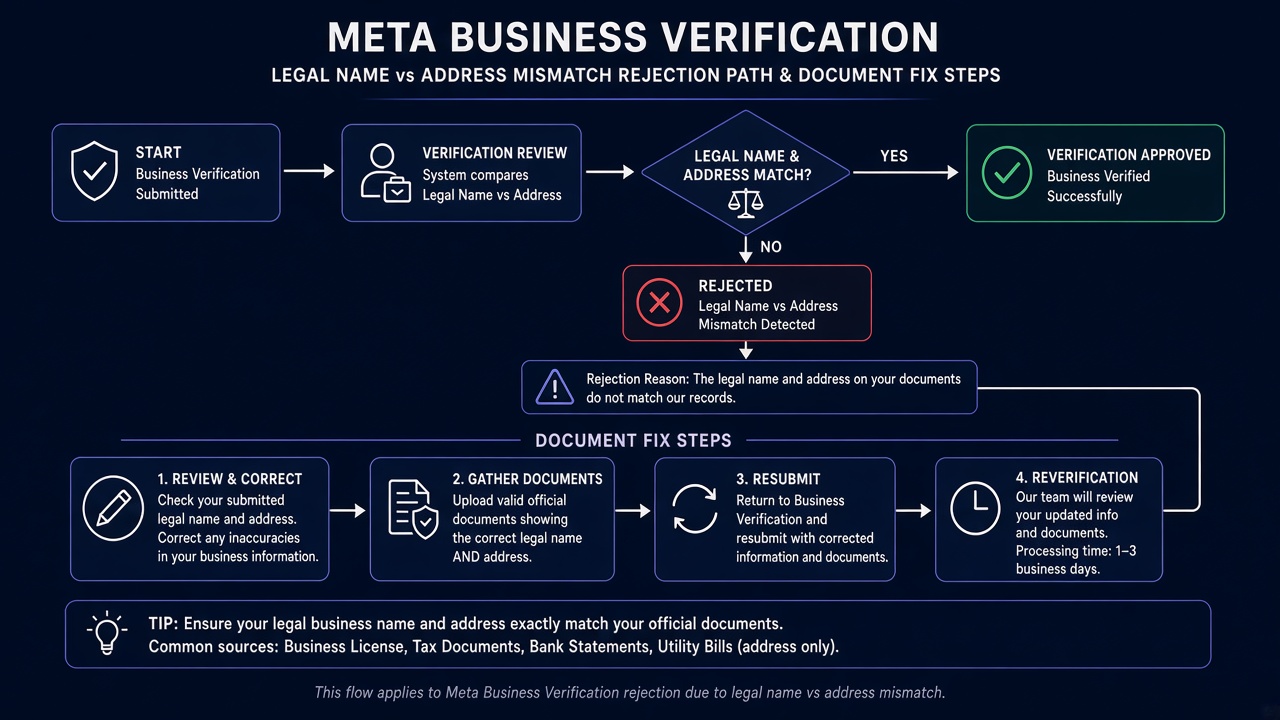
Retry / cooldown note (not App Review submit-button cooldown): Business Verification document decisions are not the Meta App Review “buttons locked up to 7 days” pattern. Rapid-fire uploads of the same mismatched PDFs can still slow review queues and deepen insufficient-document outcomes. Align Business Info to registry truth once, select documents that prove the required name+address or name+phone pair, then resubmit a single coherent package — do not burn the Business Manager into a spam loop of cropped scans.
Expert Diagnosis framework (not a DIY paste template)
Every jurisdictions registry format, bilingual legal name, and address standard differs. There is no safe universal approved PDF pack” to paste into Business Suite. Specialists diagnose first:
Freeze the legal entity string
Copy the legal name exactly from incorporation / tax registration into Business Info. Separate brand/DBA storytelling to the website relationship note not the legal name field.
Match the address or phone path you chose
If verifying by address, the document must show legal name + that address. If verifying by phone, legal name + that phone. Do not mix paths with unpaired docs.
Pick document types Meta actually accepts for each fact
Use incorporation, license, or tax documents for legal name. Use utility/bank materials only where Meta allows for address/phone — never as sole legal-name proof.
Resubmit once with readable, complete scans
Full pages, current documents, unaltered files, authorized-representative upload. One aligned package beats five frantic uploads.
Managed help: Meta Business Verification service, Facebook App Review service. Patterns: case studies. Related: WhatsApp template rejection, data deletion callback, rejection reasons hub.
Free 15-Minute Meta Rejection Audit
Share the Business Info legal name/address as entered, Meta’s rejection notice, and which documents you uploaded (types only — redact personal numbers). We will separate field-string mismatch from document-type failure before you burn another verification cycle.
What not to do after this rejection
Business verification rejected: when to resubmit
A business verification rejected notice is usually a field problem before it is a document problem. Start by comparing the legal name and address in Business Settings with your registry certificate, character for character. Most mismatches are small: a missing suffix, an extra unit number, or a brand name typed where the legal name belongs.
Once the fields match, choose a document pair that proves both the legal name and the address, then resubmit once. Repeated uploads rarely fix a business verification rejected case. Each extra file that repeats the same mismatched details gives the reviewer the same conflict, and it can slow the review queue. Business verification rejected results are usually solved in the Business Settings panel, not in the upload folder.
If you are unsure which fields to compare, send the Business Settings values and your business verification rejected notice for a free 15-minute audit before you upload again. That keeps the next submission to one coherent package instead of another round of guesses.
Need Us to Get Your Meta App 100% Approved?
Stop losing weeks to repeated rejections. With 500+ apps approved, we handle your entire submission from start to finish. You get 100% Approval or a 100% Refund — and for your complete safety, you can hire us directly through Upwork or Fiverr Escrow (or use the WhatsApp / Calendar buttons in the header & footer).
Chat on WhatsAppFrequently Asked Questions
Why does Meta reject Business Verification?
Rejections usually come down to mismatches: the legal name, address or phone on your documents doesn't match what's in Business Manager, the website doesn't clearly belong to the business, or the documents are expired, cropped or in the wrong format.
How long does Business Verification usually take?
It takes ~3 days for our complete preparation and submission, followed by Meta's review queue — typically 10–20 days (can be faster or take longer depending on Meta's volume). For apps with multiple permissions, if Meta requests adjustments on specific scopes, we handle the changes and re-apply at no extra cost, and each follow-up round follows the same 10–20 day review window.
Is there a guarantee?
We work on a 100% Approval or 100% Refund basis: if we can't get your valid use case approved, you get a full refund.
How can I hire you safely?
You can hire us through Upwork or Fiverr, so your payment stays in Escrow and is only released when the work is delivered. We've been doing this for 10+ years, with 500+ apps approved and 10,000+ permissions granted.
Amandeep Singh — Meta API Expert
10+ years helping product teams through Meta App Review, Business Verification, and Advanced Access. 500+ apps guided; 10,000+ permissions handled across Facebook, Instagram, WhatsApp, and Marketing API surfaces. Focus: policy-aligned proof, not hype.
Still stuck on Meta Business Verification rejected — legal name / address mismatch? Get a focused document-to-field read before the next upload.
Book Free 15-Minute Meta Rejection Audit on WhatsApp