Client Attempted 2 Times & Got Rejected — Amandeep Singh Submitted Once & Got All Permissions Approved on Attempt #1.
This Instagram Insights API approval came after two rejections in a row, and the fix was not a new feature. It was a better screencast and clearer reviewer notes. Here is the full Instagram App Review case study, step by step.
Project Overview
The Story Behind This Instagram App Review Case Study
The client runs a marketplace in Korea that connects restaurants and cafes with Instagram creators. Cafes want local creators to visit and post. Creators want paid work that fits their audience.
To match the two sides, the app uses the Instagram API with Instagram Login. Creators connect their own professional account, and the platform reads their insights so venues can see real reach and engagement.
That is exactly why the app needed Instagram Insights API approval. Without instagram_business_manage_insights approval, the marketplace has no trusted numbers to show restaurants.
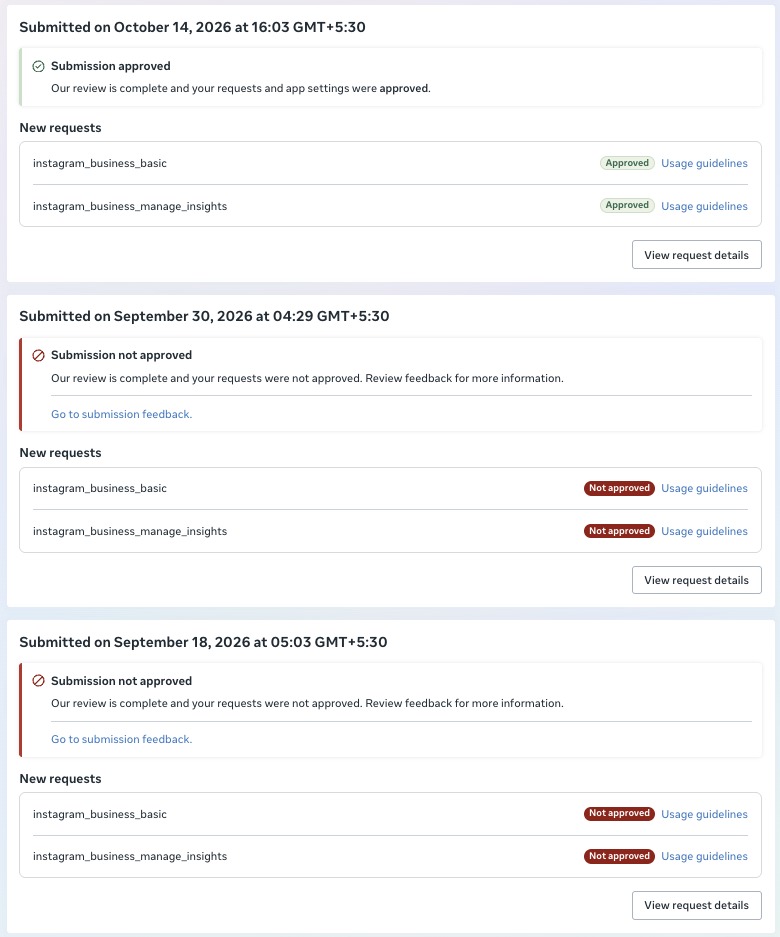
The client submitted for Instagram Insights API approval on their own twice. Meta said no on Sep 18, 2026 and again on Sep 30, 2026. Both times the reason was the same: "Screencast Not Aligned with Use Case Details."
After the second rejection, they reached out for help. They did not want to risk a third Instagram Insights API approval attempt guessing, so they asked me to take over the submission.
Diagnosis: Why Instagram Insights API Approval Was Blocked
I audited the app, the use case text and both rejected videos before touching anything. The problem was clear within the first review.
- Reauthorization, not first connect: the old video showed an already-connected account being reauthorized. Meta never saw a brand-new user sign up and grant permissions.
- No clear end point: the video did not land on the screen where insights data is actually used, so the reviewer could not link the permission to a feature.
- Notes and video did not match: the written use case described one journey, and the screencast showed another. That gap is exactly what this rejection reason flags.
- Thin English reviewer notes: the notes did not walk the reviewer through each step, so the flow was hard to follow.
The Instagram Screencast Rejection Fix We Applied
The app itself was fine. The Instagram screencast rejection fix was all about showing Meta the real journey, start to finish, with nothing skipped.
- Tester account: I used a dedicated tester account so the recording started from a truly fresh user with no prior connection.
- Full end-to-end flow: the new video runs from first sign-up, through the Instagram connect and permission screen, to the page where the insights data appears.
- Invitation-code gate handled: the site's invitation-code gate blocked tester signup at first. The client opened it, and the recording went ahead cleanly.
- Rewritten reviewer notes: I rewrote the English reviewer notes so each step in the text matches a moment in the video, permission by permission.
- One careful submission: nothing went in until the video, notes and use case told the same story.
The Result: instagram_business_manage_insights Approval on Attempt #1
I submitted once. On Oct 14, 2026, Meta approved both permissions. No follow-up round and no extra questions from the reviewer.
- ✅
instagram_business_basic— Approved - ✅
instagram_business_manage_insights— Approved
With instagram_business_manage_insights approval in place, the marketplace can now show restaurants and cafes real creator insights. That was the whole point of the product.
The lesson is simple. Instagram Insights API approval depends less on code and more on proof. Meta needs to see the exact flow you describe.
Why Screencast Rejections Happen
Most screencast rejections come from a mismatch between what you wrote and what you recorded. Reviewers check the video against the use case line by line.
- Skipping the login: starting the video after the account is already connected hides the permission grant.
- Not showing the data: every requested permission must appear in use on screen, not just be mentioned.
- Vague notes: short or unclear notes make the reviewer guess, and guessing usually ends in a rejection.
Meta's official Instagram Platform documentation explains each permission. Matching your video to it is the core of any Instagram screencast rejection fix.
How Our Instagram Insights API Approval Process Works
Every project follows the same calm, repeatable process. It is the same one used in this case, and it keeps surprises out of the review queue.
- Step 1, audit: we read your use case, your current video and any past rejection messages. We look for gaps between what you claim and what you show.
- Step 2, test setup: we create or use a tester account and confirm the full sign-up path works. Blockers like invite codes or region locks get cleared first.
- Step 3, screencast: we record one clean end-to-end video. It starts at sign-up, shows the Instagram Login screen and ends where each permission's data is used.
- Step 4, reviewer notes: we write clear English notes that follow the video step by step, so the reviewer never has to guess.
- Step 5, submit and monitor: we submit once, watch the status and answer any reviewer follow-up quickly.
For instagram_business_manage_insights approval in particular, the key moment is the insights screen. The reviewer must see real metrics pulled from the connected account and understand who uses them.
In this project, that screen was the moment restaurants see a creator's reach. Once the video showed it clearly, the request made sense to Meta right away.
What Reviewers Look For in an Instagram App Review Case Study Like This
Reviewers are not trying to block you. They follow a checklist, and a strong submission simply makes every box easy to tick.
- A real user journey: a fresh account, not a developer shortcut or a saved session.
- Visible consent: the Instagram permission screen, shown in full, with the requested scopes listed.
- Clear value: the screen where the data helps the user, with a short note on why it matters.
Get those three right and Instagram Insights API approval becomes predictable instead of a coin toss. Miss one, and even a great app can get the same rejection twice, as this client learned.
Why Teams Trust Us With Instagram Insights API Approval
Every Instagram Insights API approval we handle starts with an audit, not a guess. If your app was rejected, our Instagram App Review service can take over the next submission.
Need more than insights? See our guide to Instagram API advanced access approval, or browse more case studies like this Instagram App Review case study.
Need Us to Get Your Meta App 100% Approved?
Stop losing weeks to repeated rejections. With 500+ apps approved, we handle your entire submission from start to finish. You get 100% Approval or a 100% Refund — and for your complete safety, you can hire us directly through Upwork or Fiverr Escrow (or use the WhatsApp / Calendar buttons in the header & footer).
Chat on WhatsAppFrequently Asked Questions
Why does Meta reject an app for "Screencast Not Aligned with Use Case Details"?
Meta rejects with this reason when the video does not show the exact flow described in your use case. Common causes are skipping the first sign-up, reauthorizing an account that is already connected, or never showing where the permission data appears. A clean end-to-end screencast is the Instagram screencast rejection fix that works.
How long does Instagram Insights API approval take?
~3 days for our complete preparation and submission, followed by Meta's review queue — typically 10–20 days (can be faster or take longer depending on Meta's volume). For apps with multiple permissions, if Meta requests adjustments on specific scopes, we handle the changes and re-apply at no extra cost, and each follow-up round follows the same 10–20 day review window.
What does Get Approved Or 100% Refund mean?
It means you only pay for a result. If we cannot get the permissions you hired us for approved, you get a 100% refund. We take on that risk because we audit the app before we submit, so we only submit when the flow is ready.
Is it safe to hire you through Upwork or Fiverr?
Yes. On Upwork and Fiverr your payment is held in escrow by the platform. It is released only when the work is delivered and you are satisfied, so your money stays protected for the whole project.