Instagram API Advanced Access: The Gate Between Testing and Real Clients
Your app works fine for your own Instagram account. Apps still relying on old Basic Display tokens must migrate to the Graph API, and here is what the Basic Display API shutdown means. Test users authenticate without issues. Then the first paying client tries to connect — and the API returns permission errors or simply refuses to authorize. This is the Standard Access wall. Crossing it requires Meta App Review for Advanced Access, and the process has several steps most developers miss the first time.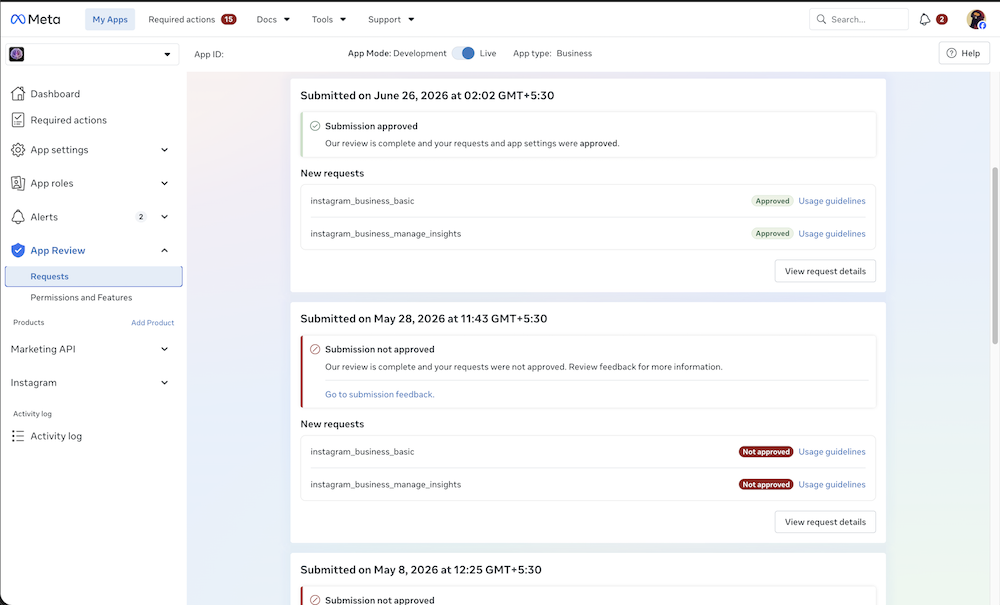
Standard Access vs Instagram API Advanced Access — what actually changes
Standard Access (default)
- Available immediately — no App Review needed
- Limited to people with roles on your app: developers, testers, admins
- App can only serve Instagram accounts you personally own or manage
- Some features may not function correctly even for test accounts
- Never suitable for onboarding real, third-party client accounts
Instagram API Advanced Access (required for real clients)
- Unlocks your app for users with no role assigned on it
- Required for serving Instagram Business and Creator accounts you do not own
- Requires Business Verification AND Meta App Review
- Each permission is reviewed and approved separately
- No practical cap on the number of Instagram accounts your app can serve once approved
Which Instagram permissions require Instagram API Advanced Access?
Instagram has two API configurations depending on how users authenticate. The permissions you can request depend on the login path, so check which Instagram API path your app needs before you submit for review. All permissions in both configurations require Instagram API Advanced Access to serve accounts outside your own — Standard Access covers only role-assigned accounts in all cases.Do I need advanced access for Instagram API? Yes, if your app serves Instagram Business or Creator accounts you do not own. Accounts with a role on your app are covered by Standard Access.
Instagram Login (Business Login for Instagram)
instagram_business_basicinstagram_business_content_publishinstagram_business_manage_commentsinstagram_business_manage_messages- Human Agent feature (7-day messaging window)
Facebook Login (Facebook Login for Business)
instagram_basicinstagram_content_publishinstagram_manage_commentsinstagram_manage_insightsinstagram_manage_messagespages_show_list,pages_read_engagement- Instagram Public Content Access (Hashtag Search)
Why Standard Access breaks production apps (and hides the problem during testing)
- Client authorization silently fails: When a real client clicks your OAuth flow, Instagram checks app roles. The client is not a developer or tester on your app, so authorization is blocked or returns empty data — no clear error message, just no access.
- Development Mode vs Live Mode gap: Permissions that worked during development stop working correctly in production because Live Mode Instagram API Advanced Access has not been approved via App Review.
- Meta’s own documentation states: “Some features might not work properly until your app has been granted Instagram API Advanced Access.” This is not a bug or a misconfiguration — it is the intended gate.
- Invisible until the first real client: If you only tested with your own account or accounts you manage, Standard Access works fine. The wall only appears when a non-role user tries to connect. By that point, the product may already be launched.
What Instagram API Advanced Access approval actually requires
Switch your app to Live Mode
Your Meta app must be in Live Mode before submitting for App Review. Apps in Development Mode are blocked from receiving Instagram API Advanced Access. Switching to Live Mode while only having Standard Access is the point where most teams first see the Standard Access wall on real accounts.Complete Meta Business Verification
Instagram API Advanced Access requires your business identity to be verified in Meta Business Manager before App Review can succeed. Business Verification has its own documentation requirements and is a common independent rejection point. Attempting App Review before Verification passes is the most common sequence mistake. See our guide to Meta Business Verification.Publish a valid privacy policy
Your privacy policy must be reachable via a public HTTPS URL, hosted on the same domain as your app, and specifically disclose how your app handles Instagram and Facebook user data — what you access, how you use it, retention period, and how users can request deletion.Add a data deletion URL (required for Facebook Login apps)
Apps using Facebook Login for Business that handle Facebook user data must provide either a Data Deletion Callback URL or a Data Deletion Instructions URL in the App Dashboard. This is one of the most commonly missing requirements and causes automatic App Review rejection. Learn more about the Facebook data deletion callback URL requirement.Write per-permission use-case justifications
For each permission you request, Meta requires a written justification explaining exactly which feature depends on it, why a narrower scope would not work, and how the data is used. Generic justifications — “we need this for our social features” — trigger rejection. Each permission is evaluated individually.Submit a screencast for each permission
For each permission, you must record a demo video showing the complete OAuth authorization flow using a real Instagram Business or Creator account (not a test user), and showing that permission’s data rendering in your app’s front-end. The reviewer must be able to reproduce every step. One screencast per permission — not a single combined video.Why Instagram API Advanced Access requests get rejected
- Screencast uses a test user account — App Review requires a real Instagram Business or Creator account, not a developer test user assigned in the App Dashboard
- OAuth consent screen missing from the screencast — reviewers must see the user explicitly granting permissions during the flow
- Requested data not rendered in the app after authorization — a success token or console log is not enough; the data must visibly appear in the app’s front-end
- Business Verification not completed before App Review submission — the most common sequencing mistake; both are required but Verification must come first
- Privacy policy on a different domain — must be on the same domain as the app’s homepage URL listed in the App Dashboard
- Data deletion URL missing — required for Facebook Login apps; absence causes automatic rejection
- Permissions requested but not demonstrated — any permission the screencast does not show being actively used will be removed or rejected
- Vague per-permission justifications — Meta expects concrete feature names and specific data-use explanations for every scope
What changes after Instagram API Advanced Access is approved
Once Meta approves Instagram API Advanced Access for each permission, your app can onboard any Instagram Business or Creator account without role restrictions. There is no per-client approval and no user cap. Instagram API Advanced Access does not raise the impression-based ceiling, so read why your Instagram app hits 429 errors for how the quota really scales. The approved permissions apply to every new account that connects through your OAuth flow — meaning one successful App Review unlocks your app for all future clients using those permissions.Need Us to Get Your Meta App 100% Approved?
Stop losing weeks to repeated rejections. With 500+ apps approved, we handle your entire submission from start to finish. You get 100% Approval or a 100% Refund — and for your complete safety, you can hire us directly through Upwork or Fiverr Escrow (or use the WhatsApp / Calendar buttons in the header & footer).
Chat on WhatsAppFAQ
Do I need Business Verification for Instagram Advanced Access?
Yes. Meta’s Business Help Center says business verification is required to obtain Advanced Access for any permission on Meta for Developers, and Instagram permissions are no exception. Verify the business portfolio that owns the app before, or alongside, App Review. Otherwise an approved Instagram permission still cannot be used with professional accounts that do not have a role on your app.
Which Instagram permissions belong to Instagram Login and which to Facebook Login?
Meta’s Instagram Platform overview lists them side by side. Instagram Login uses instagram_business_basic, instagram_business_content_publish, instagram_business_manage_comments and instagram_business_manage_messages. Facebook Login uses instagram_basic, instagram_content_publish, instagram_manage_comments, instagram_manage_insights and instagram_manage_messages, plus pages_show_list and pages_read_engagement. Request only the family your login flow actually uses, never a mix of both.
How long does Instagram Advanced Access approval take in 2026?
In 2026 the App Review dashboard tells developers that most submissions are reviewed within 20 days, and Instagram permissions follow the same queue. A complete submission, with a working Instagram login, a clear screencast, test access and matching use-case text, avoids the extra round trip a rejection adds. Each resubmission goes back into the queue, so get it right first time.
Meta makes all App Review and Advanced Access approval decisions independently. Approval timelines and outcomes are determined solely by Meta. This page describes the preparation and submission process based on publicly available Meta developer documentation — it is not an official Meta service or partnership, and no outcome can be guaranteed.