Two Rejections, Then Approved: ads_read + ads_management Case Study
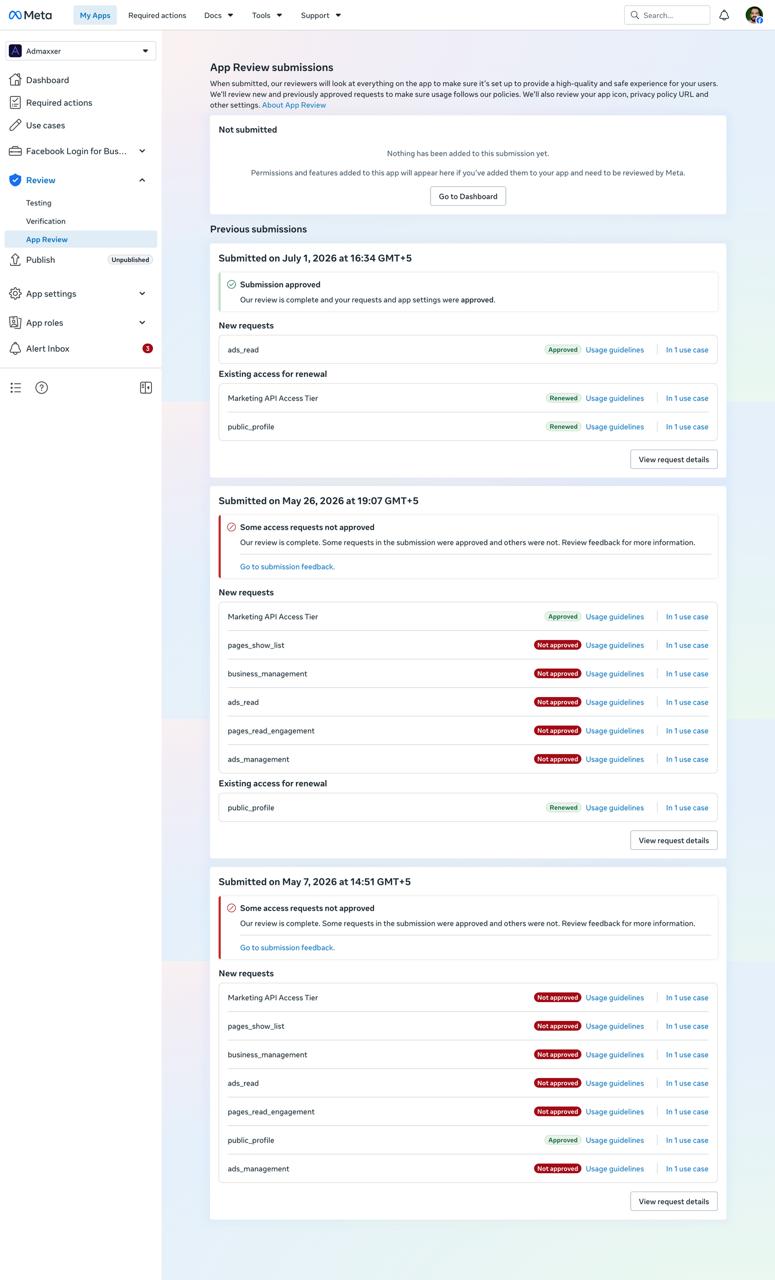
business_management, ads_read, and ads_management. The client had already tried twice on their own and been rejected both times, for the same reason both times. They hired us specifically because they didn’t want to burn a third attempt guessing at what Meta actually wanted to see.ads_read permission approved: the scopes we requested
To unlock ad account management and higher rate limits, the app needed the Marketing API Access Tier, which requires at least one of the two ads scopes below to be approved:
Why ads_read permission approved failed twice
The client’s team had submitted this exact permission set twice before we got involved — once in early May, once later that month. Both times, the outcome was almost identical:
business_management, ads_read, ads_management, pages_show_list, and pages_read_engagement were all rejected. Only public_profile came back approved.public_profile renewed. Nothing in the submission had meaningfully changed between rounds.ads_read and similar scopes, reviewers require a screen recording that shows the permission actually working end-to-end inside the app. Reusing an account that was already connected from a prior test, or recording a flow where the ad account was imported before recording started, doesn’t show a reviewer anything — there’s no visible proof the app’s own connection flow produces real, permission-gated data.The Fix — ads_read permission approved from a clean recording
Before recording a new screencast, the app first had to be removed from the test account’s connected apps in Facebook’s Business Integrations settings. Recording over an already-connected account hides the exact step Meta needs to see. Once the connection was reset, the correct recording sequence was:
ads_read is doing what the use-case description says it does.This sequence was documented step-by-step and handed to the client’s team, since their developer — not us — had direct access to a live ad account to record from.
Result: ads_read permission approved
Next round: business_management permission approval
The client’s next submission targets business_management permission approval, using the same clean-recording method.Key Lessons: meta ads api rejection fix
ads_read) got a clean approval instead of another all-or-nothing rejection.ads_read demo from an account with no ad spend or campaigns — the client’s own developer, with access to a live ad account, had to record it following an exact step-by-step sequence we provided.If your app needs ads_read or ads_management approved, our Facebook Ads API permission guide covers what reviewers check for each scope, and the Meta Ads API approval overview explains how the Marketing API Access Tier and individual scopes fit together.
Related case studies: See the same client’s new app (ads_read only) approval and the Page + Instagram reporting permissions case (not Ads API).
Frequently Asked Questions about ads_read approval
Why does Meta reject ads_read requests?
Most ads_read rejections come from a use case that doesn't show why the app needs ad account data, a screencast that skips the reporting view where the data is actually used, or a reviewer who can't reach that screen. Asking for broader ads scopes than the feature needs is another common trigger.
How long does it take if you handle it?
New app: about 3 days for our complete preparation and submission. If the app was already applied or rejected before, submission can happen the same day. Then Meta's review takes 10–20 days (less or more).
What if it still isn't approved?
Yes, we work on a 100% approval or 100% refund basis. If any permission is not approved, you get a refund for that permission.