Facebook App Review Inadequate Demonstration Fix starts with evidence, consent, and data use.
Meta App Review RejectionFacebook App Review Inadequate Demonstration Fix: Expert Diagnosis
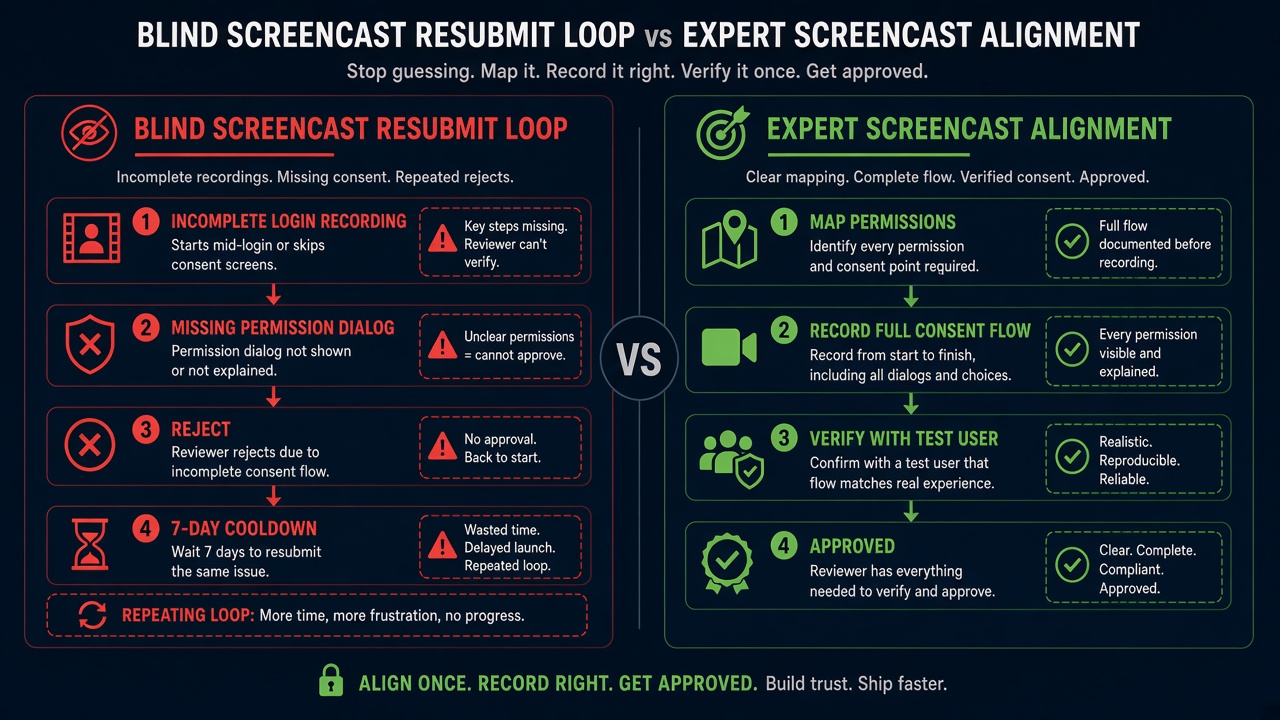
Use this Facebook App Review Inadequate Demonstration Fix checklist when preparing your screencast. When Meta App Review returns Inadequate Demonstration, the problem is usually not that your product “does not work.” It is that the screencast failed as evidence. Reviewers treat your recording as the map they will follow. If that map skips the permission prompt, hides the grant dialog, or never shows what your app does with the data after approval, the permission fails — even when your engineering is solid. This article explains what Inadequate Demonstration means, how it maps to Meta’s Screen Recordings guidance and Developer Policies, and why re-uploading a longer but still incomplete video often makes cooldowns more likely.
Facebook App Review Inadequate Demonstration Fix: What this rejection actually means
Meta’s Screen Recordings documentation is blunt: submissions must include recordings that demonstrate how to test every permission and feature requested. Reviewers use those recordings as a guide. If they cannot verify that your app needs a specific permission or feature based on what the recording shows, that permission or feature is not approved.
Inadequate Demonstration sits in that evidence gap. It is a screencast compliance failure — distinct from (but often adjacent to) live recreateability failures such as Unable to Verify Use Case Experience in App. Here the primary complaint is that the video itself does not prove the required journey: complete login, visible permission grant, and clear data usage.
WHAT failed
The screencast did not adequately demonstrate the permission/feature path — especially the consent prompt and post-grant product behavior.
WHY it matters
Without visible grant + usage, Meta cannot confirm the app needs Advanced Access or uses Platform only as documented.
WHAT they expected
Logged-out start, full login, Facebook/Business Login consent, the permission dialog on camera, then the feature working with that data.
Facebook App Review Inadequate Demonstration Fix: Reviewer psychology: the video is the checklist
App Review is not a product walkthrough with a patient co-founder. Reviewers follow the recording like a script under time pressure. They are not required to pause, rewind, invent missing steps, or accept a “trust us, the dialog appeared off-camera” narrative.
If your video opens already logged in, the login and grant story is incomplete. If the OAuth dialog flashes for half a second behind a browser window, it did not happen for review purposes. If you request pages_manage_posts but only show a settings page — never a draft, publish, and live Page post — the demonstration is inadequate. Ambiguity defaults to rejection, not benefit of the doubt.
That is why generic “we use this permission for analytics” voiceovers (which Meta says reviewers will not listen to anyway) cannot rescue a silent, incomplete recording. Proof is visual, sequential, and complete.
Facebook App Review Inadequate Demonstration Fix: Technical nuances that produce Inadequate Demonstration
Across real Meta submissions, the same screencast gaps recur under this label even when the live app can grant scopes correctly:
- Missing permission prompt flow — recording starts after scopes were already granted; no Facebook Login / Business Login consent dialog appears.
- Incomplete login capture — Meta’s guide requires starting logged out and showing the full path to logged in (including non-Facebook auth when that is how users enter).
- Grant without usage — scopes are approved on camera, but the app never shows accessing the data or performing the action those scopes enable.
- One video, many permissions omitted — a single montage that never isolates each requested permission/feature leaves reviewers unable to test the missing ones.
- Unreadable evidence — tiny cursor, 4K desktop with unreadably small UI, keyboard-only actions with no visible clicks, non-English UI without captions.
- Screencast of staging theater — mocked screens or hard-coded dashboards that do not show real (or properly provisioned test) Platform data after grant.
Meta’s Rejection Guide remediation pattern for related verification failures still applies operationally: finish development, prove the path with a Test User exactly as depicted, correct App Verification Details (credentials included), recapture an accurate screencast when the old one is incomplete, then resubmit once. The hard part is knowing which frame was missing — not whether you “need a better microphone.”
Policy grounding: trustworthy product, visible consent
Under Meta Developer Policies section 1. Build a trustworthy product, developers must follow instructions in the Developer Docs, including allowed usage for Platform (commonly referenced as policy area 1.6). App Review enforces that rule through demonstration: reviewers must see that the permission is needed and used as documented — not merely asserted in notes.
Consent is not optional window dressing. Policy also requires obtaining consent before publishing content or taking actions on people’s behalf. A screencast that jumps past the permission dialog undermines that proof surface. Likewise, a recording that never shows meaningful post-grant usage sits uncomfortably close to “requesting data without improving the user experience” concerns elsewhere in Platform policy.
Official references worth reading before you re-record:
- Meta Screen Recordings guide — complete login, permission granting, data usage
- Meta App Review Rejection Guide
- Meta Developer Policies — Build a trustworthy product
Blind resubmission risk: Practitioner experience across hundreds of apps shows that rapid re-uploads of slightly longer videos — without fixing the missing permission-prompt or data-usage frames — frequently trigger automated submission cooldowns. Those locks can disable review buttons for up to 7 days. Meta adjusts thresholds over time, but the operational pattern is stable: volume without evidence quality burns calendar time while the same Inadequate Demonstration gap remains.
Expert Diagnosis framework (not a DIY paste template)
Every app’s auth stack, Business assets, and UI are unique. A full copy-paste “perfect screencast script” would either mislead your team or be dangerously generic. Specialists run a diagnosis, then rebuild only the missing proof:
Audit the recording against the three mandatory beats
Logged-out → login; visible permission/consent grant; clear in-app data or action usage for each requested scope/feature.
Isolate demonstration gaps from product bugs
Already-granted tokens, feature flags, or wrong Test Users can hide prompts. Fix the capture environment before blaming the product.
Align each permission’s video to allowed usage
Re-record only after the live path matches Developer Docs allowed usage — annotations help, but they cannot invent a missing grant dialog.
Resubmit once with matching verification details
One coherent package (video + credentials + steps) beats three frantic uploads. Cooldowns punish volume; reviewers reward clarity.
If you need a managed path rather than another self-guided re-record, see the Facebook App Review service. For patterns from real submissions, browse the case studies hub.
Free 15-Minute Meta Rejection Audit
Share your rejection note and current screencast link. We will tell you whether this looks like a missing permission-prompt frame, incomplete data-usage proof, or both — before you burn another review cycle.
Strategy second.
What not to do after Inadequate Demonstration
- Do not simply lengthen the same recording without adding the missing grant and usage beats.
- Do not start the video already authenticated with all scopes pre-approved.
- Do not rely on voiceover or off-screen clicks; Meta advises omitting audio and using a visible mouse path.
- Do not resubmit the identical package hoping for a different reviewer.
Capture the consent. Show the usage. Match the notes. Then submit once. Anything else is gambling with cooldown risk.
Keep the Facebook App Review Inadequate Demonstration Fix evidence path visible from login through consent and data use.
Need Us to Get Your Meta App 100% Approved?
Stop losing weeks to repeated rejections. With 500+ apps approved, we handle your entire submission from start to finish. You get 100% Approval or a 100% Refund — and for your complete safety, you can hire us directly through Upwork or Fiverr Escrow (or use the WhatsApp / Calendar buttons in the header & footer).
Chat on WhatsAppFacebook App Review Inadequate Demonstration Fix FAQ
Is Inadequate Demonstration the same as Unable to Verify Use Case Experience?
Related, but not identical. Inadequate Demonstration is primarily a screencast evidence failure (missing or incomplete demonstration). Unable to Verify Use Case often means reviewers followed your materials and still could not recreate the experience live. Many apps hit both across retries if the video and the product diverge.
Must every screencast show the Facebook permission dialog?
For permissions granted through Facebook Login or Business Login flows, yes — Meta’s Screen Recordings guide expects you to show the user granting the permission you are demonstrating, then using the functionality that requires it. Skipping the prompt is a classic Inadequate Demonstration trigger.
Can repeated re-uploads of a weak screencast lock App Review?
Yes. Rapid retries without fixing the underlying demonstration gaps frequently trigger automated cooldowns that can lock review submission controls for up to 7 days. Thresholds change, but the delay cost is real.
Will annotations alone fix Inadequate Demonstration?
Annotations help reviewers notice the right moment — they do not replace a missing login, consent dialog, or post-grant data usage sequence. Fix the capture first; polish second.
Amandeep Singh — Meta API Expert
10+ years helping product teams through Meta App Review, Business Verification, and Advanced Access. 500+ apps guided; 10,000+ permissions handled across Facebook, Instagram, WhatsApp, and Marketing API surfaces. Focus: policy-aligned proof, not hype.
Still stuck on Inadequate Demonstration? Get a focused read on your screencast before the next submit.
Book Free 15-Minute Meta Rejection Audit on WhatsAppFor a reliable Facebook App Review Inadequate Demonstration Fix, show the permission prompt and the approved data path. This Facebook App Review Inadequate Demonstration Fix evidence map keeps the screencast easy to verify. Use the Facebook App Review Inadequate Demonstration Fix checklist before resubmitting.