Real Client Case Study
Instagram API permissions approved is what this project came down to, and it took three rejections first. A SaaS platform built for content creators and business founders needed their Instagram Business API permissions approved. The use case was clear: users would connect their professional Instagram accounts, and the platform would read profile data, media, and insights to power an analytics dashboard. But Meta’s review team had rejected the submission three times over several months — with no specific reason given. The team had followed the guidelines, re-recorded screencasts, rewritten their application, and even had a Meta Marketing Partner agency pushing through official support channels. Nothing worked. They came to me after running out of options.
Three rejections in, Instagram API permissions approved still looked out of reach, so we rebuilt the submission instead of resending it. Meta’s
Instagram Platform documentation spells out what each scope returns, and reviewers check the screencast against it.
The platform’s core feature requires reading Instagram Business account data — profile information, media, and performance insights — after users authorize the connection. Two permissions were required:
instagram_business_basic
Base permission to access a connected professional Instagram account’s profile info and linked media
instagram_business_manage_insights
Required to read engagement metrics, reach, impressions, and performance data from the connected account
Instagram API permissions approved required both scopes to clear in the same submission.
Generic Use Case Description
The use case text submitted for each permission was essentially the same — a general statement about connecting Instagram accounts and displaying data. Meta’s reviewers need a per-permission justification that explains exactly what data is accessed, where it appears in the app, and why it cannot be removed. A one-size-fits-all description is one of the most common silent rejection triggers.
Screencast Missing the Full Authorization Flow
The previous recordings were functional but incomplete. They didn’t start from a disconnected state and didn’t clearly show the user going through the Meta/Instagram OAuth flow before data appeared. Meta’s team needs to see the full authorization loop from start to finish — not just the final data screen.
Months of Waiting With No Explanation
The team had a Meta Marketing Partner agency pushing through internal support channels and still couldn’t get a clear rejection reason or any movement. When Meta rejects without a specific rejection code, it almost always points to the use case description or screencast quality — not the app itself or its technical implementation.
1
Reviewed the existing rejection and the previous use case descriptions — confirmed the problem was the generic justification, not the app or its technical implementation
2
Rewrote both use case descriptions from scratch — each one specific to its permission, explaining exactly what data it accesses, where it appears in the app, and why it is essential to that feature
3
Guided the client through recording a proper demo screencast — starting from a fully disconnected state, completing the Meta OAuth authorization flow, and ending inside the analytics feature showing the live Instagram data
4
Verified reviewer test credentials and step-by-step access instructions were clear and working before submission
5
Resubmitted both permissions together in one clean, complete submission with all documentation in order
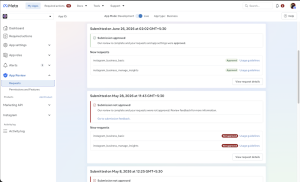
instagram_business_basic — Approved
instagram_business_manage_insights — Approved
Both permissions live — app submission approved by Meta
Platform’s Instagram integration now fully functional for all users
~20 days from last rejection to approval
Instagram API permissions approved landed about twenty days after the third rejection.
Meta controls their review timelines. What we control is making the submission correct so there are no avoidable delays. The client had been stuck for months. The issue was never the app — it was how the submission was prepared.
These are the patterns that keep Instagram API permissions approved out of reach for most teams.
Use case description is generic — same text for all permissions instead of per-permission justification
Screencast doesn’t start from a disconnected/fresh state or skips the full OAuth authorization flow
Reviewer test account doesn’t have a connected professional Instagram account ready to verify
The permission’s data is not visibly displayed in the app after authorization — reviewer cannot confirm the use case
Applying for permissions beyond what the actual app functionality requires
Our Instagram API permissions approval case study walks through a messaging SaaS at the same review gate, and the Meta App Review rejection reasons guide lists the codes behind most declines. Instagram API permissions approved comes down to evidence a reviewer can watch.
Meta makes all App Review decisions independently. This is approval support and submission preparation — not an official Meta service or partnership. No outcome guaranteed.