Instagram Manage Insights Approved for a Creator Marketplace (2026 Case Study)
The team behind a creator-marketplace product needed creators to connect Instagram and show a real insights read inside the marketplace. They had already been rejected six times. Their developer asked the practical question every Advanced Access team hits: how do you record the feature before those permissions exist on the app? This instagram manage insights case is the Facebook Login path Meta marked submission approved on 8 September 2026. If your creator marketplace must read a connected professional account and the screencast never shows that read, start here.
Approved
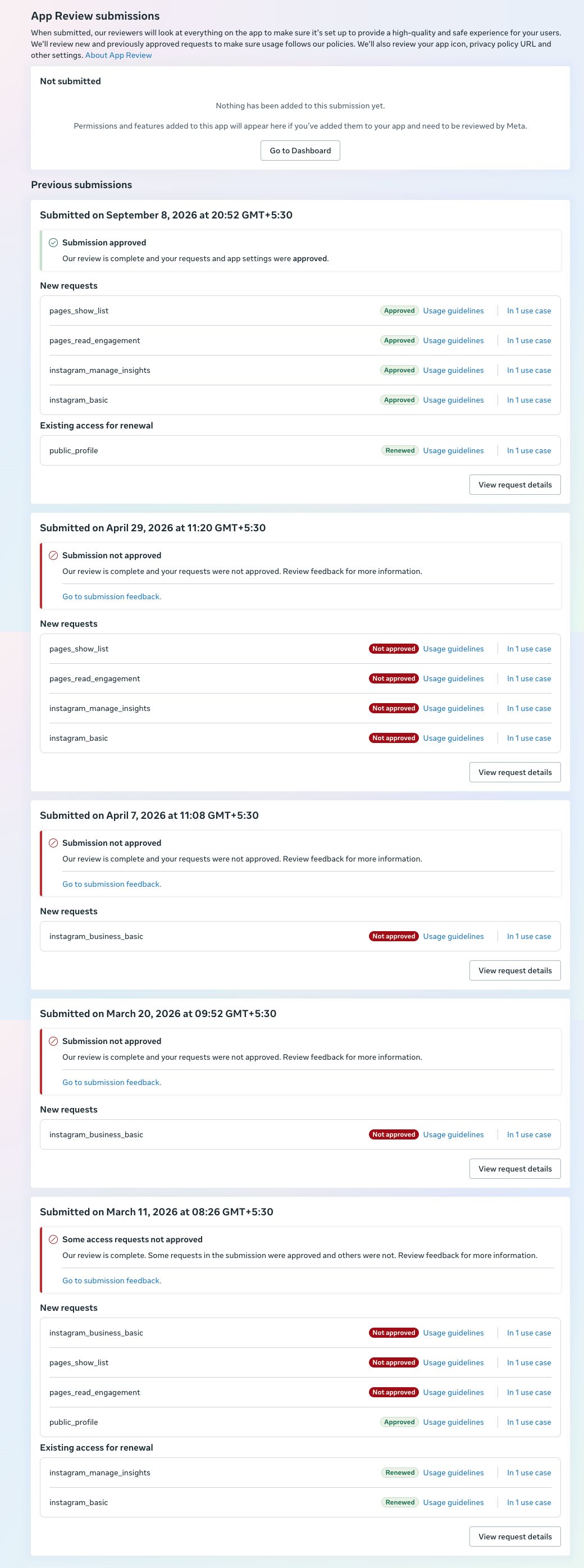
pages_show_list, pages_read_engagement, instagram_manage_insights, and instagram_basic — each Approved, usage guidelines, in 1 use case.
Renewed
public_profile, existing access, Renewed. Not a new insights scope.
8 September 2026
Submitted at 20:52 GMT+5:30. Status: Submission approved.
What the creator marketplace needed
A marketplace that matches brands with creators still has to prove the Graph read on a site a reviewer can open. The product job was narrow: Facebook Login, connect an Instagram professional account, then show profile plus insights inside the marketplace — not a publishing tool, and not a multi-network pitch. The Permissions Reference is the list that recording has to cover for an instagram manage insights package on Facebook Login. A creator marketplace asks for instagram manage insights when brands need creator performance data after connect.
The approved set on 8 September was four new rows plus one renewal:
instagram_basic— the basic Instagram account on Facebook Login.instagram_manage_insights— the instagram manage insights read on that same login.pages_show_listandpages_read_engagement— Page-side companions that travel with this Facebook Login path.public_profile— already on the app, Renewed only.
Say the family plainly. instagram_basic and instagram_manage_insights are Facebook Login permissions. The Instagram Login pair is instagram_business_basic and instagram_business_manage_insights. This approval is the first pair. The other family has its own case: instagram business insights approved. Publishing is different again: instagram content publish app review.
Why the path had already failed six times
The client described Meta’s notes as generic. This page does not invent a reviewer paragraph. The reviewer note text is not in this case study. What we can name from the work is the proof gap the developer’s question exposed: you cannot film an insights read that the test app cannot perform until a professional account is connected for review.
Cards already on the same screen show the pattern. On 29 April 2026 at 11:20 GMT+5:30 the status is Submission not approved — pages_show_list, pages_read_engagement, instagram_manage_insights, and instagram_basic each Not approved. That is the same set that later passed.
On 7 April 2026 and 20 March 2026 the only new request was instagram_business_basic, Not approved — a different permission family. On 11 March 2026 the card was a split result: some rows Not approved, public_profile Approved, and instagram_manage_insights / instagram_basic only Renewed. Six rejections overall is the history the team brought in; filming the wrong login family, or filming before a test professional account could show the read, is how those rows stacked up.
Teams that search for instagram manage insights often record the Instagram Login pair by mistake, or show a marketplace UI with no insights data on screen. Neither path proves this Facebook Login scope. An instagram manage insights rejection that only shows a marketplace tour still fails for the same reason.
What we fixed for App Review
The developer asked how to record without the permissions yet. The answer was practical and narrow: connect a test Instagram professional account to the app so the product can show the real read — profile plus insights — in the screencast, on a site a reviewer can open. Standard Access and a connected test account are how you demonstrate the use while Advanced Access is still open. The screencast had to show instagram manage insights as data on that site, not as a permission name typed into a form.
That is what changed before the 8 September package. We did not invent a multi-step script for every marketplace. We did not expand the ask into publishing. We kept Facebook Login, connected the test professional account, and recorded the insights the product already rendered once that account was on the app.
Resubmitting the same unreproducible video can lead to an App Review cooldown of about 7 days. That interval is widely reported, and it is not printed on this screen. Developer Policies text last updated 3 February 2026 still expects the app to follow the Developer Docs for allowed usage; we did not invent policy section numbers for this case.
The 8 September result
Submitted on 8 September 2026 at 20:52 GMT+5:30. Status: Submission approved. Under new requests, four rows each Approved, with usage guidelines, in 1 use case:
pages_show_listpages_read_engagementinstagram_manage_insightsinstagram_basic
Existing access shows public_profile Renewed. That is the instagram manage insights card this case is about. The instagram manage insights read is the row creators needed for the marketplace to score. Nothing in the approved rows renames this Facebook Login scope to the business-login family. Publishing is not what this instagram manage insights decision covers.
Other outcomes are on the case studies page. The standard that passed was a site a reviewer can open, with the profile and the insights on screen after a test professional account was connected.
If your creator marketplace is stuck on the same question
If your product needs Facebook Login Instagram insights for creators, and your developer is asking how to record before Advanced Access exists, this is exactly the kind of Meta App Review project we handle. Send the submissions screen and one still of the insights read — or say the test professional account was never connected. Do not keep resubmitting a marketplace tour with empty insights panels.
The managed path is the Instagram App Review service, with Page-side Facebook work on the Facebook App Review service when those companion scopes are in the same package. An instagram manage insights pass on one creator marketplace is not a template for publishing, or for the Instagram Login business pair.
Need Us to Get Your Meta App 100% Approved?
Stop losing weeks to repeated rejections. With 500+ apps approved, we handle your entire submission from start to finish. You get 100% Approval or a 100% Refund — and for your complete safety, you can hire us directly through Upwork or Fiverr Escrow (or use the WhatsApp / Calendar buttons in the header & footer).
Chat on WhatsAppFAQ
Which permissions were approved on 8 September 2026?
pages_show_list, pages_read_engagement, instagram_manage_insights, and instagram_basic were Approved in 1 use case — the instagram manage insights Facebook Login set. public_profile was Renewed.
Is instagram_basic the same as instagram_business_basic?
No. instagram_basic and instagram_manage_insights are Facebook Login. instagram_business_basic and instagram_business_manage_insights are Instagram Login. March and April rows that asked only for the business-basic family were not this approval.
How do you record before the permissions are approved?
Connect a test Instagram professional account to the app so the product can show the real profile and insights read while review is open. That is how an instagram manage insights screencast gets data on screen.
Does this decision grant publishing?
No. Publishing is a different permission and a different recording. This card is the Facebook Login insights read for a creator marketplace.
If your creator marketplace needs to pull Instagram insights for connected professional accounts, this is exactly the kind of Meta App Review project we handle. An instagram manage insights pass starts with a test professional account on the app — not another empty marketplace tour.
WhatsApp: send the insights rejection screenService: Instagram App Review. Also: Facebook App Review.