Update (Oct 2026): Meta has retired Access Verification from Tech Provider onboarding. This Meta Access Verification case study shows the process as it worked before that. Business Verification and App Review are still required. See the Access Verification retirement update. For the current process, read our Meta tech provider verification guide.
Meta Tech Provider Verification Guide explains Access Verification (retired Oct 2026), business evidence and review preparation.
Meta Tech Provider Verification Guide: 5 powerful verification fixes
Real Client Case StudyInstagram Messaging Worked for the Team — but Not for Users: A Meta Access Verification Case Study (Pre-Oct 2026 Process)
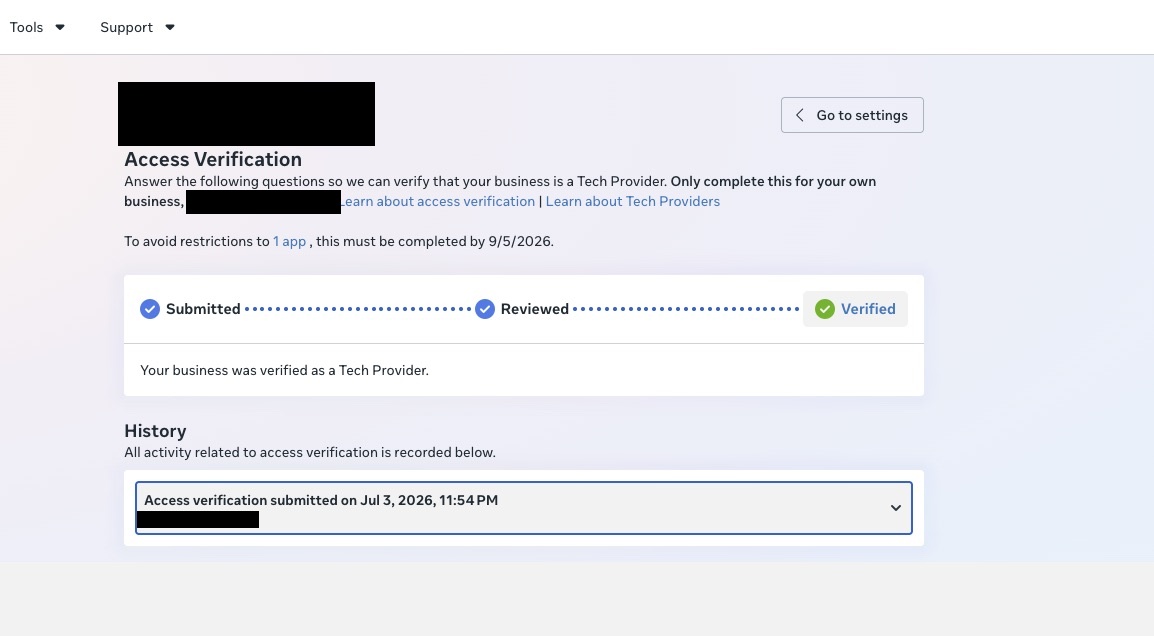
“Your business was verified as a Tech Provider.” — Meta Access Verification, completed for this client’s Business Manager.
An integration team in Australia had built a chat feature that sends and receives Instagram messages directly from Salesforce CRM. The app existed, the permissions were in place, and messaging worked perfectly — for the development team. The moment anyone outside the team tried it, messaging failed. Their first assumption was the obvious one: “Do we need to push the app for review again?”
No. The missing piece wasn’t App Review at all. It was Access Verification, Meta’s Tech Provider check at the time (retired in October 2026).
The symptom that confuses everyone
This failure pattern is the classic Access Verification signature, and it is why teams misdiagnose it:
Works for the team
Anyone with a role on the app — admins, developers, testers — can use every permission normally. Meta's endpoint check passes them through.
Fails for real users
For anyone without an app role, the same API calls are rejected unless the business behind the app is verified as a Tech Provider.
Per Meta’s official documentation, the rejected calls return a deliberately vague error that mentions nothing about verification:
Nothing in that message says “your business needs Access Verification.” Teams re-check tokens, re-read permission docs, and consider resubmitting App Review — none of which fixes it.
What Access Verification actually is
Access Verification is the process Meta uses to confirm that a business operates as a Tech Provider — a business whose app is used by other businesses and touches their data. It is independent of App Review and permission access levels: an app can have every permission approved and still fail for real users if the business behind it isn’t verified.
It applies when the app requires permissions from Meta’s published list — which includes the messaging, Pages, Instagram, ads and business permissions that almost every SaaS or CRM integration relies on. Once the business is verified once, every app it claims passes the check.
How the project was handled (high level)
Diagnosis on a live call
The team walked through the failing flow. The works-for-us / fails-for-users pattern pointed straight past App Review to the Business Manager: no Tech Provider verification.
Least-privilege access
Work was done through role-based access only — Business Manager people access plus the specific app asset. No passwords asked for, no unnecessary assets shared.
Fixing what would fail the check
Before submitting, the details reviewers actually look at were aligned — including making sure the website information in Business Manager matched the platform really serving the integration.
Submission and follow-through
The Access Verification form was completed and submitted from the App Dashboard, describing how the business uses other businesses’ data to provide its service — then monitored to the decision.
The result
Verified as a Tech Provider. Meta’s confirmation arrived three days after submission: “Your business has been verified as a Tech Provider and no further action is required.” The Salesforce–Instagram messaging integration could finally work for real users — not just the dev team.
One more detail worth noting: as soon as the verification was confirmed, the client revoked the temporary access from both sides — exactly how this kind of engagement should end.
Access Verification vs App Review vs Business Verification
- App Review approves your app’s permissions — what the app is allowed to do.
- Business Verification confirms your business legally exists — documents, domain, details. It is a prerequisite for Access Verification.
- At the time, Access Verification confirmed Tech Provider status. Meta has since said endpoints ‘will no longer perform that check.’
Where Access Verification goes wrong
- The team resubmits App Review instead — wasting weeks on the wrong process.
- Business Verification isn’t completed first, so the Access Verification form can’t be processed.
- The business account carries restrictions that block the check.
- The website and business details in Business Manager don’t match the platform actually running the integration.
- The 60-day deadline passes and API calls start failing gradually in production.
If your integration works for your team but fails for real users, check Business Verification, advanced-permission approval and Tech Provider classification. See our Meta Business Verification guide, our Tech Provider onboarding article, or the Business Verification service.
Eligibility for Meta Tech Provider Verification Guide
Confirm business identity, app ownership, domains, and product use for the Meta Tech Provider Verification Guide.
Evidence and access
Prepare business documents, screenshots, support contacts, and clear use cases for the Meta Tech Provider Verification Guide.
Keep account details and technical flows consistent during the Meta Tech Provider Verification Guide.
Review and continuity
Test messaging, permissions, redirects, error handling, and fallbacks before the Meta Tech Provider Verification Guide review.
Document approval status and renewal ownership after the Meta Tech Provider Verification Guide.
Monitor policy notices following the Meta Tech Provider Verification Guide.
Read the official Meta App Review documentation for current requirements.
See our Meta API guide for implementation planning.
Meta Access Verification case study: confirm the tech provider relationship, client authorization, and permission-level review evidence before onboarding customers.
For a Meta Access Verification case study, pair the access request with the client authorization trail and the published Meta Business Verification documentation.
This Meta Access Verification case study explains the evidence trail and approval sequence. In this Meta Access Verification case study, the client authorization record is kept with the review evidence.
What this Meta Access Verification case study shows
This Meta Access Verification case study shows how a working integration can still fail for real users. Approved permissions were not enough on their own; customers without a role on the app stayed blocked until the business check was complete. Teams reading this Meta Access Verification case study often ask why the integration passed testing.
The main lesson from this Meta Access Verification case study is to confirm Tech Provider classification before onboarding customers. Keep a dated record of every business document, and test with an account that has no admin role.
Use this Meta Access Verification case study as a record of the pre-October 2026 process. A Meta Access Verification case study is only useful if the evidence behind it is current. Each Meta Access Verification case study like this one should be checked against current Meta documentation before reuse.
For current steps, read the Meta tech provider verification guide and the Access Verification retirement update.
Need Us to Get Your Meta App 100% Approved?
Stop losing weeks to repeated rejections. With 500+ apps approved, we handle your entire submission from start to finish. You get 100% Approval or a 100% Refund — and for your complete safety, you can hire us directly through Upwork or Fiverr Escrow (or use the WhatsApp / Calendar buttons in the header & footer).
Chat on WhatsAppFrequently Asked Questions about Meta access approval
Why do Meta access and verification requests get rejected?
Rejections typically come from business details that don't match across documents and Business Manager, use cases that don't explain why advanced access is needed, or submissions made before the business side is fully verified.
How long does it take if you handle it?
It takes ~3 days for our complete preparation and submission, followed by Meta's review queue — typically 10–20 days (can be faster or take longer depending on Meta's volume). For apps with multiple permissions, if Meta requests adjustments on specific scopes, we handle the changes and re-apply at no extra cost, and each follow-up round follows the same 10–20 day review window.
What if it still isn't approved?
We work on a 100% Approval or 100% Refund basis: if we can't get your valid use case approved, you get a full refund.
Is it safe to hire you?
Yes. You can hire us through Upwork or Fiverr, so your payment stays in Escrow and is only released when the work is delivered. We've been doing this for 10+ years, with 500+ apps approved and 10,000+ permissions granted.