Real Client Case Study
Instagram API permissions approval was the blocker. A SaaS founder built an AI assistant that helps businesses handle customer messages on Instagram and WhatsApp — upload a product spreadsheet and the app automatically responds to customer DMs with pricing and recommendations. The product was fully built but completely blocked. Meta’s API permissions weren’t approved, so the core messaging features couldn’t go live. He came to me after weeks of being stuck, unsure what Meta actually needed to see.
Instagram API permissions approval meant mapping the full dependency chain before any resubmit. Meta reviews the whole request in one pass, so one missing supporting permission rejects every scope in that submission.
We documented why each of the 12 permissions improved the messaging product, and we gave reviewers a login that worked outside our network.
Business verification had already failed once, so we waited until those documents were accepted.
Meta’s App Review documentation asks for a working demo, not a description.
Our Meta Business Verification guide covers that step, and our Meta App Review rejection reasons list covers the codes that reset the clock.
The same Instagram API permissions approval stayed with the app after the client pointed the domain back at their own server.
Instagram API permissions approval: what we needed and why
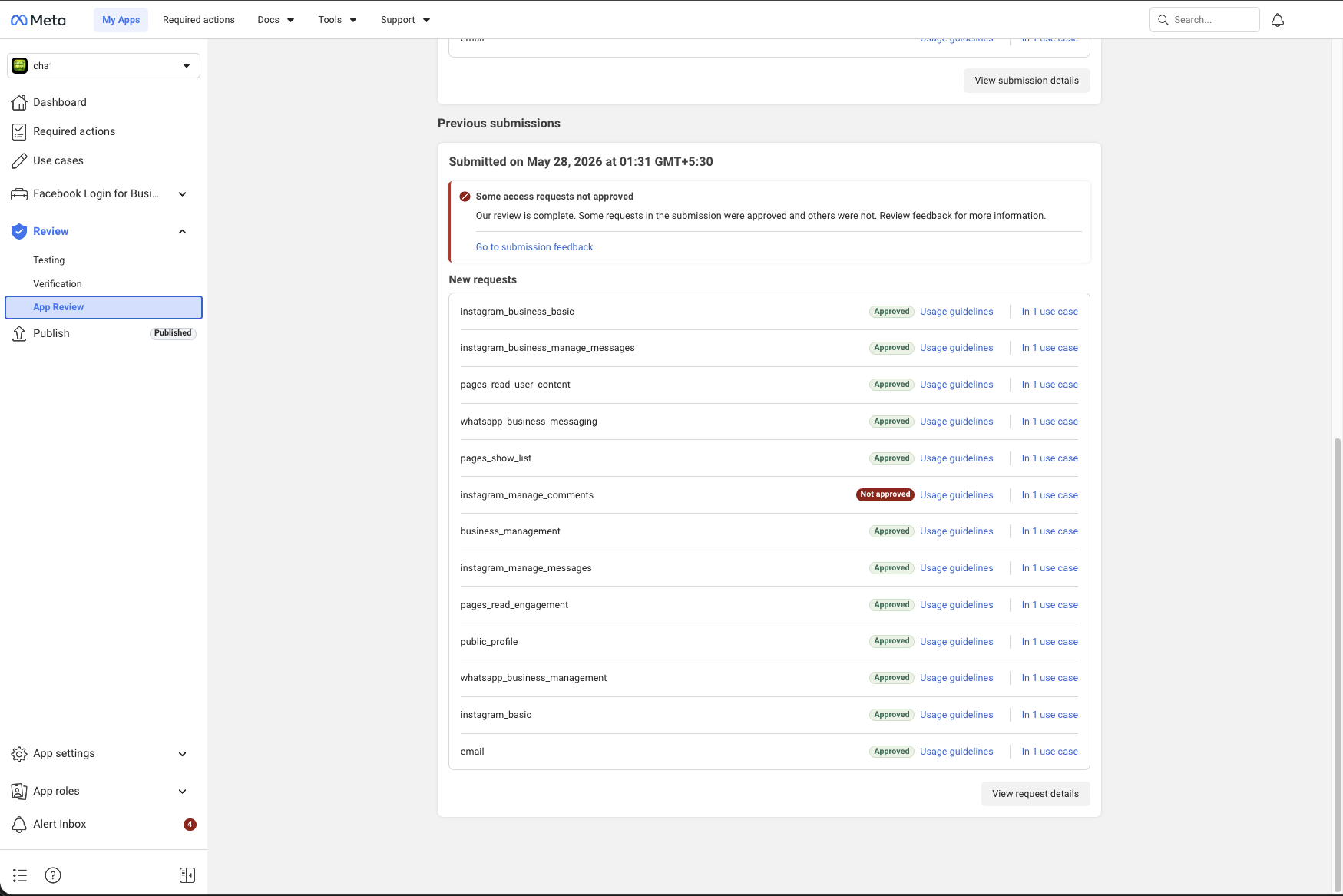
Meta’s permission system has dependencies — you cannot apply for one permission alone. If supporting permissions are missing, Meta rejects the entire submission. Here are all 12 permissions we applied for:
instagram_business_basicBase dependency for all Instagram Business API access
instagram_basicBase Instagram permission, required dependency for several others
instagram_business_manage_messagesCore permission to send and receive Instagram DMs via API
instagram_manage_messagesRequired alongside the business version for full messaging coverage
pages_read_user_contentRead content from Facebook Pages linked to the Instagram account
pages_read_engagementRead engagement data on Page posts
pages_show_listRetrieve the list of Pages a user manages
business_managementAccess Meta Business Suite data
public_profileBase permission required for user authentication
emailUser login and account identification
whatsapp_business_messagingSend and receive WhatsApp messages via Business API
whatsapp_business_managementManage WhatsApp Business accounts and settings
What We Needed to Address
Meta Business Verification
Before advanced permissions can be approved, the developer’s Meta Business Manager must be verified with real business documents. This step alone took several weeks — multiple submission attempts failed before verification finally completed.
A Working Demo Is Important
Meta’s review team typically needs more than descriptions alone; they need to see a fully working application that actually demonstrates each permission being used. A non-functional or incomplete app is a likely reason for rejection.
The Approach
This Instagram API permissions approval used one submission. Rather than risk rejection on the client’s main production domain, we used a subdomain strategy:
1A separate subdomain was pointed to our server
2We configured a fully working demo environment showing every permission in actual use
3All 12 permissions were submitted together in one submission with the complete dependency chain
4Meta’s review team verified the working app with zero interference to the client’s live setup
5After approval, the client moved the domain back to their own server — approved permissions stayed intact — tied to the app, not the server
The Result
12 out of 13 permissions approved after this Instagram API permissions approval
App successfully published on Meta
Instagram and WhatsApp messaging fully functional in production
instagram_manage_comments was not approved in the first submission. Already resubmitted with additional documentation — awaiting Meta’s decision.
~15 days total timeline
Meta controls their review speed. Our job in this Instagram API permissions approval is to make sure the submission is complete and correct the first time — no unnecessary delays.
Common Review Gaps to Check
Incomplete dependency permissions missing from the submission
App not verified under a verified Meta Business Manager
No working demo that shows the permissions actually being used
Insufficient explanation of how each permission is used in the app
Related case studies
Instagram API permissions approved after 3 rejections
Instagram business messaging screencast rejection case study
Need Us to Get Your Meta App 100% Approved?
Stop losing weeks to repeated rejections. With 500+ apps approved, we handle your entire submission from start to finish. You get 100% Approval or a 100% Refund — and for your complete safety, you can hire us directly through Upwork or Fiverr Escrow (or use the WhatsApp / Calendar buttons in the header & footer).
Chat on WhatsAppFrequently Asked Questions about Instagram API permissions
Why does Meta reject Instagram API permissions?
The usual reasons are use cases that don't map to a visible feature, screencasts that skip the login or permission grant step, test accounts that aren't Instagram Professional accounts, and requesting permissions the app doesn't really use.
How long does it take if you handle it?
It takes ~3 days for our complete preparation and submission, followed by Meta's review queue — typically 10–20 days (can be faster or take longer depending on Meta's volume). For apps with multiple permissions, if Meta requests adjustments on specific scopes, we handle the changes and re-apply at no extra cost, and each follow-up round follows the same 10–20 day review window.
What if it still isn't approved?
We work on a 100% Approval or 100% Refund basis: if we can't get your valid use case approved, you get a full refund.
Is it safe to hire you?
Yes. You can hire us through Upwork or Fiverr, so your payment stays in Escrow and is only released when the work is delivered. We've been doing this for 10+ years, with 500+ apps approved and 10,000+ permissions granted.