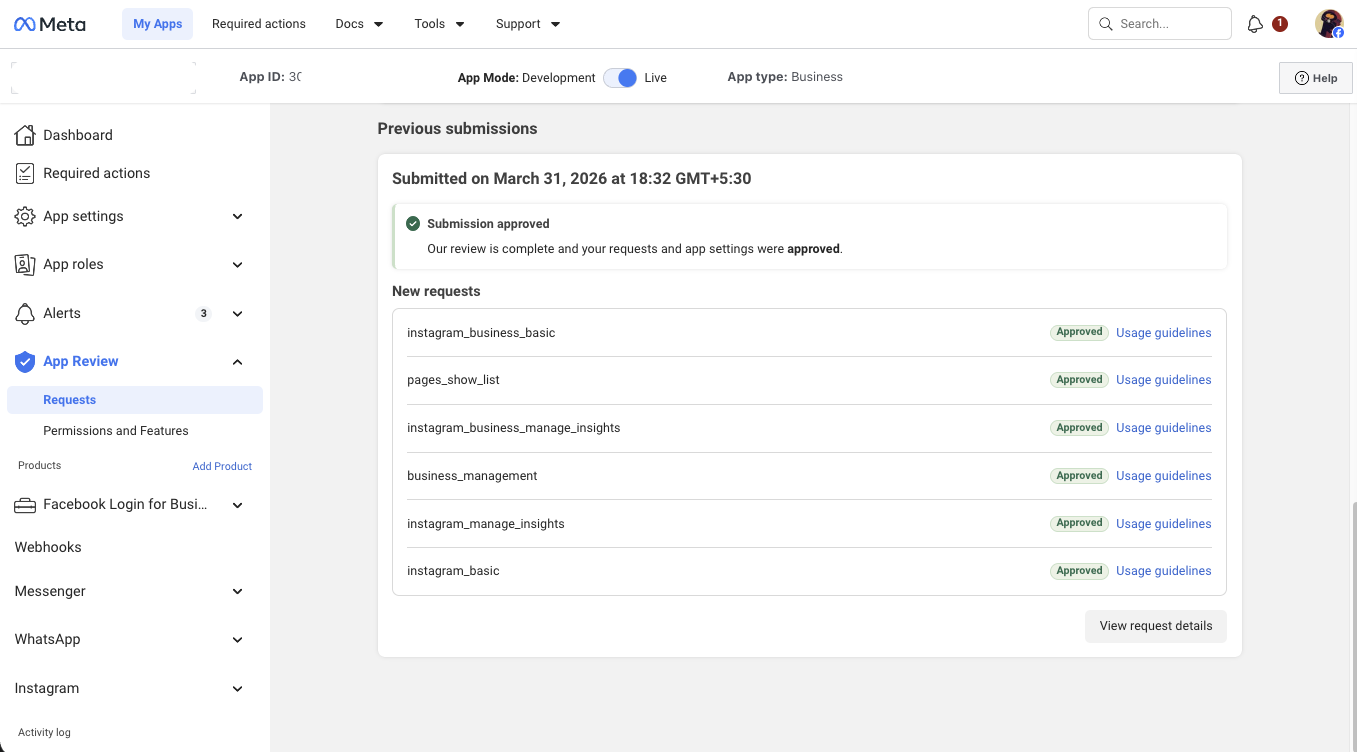
Meta App Permissions Approved — Social Media Automation SaaS Case Study
Real Client Case Study
A SaaS company built a creator automation platform — Instagram and Facebook analytics, auto DMs, comment automation, and social media scheduling for creators and agencies. The product was live but blocked behind Meta's permission wall. Without approved permissions, end users couldn't connect their accounts or use any of the core features. They reached out for two separate services: Facebook App Permissions approval, and Meta Business Verification.

Phase 1 — App Permissions

8 Permissions Requested

These 8 permissions were identified for the first submission based on the platform's current and planned features:

pages_show_list
Retrieve the list of Facebook Pages a user manages
pages_read_engagement
Read engagement metrics on Page posts
pages_manage_metadata
Subscribe Pages to webhooks for real-time events
business_management
Access Meta Business Suite data
instagram_basic
Base dependency for Instagram API access
instagram_manage_insights
Read Instagram account and media insights
instagram_business_basic
Base dependency for Instagram Business API
instagram_business_manage_insights
Read insights for Instagram Business accounts

The Complications We Had to Solve

Features Must Exist Before Permissions Can Be Submitted
Two permissions — pages_read_engagement and pages_manage_metadata — could not be submitted in the first round. Meta requires a working demo of each permission actively in use. The client's platform did not yet have the corresponding features built. We had to wait for their development team to complete those features before those permissions could be applied.
Wrong App ID for Instagram Login
The app was pointing to a secondary Instagram App ID instead of the main app ID for Instagram login. This caused OAuth failures that were caught and flagged during demo testing — and had to be corrected before the submission could proceed.
Webhook Configuration Required Multiple Fixes
The automation features — auto DMs, comment replies — required correct webhook configuration before they could be demonstrated to Meta reviewers. Multiple rounds of testing and fixes were needed before the demo environment was ready.

Phase 1 Result

instagram_business_basic — Approved
pages_show_list — Approved
instagram_business_manage_insights — Approved
business_management — Approved
instagram_manage_insights — Approved
instagram_basic — Approved
pages_read_engagement and pages_manage_metadata held pending — corresponding features not yet built on the platform. Applied in the next round once development was complete.
~19 days from submission to approval

Tech Verification (Meta Business Verification)

Meta Business Verification was handled as a separate service after permissions were approved. This required admin access to the client's Facebook Business Manager.

Meta Business Manager — Verified
~3 days after submission

Phase 2 — Additional Permissions

Once the platform's messaging and comment automation features were fully built, a second round was submitted:

pages_read_user_content
Read user comments on Page posts
pages_read_engagement
Read engagement data on Page posts (pending from Phase 1)
pages_manage_metadata
Subscribe Pages to webhooks (pending from Phase 1)
pages_messaging
Enable Facebook Messenger bot for Page inbox
instagram_manage_comments
Reply to Instagram comments
instagram_manage_messages
Read and respond to Instagram DMs
instagram_business_manage_messages
Instagram Business DM access
instagram_business_manage_comments
Reply to comments on Business accounts

Key Lessons From This Project

Features must exist before permissions can be applied. Meta reviewers need to see every requested permission actively used in the app. Submitting for pages_manage_metadata without a working webhook subscription means instant rejection.
Wrong App ID = broken OAuth. The app was using a secondary Instagram App ID for login. This caused failures that had to be diagnosed and fixed before any submission could proceed.
Tech Verification is a separate process. It requires its own timeline, admin access to Business Manager, and should only start after permissions are confirmed.
Multi-phase submissions are normal. Submitting only the permissions your app currently supports is cleaner, faster, and reduces rejection risk. The remaining permissions follow once the features are ready.

For social media scheduling tools like Beepost, our Beepost app approval service covers the full Meta and API configuration for all supported platforms. And if your project needs ongoing integration work beyond approval — Graph API, webhooks, OAuth — you can hire Facebook API developers for the full build.

Need Us to Get Your Meta App 100% Approved?

Stop losing weeks to repeated rejections. With 500+ apps approved, we handle your entire submission from start to finish. You get 100% Approval or a 100% Refund — and for your complete safety, you can hire us directly through Upwork or Fiverr Escrow (or use the WhatsApp / Calendar buttons in the header & footer).

Chat on WhatsApp

Frequently Asked Questions about Meta App Permissions for Social Media Automation SaaS

Why does Meta reject social media automation apps so often?

Automation tools request many Page, Instagram and publishing permissions at once. Meta rejects them when each permission isn't tied to a visible feature in the screencast, when the use case sounds like bulk or spam-style activity, or when Tech Provider or Business Verification steps are missing.

How long does a project like this take?

It takes ~3 days for our complete preparation and submission, followed by Meta's review queue — typically 10–20 days (can be faster or take longer depending on Meta's volume). For apps with multiple permissions, if Meta requests adjustments on specific scopes, we handle the changes and re-apply at no extra cost, and each follow-up round follows the same 10–20 day review window.

Is there a guarantee for my SaaS app?

We work on a 100% Approval or 100% Refund basis: if we can't get your valid use case approved, you get a full refund.

How do I hire you safely?

You can hire us through Upwork or Fiverr, so your payment stays in Escrow and is only released when the work is delivered. We've been doing this for 10+ years, with 500+ apps approved and 10,000+ permissions granted.