WhatsApp Message Template Rejection (Marketing / Utility Category Mismatch): Expert Diagnosis
When Meta rejects a WhatsApp message template or auto-moves it from UTILITY to MARKETING the failure is usually categorization, not your English is wrong. Utility templates must stay non-promotional and tied to a user-specific action, account, order, or essential alert. Discounts, upsells, open-ended re-engagement, and persuasive CTAs read as Marketing. This article diagnoses WhatsApp template rejection and message template rejection and appeal paths using Metas template categorization documentation. It does not invent App Review Rejection Guide quotes; template review lives in WhatsApp Manager / Cloud API template workflows, not the App Review submit button.
What this rejection actually means
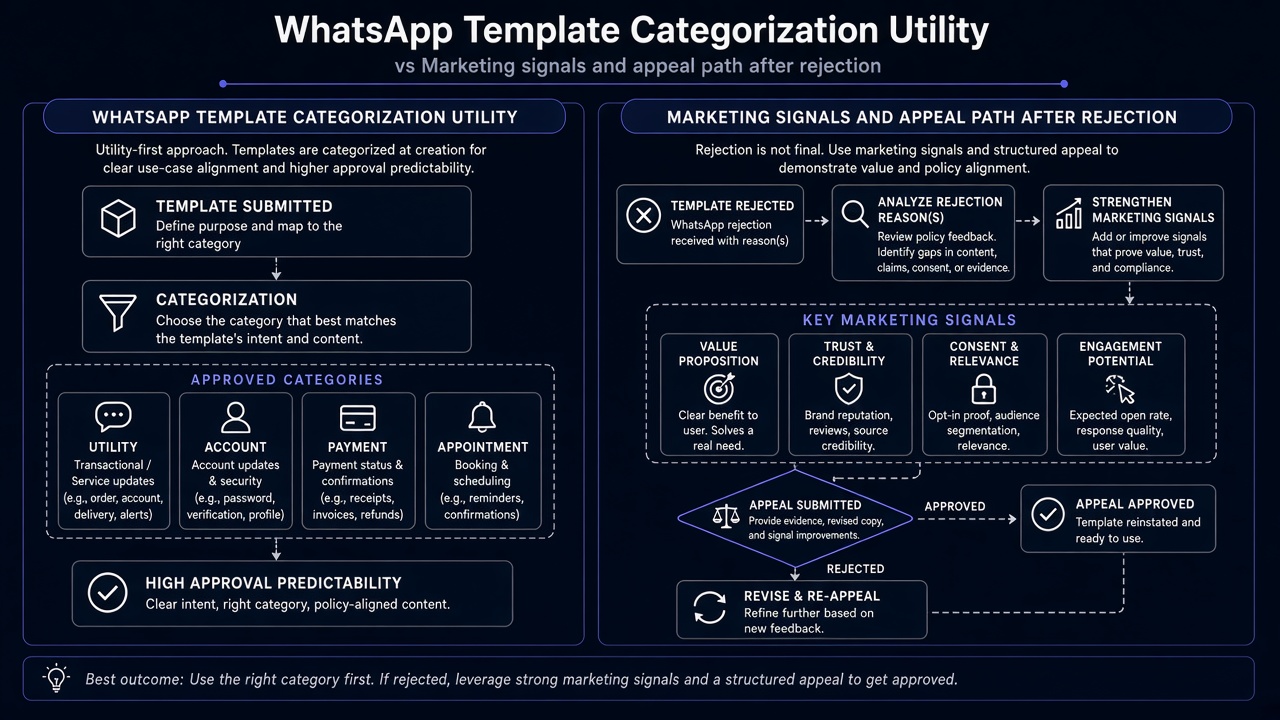
WhatsApp template categorization separates how messages are priced, paced, and allowed to open conversations. Per Metas template categorization docs, a REJECTED status can mean WhatsApp disagreed with the category you designated often surfaced with reasons such as INCORRECT_CATEGORY on message_template_status_update webhooks. Meta may also approve a template under a different category than you requested (for example, you submit Utility; Meta approves as Marketing) or later recategorize an approved Utility template to Marketing when content or usage looks promotional.
Appeals are category reviews inside WhatsApp Manager (Template Category Updates / Business Support paths Meta documents), typically within a limited window such as about 60 days from the category decision — not a paste of App Review use case essays. Neighboring operational pain often co-travels with phone number already registered during go-live, and with permission review only when your product also needs WhatsApp product permissions approved see WhatsApp App Review service.
WHAT failed
Meta judged the template’s category (or content) mismatched — Utility claimed, Marketing signals present or rejected the template under categorization rules.
WHY it matters
Wrong category changes pricing, delivery expectations, and compliance risk. Repeated Utility-washing of promos can freeze reviews and damage quality.
WHAT they expected
Honest category: transactional/essential Utility language without promo hooks, or explicit Marketing for offers, invites, and re-engagement.
Reviewer / classifier psychology: promo DNA vs transaction DNA
Template systems score intent from wording and structure. Your order #{{1}} shipped is Utility-shaped. Your order shipped enjoy 20% off your next purchase smuggles Marketing DNA into a Utility shell. We miss you, come back this weekend is Marketing even if you titled the template order_update_utility. Classifiers and human reviewers do not owe you the cheaper Utility rate because your CRM lifecycle named the campaign “transactional.
That psychology is why “fix attempts that only rename the template while keeping discount language fail again. It is also why some genuinely transactional templates get pulled to Marketing when variables, buttons, or footer copy still look like acquisition. Appeals work when you can show the message is triggered by a concrete user action or essential account event not when you argue about price.
Technical nuances that trip capable teams
Across hundreds of WhatsApp Cloud API / BSP launches, Marketing vs Utility template failures cluster around:
- Utility body with promo footer / coupon button transactional headline, Marketing CTA.
- Re-engagement framed as update” no specific order, ticket, or security event; just checking in.
- Upsell inside confirmation payment receipt plus cross-sell in the same template.
- Category shopping resubmitting the same promo under Utility after Marketing rejection.
- Auto-recategorization surprise — approved Utility later moved to Marketing; teams keep sending as if Utility pricing still applies.
- Appeal without evidence of trigger — category review requested with no explanation of the user action that fires the template.
- Quality / pacing collateral damage — aggressive Marketing sends after a mismatch fight, hurting template quality rating.
- Confusing template rejection with App Review rewriting Facebook Login screencasts will not unstick WhatsApp Manager template status.
Official references (template categorization docs not Rejection Guide inventions):
- WhatsApp template categorization / guidelines
- Template categorization (Business Messaging) — REJECTED / INCORRECT_CATEGORY, review options
- WhatsApp Manager Message templates / Template category updates request review where Meta allows
Retry / cooldown note (not App Review submit-button cooldown): Template category fights are not the Meta App Review “buttons locked up to 7 days pattern. Spamming near-duplicate Utility templates after Marketing decisions can still trigger review friction, delayed category reviews, and — in misuse cases described by practitioners and partner notices temporary freezes on category review. Fix the copy and category honestly once; use the documented category review path when you truly disagree; do not flood new Utility clones of the same promo.
Expert Diagnosis framework (not a DIY paste template)
Every CRM journey and vertical has different trigger language. There is no safe universal “approved Utility paragraph” to paste into WhatsApp Manager. Specialists diagnose first:
Separate transactional triggers from growth sends
Map which templates fire from orders, OTPs, account alerts vs campaigns and win-backs. Category must follow the trigger, not the CRM folder name.
Strip Marketing DNA from Utility candidates
Remove discounts, scarcity, cross-sells, and vague we miss you lines. If promo must stay, submit as Marketing.
Choose appeal vs recreate
If Meta recategorized a clean transactional template, use category review with a clear trigger explanation. If the template is promotional, recreate under Marketing instead of appealing Utility.
Resubmit / appeal once with aligned proof
One honest package beats five Utility clones that invite review freezes and quality risk.
Managed help: WhatsApp App Review service, Facebook App Review service. Patterns: case studies. Related: phone already registered, instagram_content_publish rejection, rejection reasons hub.
Free 15-Minute Meta Rejection Audit
Share the rejected or recategorized template body, the category you selected, Meta’s status/reason, and the business event that triggers the send. We will separate true Utility from Marketing DNA before you burn another review cycle.WhatsApp: Free 15-Minute Meta Rejection Audit
Strategy second.
What not to do after this rejection
Match category to content and trigger. Appeal only when the template is truly Utility. Then proceed once.
Need Us to Get Your Meta App 100% Approved?
Stop losing weeks to repeated rejections. With 500+ apps approved, we handle your entire submission from start to finish. You get 100% Approval or a 100% Refund — and for your complete safety, you can hire us directly through Upwork or Fiverr Escrow (or use the WhatsApp / Calendar buttons in the header & footer).
Chat on WhatsAppFAQWhy does Meta reject WhatsApp message templates for category mismatch?
Because the content does not match the category you selected commonly Utility templates that include promotional, persuasive, or open-ended re-engagement language that belongs in Marketing under Metas template categorization rules.
Can I appeal a Utility Marketing recategorization?
Often yes, via WhatsApp Manager category review flows Meta documents (within the stated time window, commonly discussed as up to about 60 days). Appeals work best when you can prove a specific user/account/order trigger and non-promotional wording — not when the template still sells.
Should I keep creating new Utility templates after a rejection?
Not as clones of the same promo. Either remove Marketing DNA and resubmit a clean Utility template, or create an honest Marketing template. Duplicate Utility-washing increases review friction and compliance risk.
Is template rejection the same as a 7-day App Review cooldown?
No. Template decisions happen in WhatsApp template systems, not the App Review permission submit button. You can still hit category-review delays or freezes from misuse, but that is a different control plane than App Review cooldowns.
10+ years helping product teams through Meta App Review, Business Verification, and Advanced Access. 500+ apps guided; 10,000+ permissions handled across Facebook, Instagram, WhatsApp, and Marketing API surfaces. Focus: policy-aligned proof, not hype.
Still stuck on WhatsApp message template rejection? Get a focused read on category vs content before the next submit or appeal.
Book Free 15-Minute Meta Rejection Audit on WhatsApp