Meta Data Use Checkup Overdue? Why the App Gets Disabled (2026)
A meta data use checkup is not another permission screencast. It is the annual certification Meta requires after an app is already live. Founders usually notice it only when a banner says the checkup is due, or when API calls start failing because the deadline passed. This guide explains what that form is checking, which proof it actually asks for, and why a rushed resubmit after the app goes dark is a different problem from the original overdue notice. It does not include copy-paste answers. Every app’s data handling is specific to that product.
WHAT failed
The annual certification was missed, or the answers and test instructions did not match how the live app still uses Meta data.
WHY it matters
Meta’s own FAQ says a missed deadline deactivates the app until the checkup is completed. Extensions are not offered.
WHAT they expected
An admin certifies allowed usage and data handling, and leaves testing instructions a reviewer can follow on the real app.
What a meta data use checkup actually is
Meta’s Data Use Checkup page describes an annual assessment for apps that are published live with a use case, or that have Advanced Access to any permission or feature. The point is to confirm that continued API access still matches the Platform Terms and Developer Policies. Standard Access alone does not trigger it. An app that is still in Development mode does not complete it yet, but it does have to complete it before that app can switch to Live.
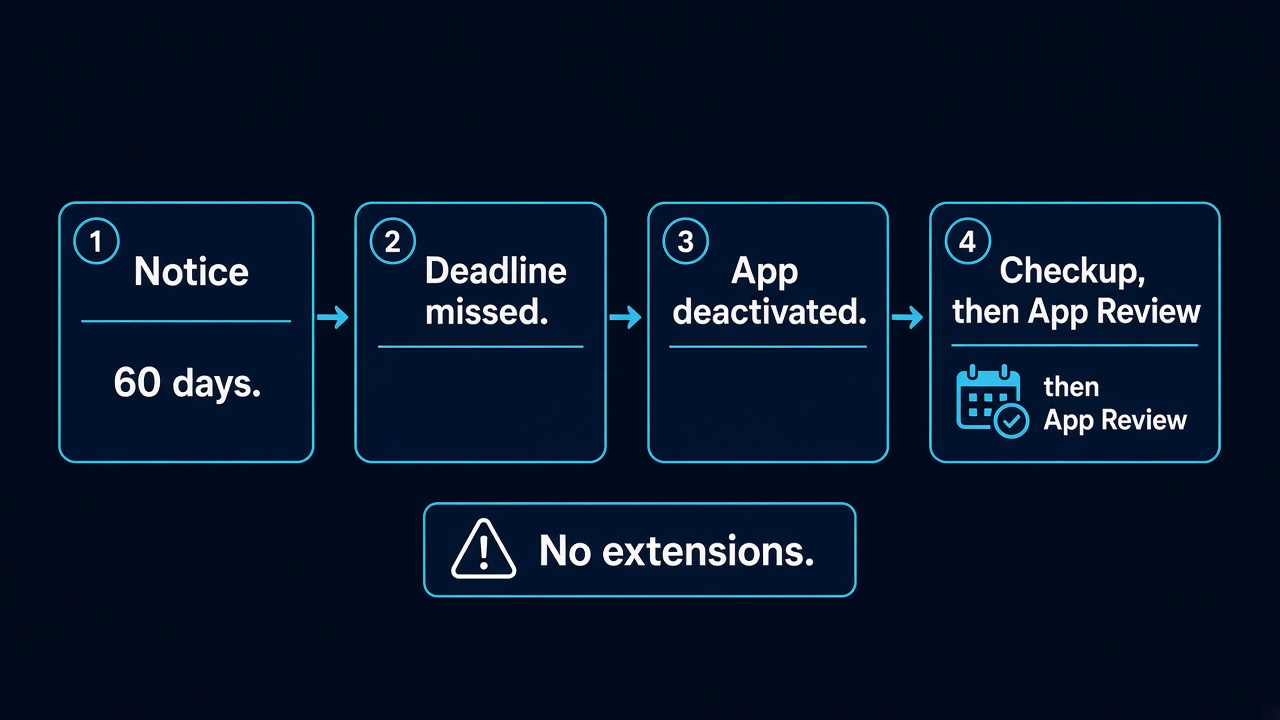
Meta’s Data Use Checkup FAQ says the cycle is annual. The deadline is unique to each app. It shows up in the developer notification, the app dashboard banner, and the apps panel. An admin gets email and an Alerts Inbox notice 60 days before the due date, then reminders at 30 days, 10 days, and 3 days. If the meta data use checkup is not done by that date, the app is deactivated until it is completed. The FAQ is explicit that a missed meta data use checkup gets no extension.
That is a different door from Business Verification, which is about legal name, tax records, and address documents. It is also different from a first business_management app review or a pages_messaging app review. Those reviews ask whether a new permission is allowed. The checkup asks whether access you already have is still being used the way you told Meta. Data Access Renewal is a separate annual assessment with its own FAQ. Do not fill one form because the other banner is red.
Why Does Meta Reject a Meta Data Use Checkup?
People say “rejected” for three different outcomes. A meta data use checkup can be overdue, it can be completed and then flagged, or the app can already be inactive so the permissions have to be reviewed again. Treating all three as the same ticket is how teams burn the next month.
- The deadline passed. The FAQ outcome is deactivation, not a polite warning you can ignore for a week. A data use checkup overdue state is a missed annual certification. No extension is part of that FAQ.
- The answers describe an older product. Allowed usage is judged against the app that is live now. A chatbot that later added Lead Ads, a scheduler that later added delete, or a CRM that now stores more fields than the last approval will not match last year’s certificate.
- Testing instructions do not open the real path. Reviewers need a way to see the same data use the answers describe. A login that lands on a marketing site, a test user with no role, or a webhook URL that never receives a call is a failed demonstration, not a wording problem.
- The app is already inactive. Meta’s FAQ says you may still open the dashboard, finish the checkup, and try to restore access. It also says an inactive app must have its use cases, permissions, and features re-approved through App Review, and must complete the checkup before reactivation.
Developer Policies, last updated 3 February 2026, say in section 1, item 6 to follow the Developer Docs, including allowed usage. Do not cite “Policy 1.9”. That number is not in the current text. Case studies here show two apps can fail the same permission for different reasons. A copied data-handling paragraph is not your answer.
What Exact Documents / Proof Does Meta Expect?
A meta data use checkup is not a utility-bill upload. Business Verification is the flow that asks for legal name, tax ID, and address evidence, and that flow already has its own guide. The checkup asks an admin to certify behaviour and to answer how the app handles data. The proof is the set of answers plus testing instructions that a reviewer can run. It is not a ZIP of screenshots with no path through the product.
What “enough” looks like depends on the permissions that app still holds. Meta does not publish one screenshot list for every app, and this page will not invent one. For a meta data use checkup the official bar is narrower: review each approved permission and feature, certify allowed usage, certify the Platform Terms and Developer Policies, answer the data-handling questions, and leave instructions that reach that behaviour on a working build.
Your retention, sub-processors, and delete path are specific to your servers. A white-label script does not make those answers interchangeable. Pasting another founder’s sentences is how the next review says they do not match the app.
The Risk of Blind Resubmissions (7-Day Cooldown Warning)
Once a meta data use checkup deadline is missed, retyping the same answers does not fix a meta data use checkup failure. The FAQ already deactivated the app, and it already said extensions are not provided. If the app is inactive, permissions and features have to go back through App Review before they return. That second queue is where teams hurt themselves.
7-day cooldown warning: The Data Use Checkup FAQ does not name a 7-day cooldown. What it does say is that a missed deadline deactivates the app and that extensions are not provided. Separately, repeated App Review resubmissions are widely reported to trigger a cooldown of about 7 days. Resubmitting the same use, or the same unreproducible test, is what creates that lock. This is a reported App Review pattern, not a sentence in the checkup FAQ.
Read the notice before you submit. “Past due” is not the same sentence as “this permission use is not allowed.” A data use checkup overdue app that still matches its approval needs a true certification and a test path. If the product changed, correct that story first. The old screencast does not restore access, and it can push the re-approval into that cooldown.
How to Fix and Successfully Appeal a Data Use Checkup
Start from the notice, not from a template. Confirm you are on the Data Use Checkup for that app ID, not on Business Verification and not on Data Access Renewal. Confirm whether the app is still live or already inactive. An admin has to be the one who can open the form. If the only person with admin access has left the company, that is the blocker, and no rewritten answer will submit itself.
If the app is still inside the notice window, the fix is to complete the meta data use checkup against the product you ship today. Re-read each approved permission. Remove access you no longer use instead of certifying a feature the UI no longer has. Write testing instructions a stranger can follow: which login, which role, which screen shows the data use. Do not paste another company’s data-handling paragraph. Your retention, your sub-processors, and your delete path are yours.
If the app is already deactivated, Meta’s FAQ allows a return to the dashboard to finish the checkup. It also requires App Review again for use cases, permissions, and features on an inactive app, and it requires the checkup before reactivation. Appealing that state means answering the checkup honestly and, where App Review is asked again, showing the same use on a build the reviewer can open. It does not mean emailing a promise that you will “update the policy later.”
There is no fill-in script for a meta data use checkup. Two products can miss the same deadline and need opposite fixes: one still matches its approval and only lacked an admin, the other now stores data the original review never saw. The sentences in Meta’s form have to come from your own build.
Need Us to Get Your Meta App 100% Approved?
Stop losing weeks to repeated rejections. With 500+ apps approved, we handle your entire submission from start to finish. You get 100% Approval or a 100% Refund — and for your complete safety, you can hire us directly through Upwork or Fiverr Escrow (or use the WhatsApp / Calendar buttons in the header & footer).
Chat on WhatsAppFAQ
What is a meta data use checkup?
It is Meta’s annual certification that a live app with a use case, or with Advanced Access, still uses API data within the Platform Terms and Developer Policies. Standard Access alone does not require it. Development mode does not require it until you switch the app to Live.
What happens if a data use checkup is overdue?
Meta’s FAQ says the app is deactivated until the checkup is completed, and that extensions are not provided. Admins are notified 60, 30, 10, and 3 days before the deadline, which is unique to each app.
Does a meta data use checkup ask for tax documents?
No. Legal name, tax ID, and utility evidence belong to Business Verification. The checkup asks an admin to certify allowed usage, answer data-handling questions, and provide testing instructions for the live app.
Can I restore permissions by resubmitting the old App Review video?
Only if that video still matches the product and a reviewer can reproduce it. An inactive app must complete the checkup and have use cases, permissions, and features re-approved. Repeating a failed App Review is widely reported to cause a cooldown of about 7 days. The checkup FAQ itself does not name that cooldown.
Amandeep Singh — Meta API / App Review Specialist
Meta App Review specialist. Policy-aligned diagnosis, not resubmit templates.
Free 15-Minute Audit
Send the dashboard notice, whether the app is still live or already deactivated, and the list of permissions that checkup covers. We separate a missed certification from a product that no longer matches its approval.
Strategy second.