Unable to Verify Use Case Experience in App: Expert Diagnosis
For teams facing a meta rejection unable to verify use case experience in app, Meta App Review returns Unable to Verify Use Case Experience in App, the rejection is rarely about a missing checkbox. It is a signal that reviewers could not recreate — inside your live product — the permission and feature experience your submission claimed. This article explains what that rejection means, why it happens, how it maps to Meta’s official rejection guide and Developer Policies, and why blind resubmission often makes the situation worse.
Meta rejection unable to verify use case experience in app: what this rejection means
Meta’s App Review Rejection Guide documents a closely related outcome: “We are unable to verify the permission(s) requested while testing your app.” Per that guide, submission reviewers treat your screencast as a walkthrough and attempt to recreate how the app uses each requested feature and permission. If they cannot recreate the experience shown for any permission or feature, the submission fails.
In practice, a meta rejection unable to verify use case experience in app sits in the same failure family. The reviewer followed your instructions, opened your app, and still could not observe a coherent use-case path that matches your written justification and screencast. From Meta’s side, that is not a soft preference — it is an incomplete verification.
WHAT failed
The reviewer could not reproduce the claimed use-case experience for one or more requested permissions or features inside your app.
WHY it matters
Without a recreateable experience, Meta cannot confirm allowed usage under Developer Docs — the foundation of a trustworthy product.
WHAT they expected
A finished product path: login, consent, permission grant, and the feature actually working with real (or properly provisioned test) data.
Reviewer psychology: they are auditors, not co-founders
App Review is not a product demo session. Reviewers work from a checklist constrained by time, policy, and reproducibility. They are not obligated to invent missing steps, guess at broken menus, or accept a polished video as a substitute for a working build.
If your screencast shows a dashboard loading Instagram insights, but the test credentials land on an empty onboarding wall, the submission fails. If your notes describe Pages messaging automation, but the reviewer never reaches a Page connection flow, the submission fails. Ambiguity is treated as unverified — not as “probably fine.”
That psychology is why copying a generic use-case paragraph from a forum rarely helps. The text must describe the same path the screencast shows, and both must match what a stranger can complete with the credentials and URLs you provide.
Technical nuances that trip capable teams
After a meta rejection unable to verify use case experience in app, the same technical gaps appear under this rejection label even when engineering quality is high:
- Screencast vs. live divergence — UI shipped after the recording, feature flags off for external testers, or staging URLs that reviewers cannot reach.
- Incomplete App Verification Details — missing Test User email/password, wrong app URL, or steps that skip how to locate the permission grant.
- Permission experience never surfaces — the OAuth dialog appears, but the product never shows the data or action those scopes enable.
- Allowed-usage mismatch — the product works, yet the described use case does not match Meta’s documented allowed usage for that permission or feature.
- Environment lockouts — geo-blocks, IP allowlists, CAPTCHA walls, or “invite-only” gates with no external test path.
Meta’s Rejection Guide is explicit on remediation for the related verification failure: finish development, prove the experience with a Test User exactly as depicted, correct testing instructions (including credentials), recapture an accurate screencast if needed, then resubmit. Those steps sound simple. Executing them against a unique UI, token model, and business context is where most teams lose days.
Meta rejection unable to verify use case experience in app: policy grounding
Under Meta Developer Policies section 1. Build a trustworthy product, developers must follow instructions in the Developer Docs, including allowed usage for Platform (policy area commonly referenced as 1.6). App Review is one enforcement surface for that rule.
That distinction matters. A broken button can be fixed. A submission that repeatedly claims an experience reviewers never see creates a pattern of weak proof. Policy-aligned approval work focuses on making the experience true, visible, and recreatable — not on rewriting marketing language until something sticks.
Official references worth reading before any resubmit:
- Meta App Review Rejection Guide
- Meta Developer Policies — Build a trustworthy product
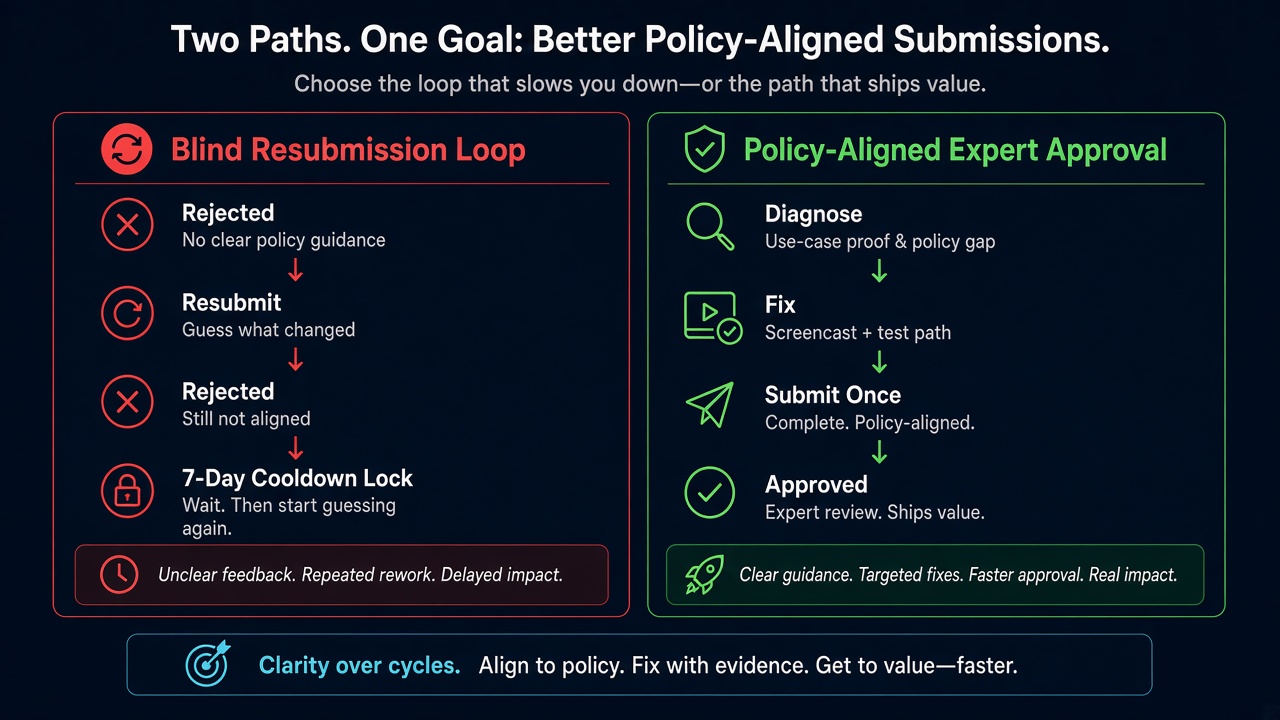
Blind resubmission risk: Practitioner experience across hundreds of apps shows that rapid, repeated submissions without fixing the underlying verification gaps frequently trigger automated submission cooldowns. Those locks can disable review buttons for up to 7 days. Meta updates thresholds over time, but the operational reality is consistent: blind resubmits erode trust signals and can delay launches by weeks while the same recreateability problem remains untouched.
Expert Diagnosis framework (not a DIY paste template)
Every app’s UI, token model, and use case is unique. A complete copy-paste “fix script” would either be wrong for your product or dangerously generic. What specialists do instead is a structured diagnosis:
Map claimed vs. recreatable experience
Line up each requested permission against the screencast path and a cold-start walkthrough with reviewer-grade credentials.
Isolate verification blockers
Separate product bugs from instruction gaps, environment access issues, and allowed-usage mismatches — each needs a different fix.
Align proof to Developer Docs
Rewrite and re-demonstrate only after the live experience matches documented allowed usage — not before.
Resubmit once, with intact evidence
One coherent package beats three frantic retries. Cooldowns punish volume; reviewers reward clarity.
If you need a managed path rather than another self-guided attempt, see the Facebook App Review service. For patterns from real submissions (successes and rejections), browse the case studies hub.
Free 15-Minute Meta Rejection Audit
Share your rejection note and app type. We will tell you whether this looks like a recreateability gap, a policy mismatch, or both — before you burn another review cycle.
Strategy second.
What not to do after this rejection
- Do not resubmit the same screencast and notes hoping for a different reviewer.
- Do not invent a broader use case that your product still cannot demonstrate.
- Do not rotate Test Users without verifying the full permission experience end-to-end from a clean session.
- Do not treat a polished marketing video as a substitute for App Verification Details that a stranger can follow.
Finish the product path. Make it recreatable. Align it to allowed usage. Then submit. Anything else is gambling with cooldown risk.
Related rejections: if the reviewer could see your flow but the video told a different story, read Meta App Review screencast rejection fixes. If the recording was too thin to judge, see inadequate demonstration.
Need Us to Get Your Meta App 100% Approved?
Stop losing weeks to repeated rejections. With 500+ apps approved, we handle your entire submission from start to finish. You get 100% Approval or a 100% Refund — and for your complete safety, you can hire us directly through Upwork or Fiverr Escrow (or use the WhatsApp / Calendar buttons in the header & footer).
Chat on WhatsAppFAQ
Is “Unable to Verify Use Case Experience in App” the same as Meta’s documented permission verification rejection?
A meta rejection unable to verify use case experience in app belongs to the same failure family. Meta’s Rejection Guide explains that reviewers use your screencast as a guide and must recreate each permission/feature experience. If they cannot, verification fails — whether the dashboard wording emphasizes permissions or the broader use-case experience.
Will uploading a longer screencast alone fix this?
Only if the live app now matches that recording and your testing instructions let a reviewer repeat the path. A longer video of an unreproducible flow still fails verification.
Can repeated resubmissions lock App Review?
Yes. Rapid retries without resolving underlying issues frequently trigger automated cooldowns that can lock review submission controls for up to 7 days. Thresholds change, but the delay cost is real.
Should every team hire a specialist for this rejection?
Not always — but when UI, tokens, Business assets, and use-case wording all interact, a specialist diagnosis is usually safer than another blind cycle. Unique apps do not share one pasteable fix.
Amandeep Singh — Meta API Expert
10+ years helping product teams through Meta App Review, Business Verification, and Advanced Access. 500+ apps guided; 10,000+ permissions handled across Facebook, Instagram, WhatsApp, and Marketing API surfaces. Focus: policy-aligned proof, not hype.
Still stuck after a meta rejection unable to verify use case experience in app? Get a focused read on your rejection before the next submit.
Book Free 15-Minute Meta Rejection Audit on WhatsApp