whatsapp_business_messaging App Review Rejection: Expert Diagnosis
This article is about whatsapp_business_messaging app review — Meta App Review permission diagnosis for Advanced Access to WhatsApp messaging APIs, grounded in Meta’s Permissions Reference (updated Sep 14, 2026). It is not a guide to WhatsApp message template rejections, and it is not about “phone number already registered” provisioning errors. Those are separate operational problems. Here we focus on why App Review denies the messaging permission itself, how reviewers think, which demo gaps appear, how official dependency whatsapp_business_management relates, and why blind resubmits risk cooldowns. This whatsapp_business_messaging app review explains the rejection context. The whatsapp_business_messaging app review focuses on permission evidence.
What this permission is (official framing)
Meta states that whatsapp_business_messaging allows an app to send WhatsApp messages and make calls to a specific phone number, upload and retrieve media from messages, manage and get WhatsApp business profile information, and register those phone numbers with Meta. Official allowed usage is to create messaging and calling experiences initiated by a customer or a business — including sending WhatsApp messages, uploading/retrieving media, making WhatsApp calls, managing/getting business profile information, and registering a phone number with Meta.
Official dependency: whatsapp_business_management. That companion permission is about reading and/or managing WhatsApp business assets (WABAs, phone numbers, message templates, QR codes, webhook subscriptions) and displaying WABA analytics — not a substitute for messaging proof, and not a template appeal process.
WHAT failed
Reviewers could not verify a recreateable WhatsApp Business messaging or calling path in your app aligned with the permission request.
WHY it matters
WhatsApp messaging reaches end users on a high-trust channel. Unverified send/receive or call access is incomplete platform proof.
WHAT they expected
Send message + WhatsApp client shows it (optionally via API Setup cURL) or a business/user call flow that your app participates in.
Permission diagnosis checkpoint
For a whatsapp_business_messaging app review, document the exact send, receive, or call proof a reviewer can recreate. This whatsapp_business_messaging app review evidence must stay separate from template appeals and phone-registration fixes.
whatsapp_business_messaging app review evidence should show the permission in action. Keep the whatsapp_business_messaging app review narrative focused on permission proof, with whatsapp_business_management documented only as the official dependency.
Use a reviewer-ready checklist for every whatsapp_business_messaging app review: show authentication, a provisioned WhatsApp context, and the end-to-end messaging or calling action. Before submitting, recheck the whatsapp_business_messaging app review screencast against the permission narrative.
Allowed usage + what Meta wants in App Review
Write use-case notes that explain the messaging functionality your app offers to business customers you onboarded onto the platform, and how they perform those functions — staying inside Meta’s allowed messaging/calling usage.
Official screencast requirements ask you to demonstrate one of the following: your app sending a message to a WhatsApp number with the WhatsApp client (web or mobile) receiving and displaying it (you can use the WhatsApp → API Setup panel in the Meta App Dashboard to generate a cURL request to integrate); or your app placing a business-initiated call that a user accepts on a WhatsApp mobile client; or a user placing a call to your business phone number that your app receives. That is permission proof — not template category compliance, not phone-registration conflict resolution.
Why Meta rejects whatsapp_business_messaging (permission lens)
- Wrong problem in the screencast — video spends time on template composer UI or partner dashboards but never shows the app exercising messaging or calling under the permission narrative.
- WABA / asset access not recreateable — Test Users cannot see a WhatsApp Business Account, phone, or embedded signup path your notes assume (often overlapping with
whatsapp_business_managementgaps). - Embedded signup or partner flow breaks — reviewer stuck on onboarding errors that never reach a message send or call.
- Use case / policy mismatch — language that sounds like bulk spam, scraped cold outreach, or non-policy categories while claiming “customer support.”
- Management vs messaging confusion — product only shows WABA settings; no messaging/calling action for
whatsapp_business_messaging.
If your rejection email is actually about a template category denial or a phone registration conflict, stop and route to those workflows — see WhatsApp template rejection and phone already registered. Forcing those fixes into an App Review permission resubmit wastes cooldown budget.
What reviewers look for (psychology)
WhatsApp App Review reviewers still behave like auditors with a stopwatch. They need a finished path: authenticate, reach a WhatsApp Business context your app controls for the test, and observe messaging or calling behavior that justifies Advanced Access. They are not obligated to complete a multi-day partner setup you did not provision, or to approve because your production tenants already message customers outside the test app.
They also notice category confusion in notes. Writing three paragraphs about template approval history does not prove permission recreateability. Writing about phone migration pains does not show send/receive or call in the product under review. Keep permission evidence centered on the app experience tied to whatsapp_business_messaging.
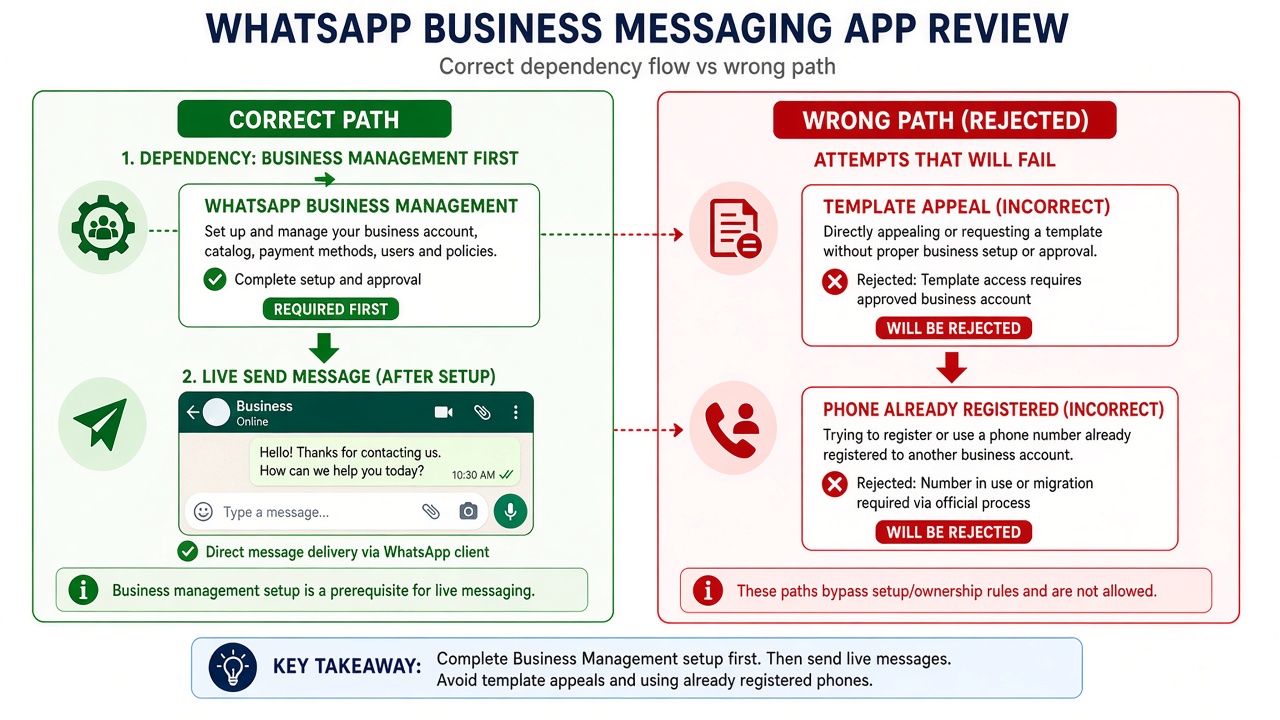
Official dependency: whatsapp_business_management
whatsapp_business_management is the official dependency. Meta describes it as reading and/or managing WhatsApp business assets you own or were granted access to — including WhatsApp Business Accounts, business phone numbers, message templates, QR codes and associated messages, and webhook subscriptions — plus displaying WABA analytics in a customer portal.
Diagnosis: if your differentiator is sending conversations or calls, lead with messaging/calling proof and include management only when the UI truly manages WhatsApp Business assets. If your product is primarily WABA administration, do not lean on a thin “hello world send” clip to carry messaging Advanced Access without a coherent dependency story. Helper permissions should clarify the story, not inflate the scope list — and template editing inside management is still not the same as App Review messaging permission proof.
Permission App Review vs template and phone issues
Template rejection asks whether a message body complies with category and format rules. Phone already registered asks whether a number can be added to a WABA. Permission App Review asks whether a stranger can recreate your app’s WhatsApp messaging or calling experience and whether that experience matches allowed usage for whatsapp_business_messaging.
When teams blend all three problems into one panicked resubmit, reviewers see incoherent notes, mismatched screencasts, and unfinished onboarding — then deny the messaging permission again for ordinary recreateability reasons. Keep queues separate so you do not burn App Review retries on the wrong class of failure.
Common demo gaps (permission App Review only)
- Screencast filmed inside a partner portal that reviewers cannot access with your Test User.
- Instructions that require a real customer phone to message first, with no provisioned test conversation or call path.
- Notes that paste WhatsApp policy essays without pointing to where the app sends, receives, or handles calls.
- Environment keys or webhook URLs that only resolve on a private network.
- Cloud API success screenshots from API clients pasted into a product that has no WhatsApp UI yet — while Meta’s table allows API Setup cURL only as part of showing delivery in the WhatsApp client.
There is no ethical one-size “approved WhatsApp App Review script” that replaces diagnosis. Phone inventory, embedded signup variants, and inbox UX differ. Specialists map which evidence class failed — connection, messaging/calling action, management dependency, or policy narrative — then rebuild one coherent package.
7-day cooldown risk: Teams sometimes alternate between template edits, phone re-registration attempts, and App Review permission retries as if they were one queue. That thrash produces repeated permission failures and can trigger App Review submission cooldowns of up to about 7 days — while the underlying unrecreateable messaging path never changes.
When a specialist audit helps
Book a permission-focused audit when Meta denied whatsapp_business_messaging (or the paired whatsapp_business_management dependency) and your team keeps pasting template or phone-reg fixes into App Review. A specialist separates those tracks, checks whether management should stay bundled, and identifies what a cold reviewer still cannot recreate in your app.
If your issue is solely template language or a number already on another WABA, say so on the audit — those need different playbooks than permission Advanced Access. This page intentionally stays on permission diagnosis so you do not optimize the wrong failure.
Need Us to Get Your Meta App 100% Approved?
Stop losing weeks to repeated rejections. With 500+ apps approved, we handle your entire submission from start to finish. You get 100% Approval or a 100% Refund — and for your complete safety, you can hire us directly through Upwork or Fiverr Escrow (or use the WhatsApp / Calendar buttons in the header & footer).
Chat on WhatsAppFAQ
Is this the same as WhatsApp template rejection?
No. Template rejection is about message content/category compliance. This guide covers App Review Advanced Access for whatsapp_business_messaging — whether reviewers can verify your app’s messaging or calling use case.
Is this about phone number already registered?
No. Phone already registered is a provisioning conflict. Permission App Review fails when messaging/calling experience in the app is unrecreateable or misaligned — a different problem class.
Why is whatsapp_business_management listed?
Meta lists it as the official dependency of whatsapp_business_messaging. It covers WABA/assets/templates admin and analytics. Messaging permission still needs messaging or calling proof; management needs management proof.
Can blind WhatsApp permission resubmits cause cooldowns?
Yes. Retrying App Review without fixing recreateability — or while confusing template/phone issues for permission proof — often fails again and can lock submissions for multiple days.