BotSailor App Review Guide: Permissions, Multi-Channel Webhooks & Rejection Patterns
A BotSailor app review is Meta Advanced Access for the Facebook / WhatsApp Cloud app behind your BotSailor white-label install — not BotSailor’s own license screen. BotSailor is built as a multi-channel chatbot SaaS (Messenger, Instagram, WhatsApp, and related automation). Live tenants usually need a stacked permission set plus HTTPS callbacks Meta can reach from the public internet. This guide diagnoses field failures: channel mix vs requested scopes, VPS webhook gaps, reviewer recreateability, Business Manager mismatches, and cooldown risk. It is diagnosis — not a pasteable DIY approval recipe.
WHAT breaks
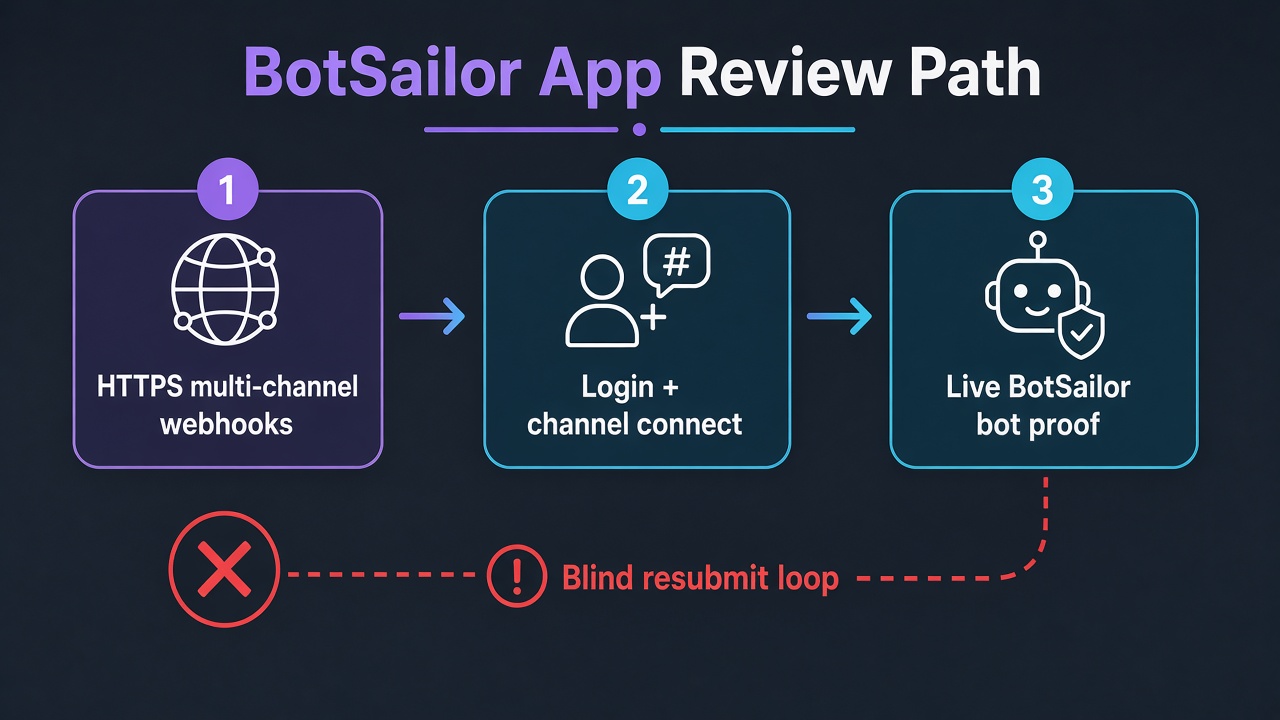
BotSailor “works for the admin tenant” while reviewers cannot recreate Login → channel connect → inbound/outbound proof for each Advanced Access scope.
WHY BotSailor is heavy
One install often spans Messenger, Instagram, and WhatsApp. Mixing channels in notes without matching live demos sinks the BotSailor app review package.
WHAT Meta expects
Recreateable flows per requested permission — not only a polished BotSailor dashboard tour.
What BotSailor typically needs from Meta
Exact scopes depend on which BotSailor modules you enable. In real BotSailor app review packages we commonly see combinations of:
pages_messagingwith dependenciespages_manage_metadata/pages_show_list— Messenger bot and Page inbox automationinstagram_manage_messages(Facebook Login path) — Instagram DM automation; do not confuse with Instagram Login’sinstagram_business_manage_messagesinstagram_basic,instagram_manage_comments, and sometimesinstagram_content_publish— when those BotSailor modules are actually onwhatsapp_business_messagingwithwhatsapp_business_management— WhatsApp Cloud API send/manage paths (permission App Review only — not template-category appeals or phone-already-registered ops)business_management— multi-asset / Business Manager patterns many multi-tenant BotSailor setups touch- Page content helpers (
pages_manage_posts, engagement / read scopes) when BotSailor’s Page tools are live
Request only what your live BotSailor build uses. A maximal checkbox list from another seller’s video is a rejection amplifier. Deep single-permission diagnosis: pages_messaging, instagram_manage_messages, whatsapp_business_messaging, business_management. Sister SaaS guide: ChatPion app review.
VPS, HTTPS callbacks, and BotSailor webhooks
BotSailor runs on your server. Meta does not approve “green” cron jobs if webhook verification fails. Typical BotSailor webhook issues that look like permission rejections:
- Invalid TLS or HTTP-only callbacks — WhatsApp and Messenger subscriptions expect public HTTPS with a trusted certificate.
- One URL, three channels — BotSailor may expose separate Facebook / Instagram / WhatsApp webhook routes; the App Dashboard still points at a stale path after a folder move or nginx rewrite.
- Verify token mismatch — BotSailor admin token ≠ Meta webhook verify token after a reinstall.
- Firewall / Cloudflare challenges — Meta’s challenge request never reaches PHP; BotSailor UI still shows “connected.”
- Tenant vs master app confusion — screencast uses master SaaS App ID; reviewer credentials open a client tenant with a different callback.
If inbound BotSailor replies only work while you are logged into the panel, messaging and WhatsApp scopes will read as unverifiable. Fix reachability before rewriting use-case essays.
Why BotSailor app review gets rejected
- Channel story mismatch — notes promise WhatsApp + Instagram + Messenger; the screencast only shows one BotSailor inbox.
- Template / ops confusion — teams treat WhatsApp template rejection or phone registration as “App Review.” Those are separate ops tracks. This BotSailor app review guide covers permission Advanced Access only.
- Admin-only success — roles/dev users chat fine; Test User / reviewer never connects a Page, IG professional account, or WhatsApp Business Account BotSailor can drive.
- Login family mix-ups — Instagram Login permission names pasted into a Facebook Login BotSailor app (or the reverse).
- Business Manager / verification gaps — app under a BM that cannot support the access level; owners notice only after rejection.
- Screenshot theater — stills of BotSailor threads while Meta’s messaging tables ask for recordings of send/delivery for several scopes.
Banner text varies (“unable to verify the permission(s) requested,” “inadequate demonstration,” “unable to approve permission request”). Map it to missing recreateable BotSailor proof. Related: Unable to Verify Permissions, Inadequate Demonstration.
BotSailor vs similar chatbot SaaS (why this guide is separate)
BotSailor is WhatsApp-first relative to many Messenger-first scripts, but Meta still reviews each Advanced Access item on its own bar. Agencies often paste a ChatPion-style submission into a BotSailor app review and wonder why WhatsApp or Instagram fails. Channel priority, webhook routes, and WABA ownership differ. Keep this BotSailor app review package aligned to the modules you actually enabled — then use the ChatPion guide only as a sibling reference, not a template to clone.
Also separate BotSailor’s Telegram and website live-chat setup from Meta App Review. Those channels matter for product go-live, but they do not substitute for Messenger, Instagram, or WhatsApp Advanced Access proof when those Meta scopes were requested.
Multi-channel BotSailor submissions (field reality)
BotSailor’s strength — many channels in one panel — is also why App Review is heavy. Reviewers still score each Advanced Access item. A weak WhatsApp send proof can fail whatsapp_business_messaging even if Messenger looked clean. Dependencies are tested as a story: Page list → metadata/webhooks → messaging, or WhatsApp management → messaging.
If a BotSailor module is half-finished (for example Instagram comments unfinished while Messenger works), drop or defer that scope. Honest smaller packages beat a maximal BotSailor feature warehouse.
Common BotSailor demo gaps (diagnosis, not secret sauce)
- Instructions that assume the reviewer already knows BotSailor’s left menu and module names.
- Test WABA / Page / IG assets not shared with the credentials you supplied.
- Webhook “connected” in BotSailor while no event arrives when the reviewer messages.
- Screencast skipping Facebook Login / asset grant and jumping into a pre-seeded bot.
- Privacy Policy or data-deletion URL on a different domain than the BotSailor app Meta sees.
Hosting, white-label domains, and token models differ — copying another agency’s BotSailor recording usually creates a new mismatch.
7-day cooldown risk: Blind BotSailor resubmits — new essay, same broken WhatsApp callback, same unrecreateable Instagram path — often fail again and can lock App Review controls for about seven days. Use the pause to fix HTTPS webhooks and scope honesty, not to spam Meta.
When a BotSailor specialist audit helps
Useful after one or two BotSailor app review rejections when the script works for you but Live tenants still cannot run. The audit maps rejection language to evidence gaps: multi-channel callbacks, Login/asset connect, which modules truly need Advanced Access, and whether Business Verification is blocking before content is judged.
Not useful if you only want a guaranteed one-size BotSailor recording or every Meta permission enabled “just in case.” Over-requesting increases failure surface. For installation + approval service framing, see BotSailor App Approval.
Need Us to Get Your Meta App 100% Approved?
Stop losing weeks to repeated rejections. With 500+ apps approved, we handle your entire submission from start to finish. You get 100% Approval or a 100% Refund — and for your complete safety, you can hire us directly through Upwork or Fiverr Escrow (or use the WhatsApp / Calendar buttons in the header & footer).
Chat on WhatsAppFAQ
What is a BotSailor app review?
It is Meta’s Advanced Access review for the Facebook / WhatsApp Cloud app powering your BotSailor install — Messenger, Instagram, WhatsApp, and Business scopes your enabled modules call — not BotSailor’s license check.
Why does BotSailor work for admin but fail App Review?
Admin/dev roles bypass Advanced Access. Reviewers need external credentials, working HTTPS webhooks per channel, and visible bot actions without insider shortcuts.
Do I need Messenger, Instagram, and WhatsApp permissions together?
Only if those BotSailor modules are live and demonstrable. Unused WhatsApp or Instagram scopes often weaken the whole BotSailor app review submission.
Is WhatsApp template rejection the same as BotSailor app review?
No. Template category / quality issues are separate from Advanced Access permission review. This guide covers permission App Review only.
Amandeep Singh — Meta API / App Review Specialist
10+ years helping product and agency teams through Meta App Review, Advanced Access, and Business Verification. 500+ apps guided and 10,000+ permissions handled — including BotSailor, ChatPion, Stackposts, Chatwoot, and Postiz SaaS stacks. Focus: policy-aligned diagnosis — not generic resubmit templates.
Free 15-Minute BotSailor Meta Audit
Share your BotSailor rejection note, which channels are enabled (Messenger / Instagram / WhatsApp), your webhook domains, and Business Verification status. We will separate callback gaps from permission-scope bloat before your next submit.
Strategy second.