business_management App Review Rejection: Expert Diagnosis
A denied business_management app review usually means Meta could not verify that your app reads and writes Business Manager assets the way the official Permissions Reference describes — not that your Business Verification paperwork failed. This guide grounds diagnosis in Meta’s reference (updated Sep 14, 2026): what business_management allows, what to include when it is only a dependency of another main permission, how reviewers think, common demo gaps, cooldown risk, and when a specialist audit helps.
What this permission is (official framing)
Meta states that business_management allows your app to read and write with the Business Manager API. Official allowed usage is to manage business assets such as an ad account, and to claim ad accounts. Official dependencies are pages_read_engagement and pages_show_list.
In product terms, this is Advanced Access trust to operate on Business Manager–level assets for businesses that grant your app access — not a substitute for Page-only publishing demos, and not the same process as Business Verification document review. App Review asks whether a stranger can recreate the asset-management path you claimed.
WHAT failed
Reviewers could not verify a recreateable Business Manager asset management or claim path matching business_management.
WHY it matters
Business asset write access is high trust. Unverified management looks like unverified control of ad accounts and portfolios.
WHAT they expected
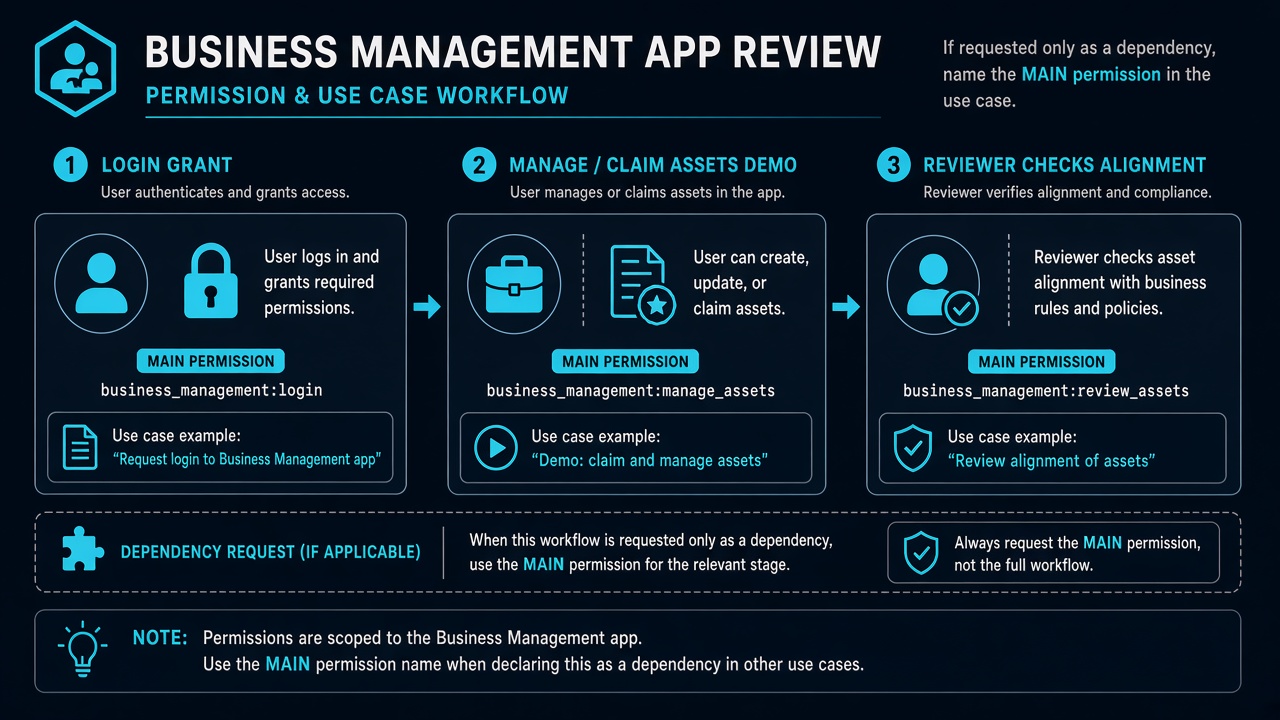
Facebook Login grant → manage business assets / claim ad accounts as claimed in the use case (and name any main permission if this is dependency-only).
Allowed usage + what Meta wants in App Review
Keep notes inside Meta’s allowed usage: manage business assets such as an ad account, and claim ad accounts. Meta asks for specific examples of why your app requires managing business assets on behalf of other businesses.
Critical Meta rule for dependency-only requests: if business_management is requested only as a dependency of another main permission (Meta explicitly mentions examples including pages_messaging or pages_show_list), specify that main permission in the use case description. Leaving the use case as a vague “we need Business Manager” essay while the real product story is messaging or Pages is a common silent rejection driver.
For screencast, demonstrate the complete Facebook Login process showing how the user grants the permission, then demonstrate the business-asset path your use case claimed — manage assets / claim ad accounts — in a way a reviewer can recreate. Align the video with the asset story you wrote; do not substitute a Page-only browse demo and hope reviewers infer Business Manager write access.
Why Meta rejects business_management
- Page-only demo for a BM permission — screencast shows Page picker or Page insights while never managing or claiming an ad account / business asset.
- Dependency-only silence — permission requested only because another feature needs it, but the use case never names the main permission Meta asks you to specify.
- Confused with Business Verification — team rewrites legal documents while App Review still cannot recreate asset management in the app. Related: Business Verification document rejection is a different queue.
- Empty Business portfolio for Test Users — reviewer Login succeeds but no claimable or manageable assets appear.
- Agency opacity — claims of multi-client BM tooling without a provisioned asset the reviewer can touch.
Generic banners (unable to verify permissions, inadequate demonstration, unable to approve permission request) often wrap this same recreateability failure. Cross-read Unable to Verify Permissions when the email is nonspecific.
What reviewers look for (psychology)
Reviewers need to believe your app actually manages business assets for other businesses — or, if this is dependency-only, that you honestly named the main permission and showed enough BM context for that dependency to make sense. They will not invent an ad account to claim mid-review.
They also punish category confusion. Business Verification proves identity documents. Tech Provider verification proves a different access tier. business_management App Review proves API-level asset management recreateability. Mixing those narratives in one essay makes every sentence look unfocused.
Official dependencies: pages_read_engagement + pages_show_list
Meta lists pages_read_engagement and pages_show_list as dependencies. Those support Page engagement reads and listing/verifying Pages a person manages — common scaffolding around Business Manager workflows that touch Pages and ad accounts. If you request them, ensure the product story does not leave Page selection completely invisible while claiming BM management. Conversely, if business_management itself is only present as a dependency of a messaging or Pages main permission, name that main permission in the use case as Meta instructs.
Common demo gaps
- Screencast of Ads Manager in a browser tab disconnected from your app’s Login and UI.
- Instructions that require the reviewer to already be admin of a Business you never invited them into.
- Use case that never states whether this is primary asset management or a named dependency of another permission.
- Claim-ad-account flow that only works with production partner tokens not available to Test Users.
- Notes that paste Business Verification history instead of describing in-app asset management.
These are diagnosis categories, not a portable approval script. Business portfolio shapes differ; specialists map whether the failure is empty assets, Page-only substitution, dependency-use-case silence, or BV confusion — then rebuild one coherent package.
business_management vs adjacent rejection labels
Generic App Review banners — inadequate demonstration, unable to verify permissions, unable to approve permission request — often hide a Business Manager–specific gap: the reviewer never managed or claimed an asset inside your app. Separately, do not treat Business Verification approval as App Review progress. BV clears identity documents; it does not prove business_management recreateability. If you only requested this permission as a dependency, Meta’s own rule still applies: name the main permission in the use case, or reviewers see an orphan BM request with no product story.
7-day cooldown risk: Teams often resubmit business_management after uploading new BV documents or rewriting “we help agencies manage clients” copy while the in-app manage/claim path stays unrecreateable. Those blind retries fail and can trigger App Review submission cooldowns of up to about 7 days.
When a specialist audit helps
Bring a specialist when you cannot tell whether Meta denied a primary BM use case or a dependency-only request that never named the main permission; when Page demos keep getting mistaken for BM proof; or when BV and App Review queues are tangled. The audit separates those tracks and identifies what a cold reviewer still cannot recreate — without a fake universal “claim ad account” click path that ignores your product.
Need Us to Get Your Meta App 100% Approved?
Stop losing weeks to repeated rejections. With 500+ apps approved, we handle your entire submission from start to finish. You get 100% Approval or a 100% Refund — and for your complete safety, you can hire us directly through Upwork or Fiverr Escrow (or use the WhatsApp / Calendar buttons in the header & footer).
Chat on WhatsAppFAQ
What is business_management used for?
Per Meta, it allows read/write with the Business Manager API. Allowed usage: manage business assets such as an ad account, and claim ad accounts. Dependencies: pages_read_engagement, pages_show_list.
What if I only need it as a dependency?
Meta says if business_management is requested as a dependency of another main permission (for example pages_messaging or pages_show_list), specify that main permission in the use case description.
Is this the same as Business Verification?
No. Business Verification is document/identity review. business_management App Review is about recreateable in-app management or claim of business assets under the permission.
Can blind business_management resubmits cause cooldowns?
Yes. Essay or BV-document churn that leaves asset manage/claim unrecreateable often fails again and can lock App Review submissions for multiple days.