ads_management App Review Rejection: Expert Diagnosis
A failed ads_management app review usually means Meta could not verify that your product reads and manages Ads accounts in a way that matches the official allowed usage not that your Ads Manager login is broken. This diagnosis guide covers what ads_management unlocks per Metas Permissions Reference (updated Sep 14, 2026), why rejections cluster around demo and purpose gaps, how reviewers think about ad write access, how ads_read differs (contrast, not a dependency), and why frantic resubmits risk a roughly 7-day cooldown.
What this permission is (official framing)
Meta states that ads_management allows your app to both read and manage the Ads account it owns, or has been granted access to, by the Ad account owner. Official allowed usage is to programmatically create campaigns, manage ads, and fetch Ad metrics to help the business and to build ad management tools that provide innovative solutions and differentiated value for advertisers.
Official dependencies are pages_read_engagement and pages_show_list. Advanced Access for this permission is write-capable trust: Meta treats it differently from read-only reporting because a poorly demonstrated app can change spend, targeting, or creative at scale. App Review does not approve a category name; it approves a visible, recreateable management experience a stranger can complete with your instructions.
WHAT failed
Reviewers could not observe a policy-aligned ads management / performance path inside your live app that matches the requested scope.
WHY it matters
Write access to ad accounts is high risk. Unverified management looks like unverified control of paid media.
WHAT they expected
Facebook Login grant business accesses ads performance on your app Impressions, Conversions, Spend, Clicks, and Reach visibly displayed.
Allowed usage + what Meta wants in App Review
Keep your use-case notes inside Metas allowed usage: programmatically create campaigns, manage ads, fetch metrics, and/or build ad management tools with clear advertiser value. Meta asks for specific examples of why your app requires managing ads on behalf of other businesses.
Official screencast requirements: demonstrate the complete Facebook Login process showing how the user grants this permission; demonstrate how a business can access ads performance data on your app after granting the permission; and showcase that ads performance data such as Impressions, Conversions, Spend, Clicks, and Reach — displays successfully on your app platform. If your product also creates or edits campaigns, keep that coherent with the notes but do not invent screencast rules beyond Metas table.
Why Meta rejects ads_management
- Empty performance surface Login works, but Impressions/Conversions/Spend/Clicks/Reach never appear as Meta’s screencast bar expects.
- Sandbox-only proof everything works on a developers personal ad account with cached tokens; Test Users cannot reach an ad account the reviewer can use.
- Agency multi-client opacity product claims multi-BM management but the demo never selects a Business / ad account the reviewer owns.
- Disallowed or vague purpose language that implies scraping competitors, unauthorized account takeover, or “full Ads Manager clone without a clear job-to-be-done.
- Dependency invisibility
pages_read_engagement/pages_show_listare listed dependencies but Page selection or engagement context never appears.
Rejection banners may say inadequate demonstration, unable to verify permissions, or unable to approve the permission request. The operating meaning is the same: management/performance proof was missing or unrecreateable. Cross-read Unable to Verify Permissions when the banner is generic.
What reviewers look for (psychology)
Reviewers are not your agency client. They will not invent an ad account hierarchy or accept a Loom of an engineer’s laptop as a substitute for a path they can walk. They look for a finished product moment: after Facebook Login and Business/ad account selection, the app shows ads performance (and management, if claimed) in a way that only ads_management would justify.
They are also sensitive to scope greed. If your product is a reporting suite, requesting write management “for future roadmap reads as speculative access. Match the smallest honest scope to the strongest visible action described in Metas allowed usage.
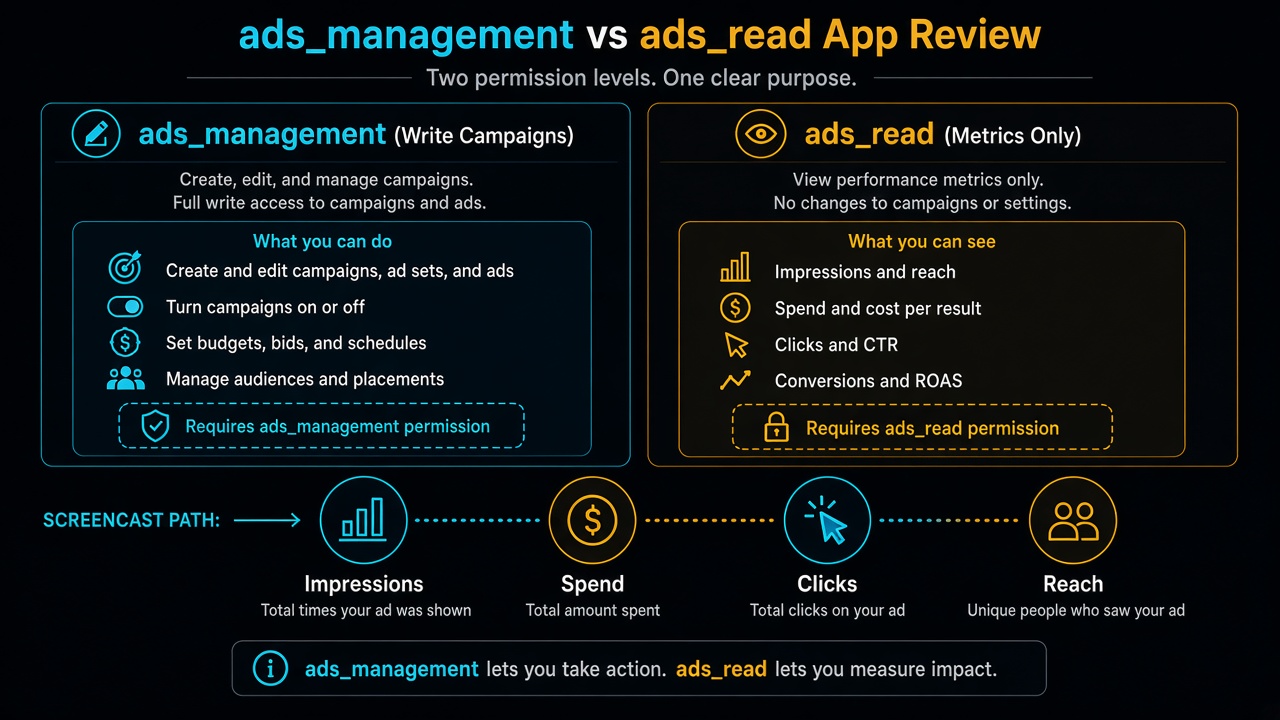
Related contrast: ads_read (not the same permission)
ads_read is a related but separate permission. Meta describes it as access to the Ads Insights API to pull Ads report information for Ad accounts you own or have been granted access to, plus Server-Side API for sending web events. Allowed usage centers on custom dashboards/analytics and sending web events not the full create/manage campaigns story of ads_management.
Diagnostic rule of thumb (not a DIY approval formula): if the only recreateable experience is viewing insights, strengthen the ads_read narrative and reconsider whether you truly need ads_management. If the product truly manages campaigns, keep notes and proof inside Meta’s ads_management allowed usage, and treat ads_read as a contrast — not as a substitute dependency (official deps remain pages_read_engagement and pages_show_list). Bundling both without two clear surfaces is a classic rejection amplifier.
Common demo gaps for ads products
- Test ad account with zero data so performance widgets look “broken empty rather than intentionally demoable.
- Screencast filmed on Production Mode features that Development Mode credentials cannot reach.
- Instructions that assume the reviewer already has Business Manager admin rights you never provisioned.
- Heavy use of Graph API Explorer clips instead of your product UI showing the required metrics.
- Notes listing every Marketing API edge while the app only shows a blank dashboard.
None of these gaps has a universal fix script. Identify which gap blocked verification for your architecture, then rebuild proof once do not paste a generic approved ads screencast outline.
ads_management vs adjacent rejection labels
Marketing API builders often receive generic banners — inadequate demonstration, unable to verify permissions, or unable to approve permission request while the distinctive failure is missing management/performance proof. Likewise, Business Verification approval does not substitute for App Review: BV validates business identity documents; it does not prove your product can show ads performance for a stranger following your instructions.
Agency multi-account products add another failure mode: the screencast shows a founder switching between client ad accounts, but Test Users never receive asset access. Reviewers will not invent Business Manager invitations mid-review. If your differentiator is partner workflows, the provisioned test path must include a business/ad account context the reviewer can actually open.
Scope honesty matters when ads_read alone would cover the shipped product. Write access “for the roadmap” while shipping charts invites distrust. Claiming management while only filming insights graphs also trains reviewers to reject write access.
7-day cooldown risk: Marketing API teams often resubmit after polishing charts or rewriting we help advertisers scale” copy while the Login performance path remains invisible. Those blind retries fail, and repeated submissions can trigger automated cooldowns that freeze App Review buttons for up to about 7 days expensive when campaigns and client launches are waiting.
When a specialist audit helps
Bring a specialist in when write vs read scope is ambiguous, when agency multi-account demos keep failing, or when rejection notes feel generic while your engineers insist Marketing API calls succeed. An audit separates API works in Postman from reviewer can see ads performance / management in the product, then decides whether to narrow to ads_read, keep ads_management, or split the narrative.
Skip DIY secret-sauce shopping if you are mid-cooldown: use the pause to fix evidence, not to spray new essays.
Need Us to Get Your Meta App 100% Approved?
Stop losing weeks to repeated rejections. With 500+ apps approved, we handle your entire submission from start to finish. You get 100% Approval or a 100% Refund — and for your complete safety, you can hire us directly through Upwork or Fiverr Escrow (or use the WhatsApp / Calendar buttons in the header & footer).
Chat on WhatsAppFAQ
What is ads_management used for in App Review?
Per Meta, it lets your app read and manage Ads accounts you own or were granted access to. Allowed usage includes programmatically creating campaigns, managing ads, fetching metrics, and building ad management tools for advertisers.
How is ads_management different from ads_read?
ads_management covers create/manage plus metrics for ad management tools. ads_read focuses on Ads Insights reporting and Server-Side API web events. They are separate permissions — do not treat ads_read as the official dependency of ads_management.
What must the ads_management screencast show?
Meta asks for complete Facebook Login granting the permission, then a business accessing ads performance on your app with Impressions, Conversions, Spend, Clicks, and Reach successfully displayed.
Can blind ads_management resubmits cause a cooldown?
Yes. Cosmetic essay or chart tweaks that leave Login/performance proof unrecreateable often fail again and can lock App Review submissions for multiple days.