ads_read Approved After Every Other Permission Passed (2026 Case Study)
The founder of an ads and Pages dashboard already had the Page permissions moving, and one ads scope still blocking the product. The dashboard manages Facebook ad campaigns and Pages in the same login: campaign insights, the campaign lifecycle, a post composer, comment replies, and boosting. They hired us so they would not burn another attempt on a screencast that never shows the data. They would pay the milestone when those permissions were approved. This ads read is that next-day approval. If your Page rows are already green and you are stuck only on ads_read, start here.
13 September 2026
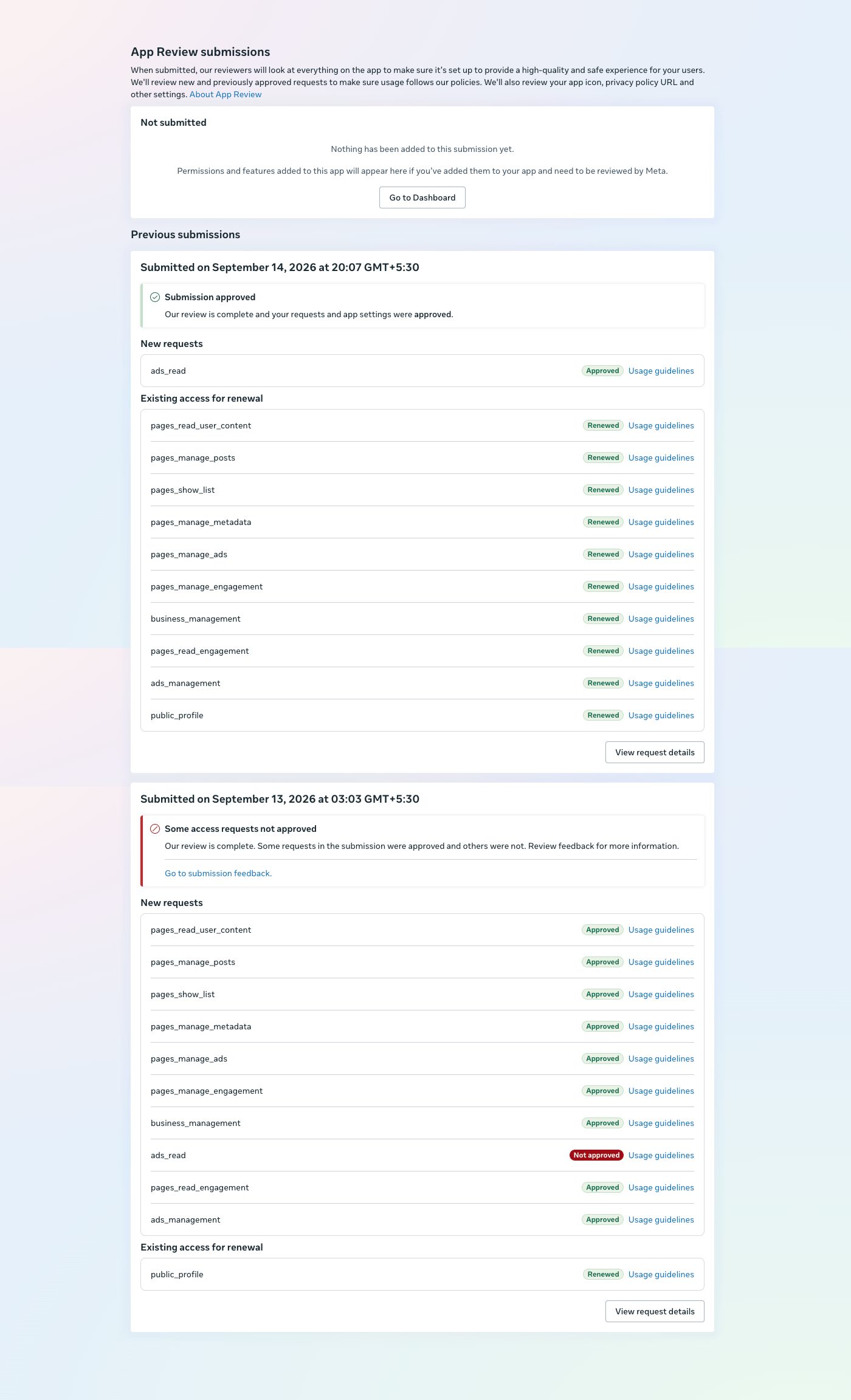
Submitted at 03:03 GMT+5:30. Page permissions and ads_management approved. Only ads_read was not approved.
14 September 2026
Submitted at 20:07 GMT+5:30. Submission approved. ads_read Approved, Usage guidelines.
Renewed with it
The Page set, business_management, ads_management, and public_profile. Each row: Renewed, Usage guidelines.
What the ads and Pages dashboard needed
A code repository was not enough. Reviewers need the live product: login, then each permission used on screen. The Permissions Reference is the list that recording has to cover.
Page permissions on this app: pages_read_user_content, pages_manage_posts, pages_show_list, pages_manage_metadata, pages_manage_ads, pages_manage_engagement, and pages_read_engagement. Account access: business_management. Ads access is two rows, not one: ads_management and ads_read. public_profile was already granted and only had to be renewed.
ads_management is the write. It runs the campaign lifecycle and boosting. ads_read is the read of campaign data, including insights, back into the dashboard. That pull is the ads read. Both have to appear on the recording, because an ads read of insights is a different screen from boosting. A green ads_management row does not include ads_read. This approval screen kept them on separate lines.
The founder needed the Page permissions and the ads permissions, including ads_read, and would pay when they were approved. We refused the repository. We needed the live site, an account import, and every permission used in the product.
Why the first recording could not be made
The first test account listed campaigns and had no ad data. Insights were empty. An ads read review cannot be shown on an empty ad account. A list of names with blank panels is not an ads read. We did not record that screen and talk over the hole.
Page publishing did nothing on text-only posts. Comment reply showed on the Page and not back in the product. Hide-comment did not work. Insights were missing in the Page area. The team said it was fixed before we had clicked through it ourselves. We would not record until we had.
The founder had an account with a real campaign. It still had to be added on the app. Until it was, the dashboard could not show that campaign, and the video would have been the empty list again. We waited until login, the import, a text post that published, a comment reply that returned into the product, hide-comment, Page insights, and campaign data were all clicks we had just made. We recorded the ads read only after that campaign rendered.
Resubmitting the same empty-account video can lead to an App Review cooldown of about 7 days. That figure is widely reported. It is not printed on this screen.
The 13 September card, where only ads_read was not approved
With the real account on the app, we submitted. The card reads Submitted on September 13, 2026 at 03:03 GMT+5:30. The status line is “Some access requests not approved.” There is no reviewer letter on the card. The only red row is ads_read, and the recording before the real account was added could not show ad data.
New requests marked Approved, Usage guidelines:
pages_read_user_contentpages_manage_postspages_show_listpages_manage_metadatapages_manage_adspages_manage_engagementbusiness_managementpages_read_engagementads_management
The only new request marked Not approved was ads_read. public_profile was Renewed, Usage guidelines. Every Page permission passed. ads_management passed. The card still held that ads read for one day: the ads read was the only new request in red while the Page rows went green.
What changed on 14 September
The next submission did not reopen the Page work. It carried the ads read the previous card had held back. Submitted on September 14, 2026 at 20:07 GMT+5:30. Status: Submission approved. New request: ads_read, Approved, Usage guidelines.
Existing access for renewal on that same card, each Renewed, Usage guidelines: pages_read_user_content, pages_manage_posts, pages_show_list, pages_manage_metadata, pages_manage_ads, pages_manage_engagement, business_management, pages_read_engagement, ads_management, and public_profile. The account with a real campaign had been added on the app, the dashboard showed that data, and the ads read the empty test account could not perform was the row that flipped. The founder paid the milestone when ads_read showed Approved.
This is not the other ads case, ads_read permission approved. That page is a different product. More outcomes are on the case studies page.
If only ads_read is still red
If your ads dashboard is approved on the Page permissions and ads_management, and only ads_read is still red, this is the kind of Meta App Review we handle. Send the 13 September shape: one red ads_read row under a pile of green Page rows. Do not send another video of campaigns with no insights. Add the account on the app, click publish, reply, and hide yourself, and show campaign data first. That is the ads read a reviewer can score. The service page is Facebook App Review.
Need Us to Get Your Meta App 100% Approved?
Stop losing weeks to repeated rejections. With 500+ apps approved, we handle your entire submission from start to finish. You get 100% Approval or a 100% Refund — and for your complete safety, you can hire us directly through Upwork or Fiverr Escrow (or use the WhatsApp / Calendar buttons in the header & footer).
Chat on WhatsAppFAQ
Does an approved ads_management row mean ads_read is included?
No. This screen kept them separate. On 13 September 2026 ads_management was Approved and ads_read was Not approved in the same new-request list. Managing a campaign is not the same permission as reading its results.
Why was the first test ad account not enough for ads_read?
Campaigns were listed and insights were empty. ads_read has to be shown on campaign data after login. A repository does not substitute, and we would not record until text posts published, comment reply returned into the product, hide-comment worked, and Page insights were on screen.
What did the 14 September submission change?
It approved ads_read and renewed the Page permissions, business_management, ads_management, and public_profile, each with Usage guidelines. The product change was the real campaign account, added on the app, with its data visible.
What should I send if my card matches 13 September?
Send the screenshot with the single red ads_read row, and say whether that recording showed campaign data. Retire the empty-account video. Do not upload it again.
If your screen looks like the 13 September card, send that screenshot. Page permissions and ads_management already approved, and the ads read still the open row, is the job.
Send the ads_read screenshot