Instagram DM App Review Playbook gives SaaS teams a practical path to approval, evidence, testing, permissions, and reliable submission follow-up.
Instagram DM App Review Playbook: 5 approval lessons
Real Client Case StudyApproved in One Submission: Meta App Review for an Instagram DM Automation SaaS
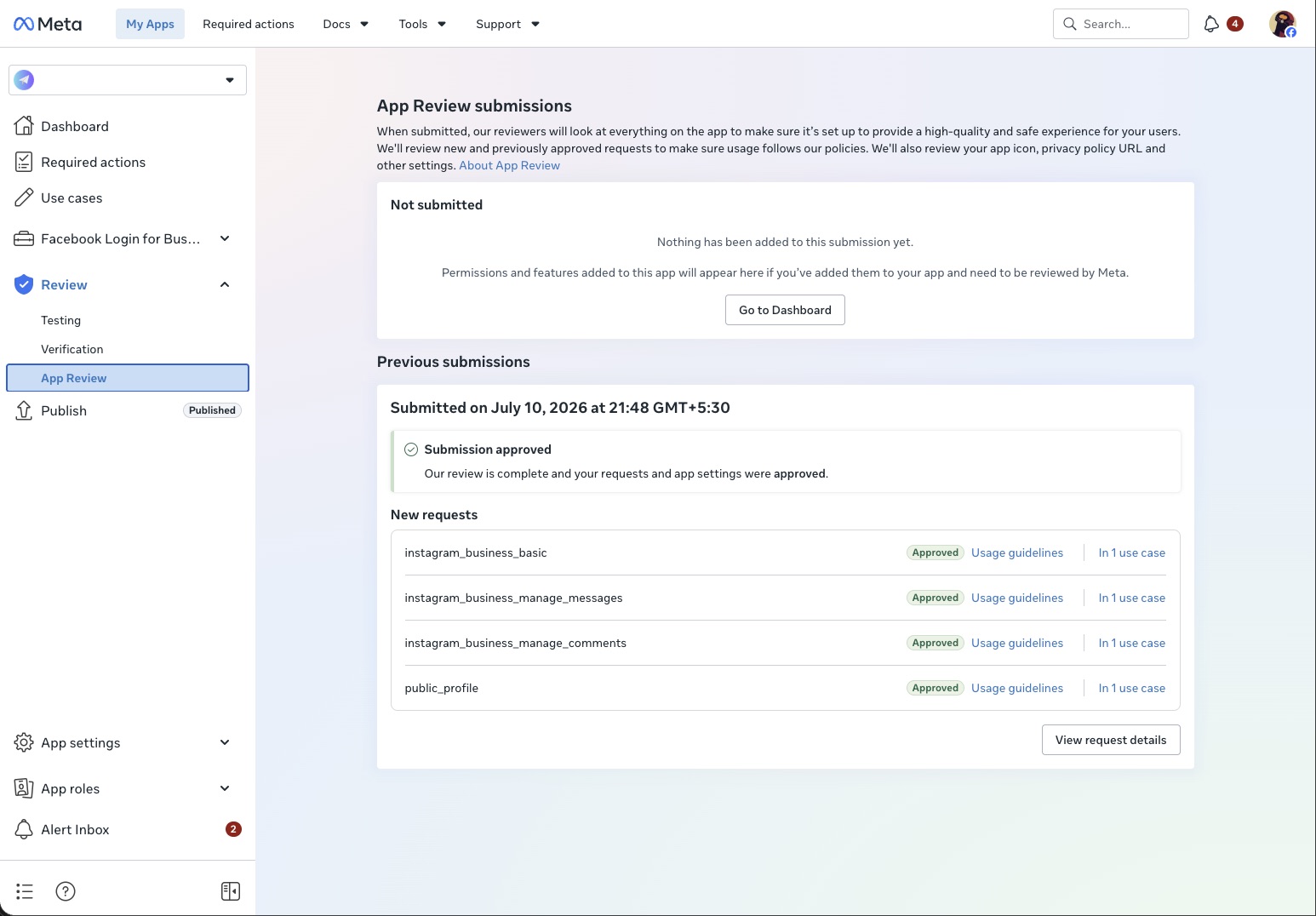
Most of the case studies on this site start with a rejection. This one doesn’t. An AI-powered Instagram DM automation platform — automated DM replies, comment-to-DM flows, story reply automation and a built-in lead CRM, built on the official Instagram API — needed Meta App Review before it could go live for real users. The submission we prepared went through on the first attempt, with no rejection rounds and no resubmissions.
That result isn’t luck. Everything that usually causes a rejection was found and dealt with before the submit button was pressed. Here is how the project actually ran, including the part nobody talks about: the wait.
The starting situation
High-scrutiny category
DM and comment automation tools are among the most carefully reviewed app types on Meta. Reviewers have seen every shortcut, so a submission in this category has to be airtight.
A full product to review
The platform had live automation flows, an inbox, a CRM and public policy pages. Every part a reviewer could touch had to be checked end-to-end before submission.
Business Verification first
The client’s Business Verification was completed before the App Review work began — the right order. Submitting before the business side is settled wastes a review round.
A moving codebase
The product was in active development. An app that changes underneath the reviewer mid-review is one of the most common silent killers of a submission.
What actually had to be approved
The submission covered the core Instagram permissions the platform’s automation depends on:
Each permission needs its own usage justification and its own working demonstration for the reviewer — messaging, comment handling, and account basics are tested as one coherent product, so the submission has to be designed as one.
What happened before the submission
End-to-end platform review
We went through the public site, the policy pages, the login flow and the live product exactly the way a Meta reviewer would — before Meta ever saw it.
Live product walkthrough
Instead of guessing from documents, we had the client’s team demonstrate the product on a live call, so the submission described what the app really does.
Development freeze
The client’s team stabilised the build and handed it over — then stopped shipping changes. The app Meta reviewed was the app we submitted, from the first day to the last.
Submission and monitoring
The submission was filed and tracked through review, with working reviewer access maintained the whole time. The client’s job was simply to keep the environment stable and wait.
The part nobody prepares clients for: the wait
The submission went in and Meta’s review took roughly three weeks — it was approved on day 22, without a single question or rejection in between. That silence is normal. It is also exactly the point where self-managed submissions go wrong: teams get nervous, push “one small update,” change a login flow, or break the reviewer’s test access — and turn a passing submission into a failing one.
Here, nothing moved. The environment stayed stable, access stayed valid, and the review ended the way a prepared review usually ends.
The result
Approved. instagram_business_basic, instagram_business_manage_messages and instagram_business_manage_comments came back approved — the client’s DM automation, comment automation and story reply flows could go live for real customers.
Approval wasn’t the finish line
After the approval came through, one more gate appeared: a final technical verification step on the client’s side before the integration was marked ready for end customers. This is a detail most first-time founders never hear about — “approved” and “live for your users” are not always the same day. Part of this service is walking the client through what each post-approval status actually means, instead of leaving them to decode Meta’s dashboard alone.
Why DM automation apps usually get rejected
- The screencast doesn’t show the automation working live, end to end, the way a reviewer needs to see it.
- Public policy pages (privacy policy, terms, data deletion) are missing, incomplete, or don’t match the app.
- Reviewer login credentials or test accounts stop working partway through the review.
- The app keeps changing while Meta is reviewing it.
- Business Verification isn’t completed before Advanced Access is requested.
If your Instagram automation or messaging SaaS needs Meta App Review — whether it’s your first submission or your fourth rejection — this is the kind of project we handle end to end. See our Instagram messaging SaaS case study, our Instagram Messaging API approval guide, or the Facebook App Review service.
Use case and scope
Define the Instagram product, user benefit, account flow, and requested permissions in the Instagram DM App Review Playbook.
Evidence for approval
Prepare a short screencast, test account, privacy notes, and reproducible steps for the Instagram DM App Review Playbook.
Keep screenshots, domains, and permission explanations consistent during the Instagram DM App Review Playbook.
Testing and renewal
Test empty states, webhooks, rate limits, errors, and opt-outs before the Instagram DM App Review Playbook submission.
Document approved permissions and renewal ownership after the Instagram DM App Review Playbook.
Monitor reviewer feedback and policy changes following the Instagram DM App Review Playbook.
Read the official Instagram API documentation for current requirements.
See our Instagram API guide for implementation planning.
Need Us to Get Your Meta App 100% Approved?
Stop losing weeks to repeated rejections. With 500+ apps approved, we handle your entire submission from start to finish. You get 100% Approval or a 100% Refund — and for your complete safety, you can hire us directly through Upwork or Fiverr Escrow (or use the WhatsApp / Calendar buttons in the header & footer).
Chat on WhatsAppFrequently Asked Questions about Instagram messaging permissions
Why does Meta reject Instagram DM permissions?
Messaging requests are rejected when the screencast doesn't show a real message being sent and received in the app, when the use case looks like unsolicited outreach, or when the reviewer can't reach the inbox feature with the test credentials.
How long does it take if you handle it?
It takes ~3 days for our complete preparation and submission, followed by Meta's review queue — typically 10–20 days (can be faster or take longer depending on Meta's volume). For apps with multiple permissions, if Meta requests adjustments on specific scopes, we handle the changes and re-apply at no extra cost, and each follow-up round follows the same 10–20 day review window.
What if it still isn't approved?
We work on a 100% Approval or 100% Refund basis: if we can't get your valid use case approved, you get a full refund.
Is it safe to hire you?
Yes. You can hire us through Upwork or Fiverr, so your payment stays in Escrow and is only released when the work is delivered. We've been doing this for 10+ years, with 500+ apps approved and 10,000+ permissions granted.