Page Public Content Access (PPCA) Not Needed: Expert Diagnosis
When Meta App Review returns Page Public Content Access not needed based on your submission details, reviewers are not saying public Page data is mythical. They are saying your submission did not demonstrate — or did not need — the Page Public Content Access (PPCA) feature in an allowed manner. This article grounds that rejection in Meta’s App Review Rejection Guide PPCA section verbatim, explains why “we might crawl Pages later” fails, and why blind resubmits with a longer essay often trigger cooldowns.
What this rejection actually means
Meta’s Rejection Guide states, verbatim in substance:
The Page Public Content Access (PPCA) feature can only be used in an allowed manner. Apps that do not use PPCA in an allowed manner will be rejected with “Page Public Content Access not needed based on your submission details”.
The same guide documents what PPCA is and what is allowed:
Page Public Content Access — The Page Public Content Access feature allows your app access to the Pages Search API and to read public data for Pages for which you lack the pages_read_engagement permission and the pages_read_user_content permission. Readable data includes business metadata, public comments and posts.
While you are testing your app and before you submit it for review, your app can only access content on a Page for which the following is true: The person who holds the admin role for the Page also holds an admin, developer, or tester role on the app. If you want the app to be able to access public content on other Pages, you must submit this feature for review. Once you set your app to live mode, it will not be able to see any Page public content without this feature.
Allowed Usage — Analyze and/or display posts and engagement on Pages.
If your submission is rejected for this reason, please make sure that your app’s use of PPCA is allowed before resubmitting.
In plain language: PPCA is not a general research API, competitive-intelligence scoop, or “just in case” public scrape. Either your live product analyzes/displays Page posts and engagement in line with that allowed usage — or you should remove PPCA from the submission. Neighboring labels include Disallowed Use Case Details and Platform Policy 8.9.
WHAT failed
Submission details / product path did not show allowed PPCA usage (analyze and/or display posts and engagement on Pages) — so Meta judged PPCA not needed (or not allowed as framed).
WHY it matters
Without approved PPCA, live apps cannot read public content on Pages outside role-linked Pages. Wrong requests waste review cycles and raise policy flags.
WHAT they expected
A product that clearly analyzes or displays public Page posts/engagement — or an honest decision to drop PPCA if that is not your product.
Reviewer psychology: “not needed” is a purpose verdict
Teams misread “not needed” as a paperwork typo. Reviewers mean: based on what you showed, PPCA is unnecessary for the experience, or the experience you described is outside allowed usage. Both outcomes deny the feature. Expanding the essay to claim “enterprise social listening across the open web” usually makes the mismatch worse, not better.
Before Live Mode, role-linked Pages can already be tested without PPCA. Reviewers notice when your screencast only opens an admin’s own Page then asks for PPCA “for scale.” If the demo never shows analyzing/displaying public posts on Pages you do not administer, the Rejection Guide’s allowed-usage bar is unmet. That is why PPCA failures sit next to recreateability issues like Unable to Verify Use Case — but the decisive text is allowed usage, not missing passwords alone.
Technical nuances that trip capable teams
Across hundreds of Meta apps, PPCA “not needed” / disallowed-usage failures cluster around:
- Future-scrape padding — requesting PPCA for a roadmap crawler while the shipping UI is a Page-owned inbox or ads tool.
- Wrong permission family — needing pages_read_engagement / pages_read_user_content on Pages you manage, but submitting PPCA instead.
- Search-only stubs — calling Pages Search with no analyze/display experience for posts and engagement.
- Competitive monitoring framing — language that implies surveilling rivals rather than analyzing/displaying public posts for the user’s workflow.
- Demo on role-linked Pages only — never showing why Live Mode needs public content on other Pages.
- Bulk export / archive surfaces — UI that looks like wholesale public-content extraction rather than analyze/display.
- Generic denial wrappers — sometimes paired with Unable to Approve Permission Request when the feature never becomes usable in test.
Official references:
- Meta App Review Rejection Guide — PPCA section (quoted above)
- Pages Public Content Access / Pages Search feature documentation in Developer Docs
- Meta Developer Policies — follow allowed usage in Developer Docs
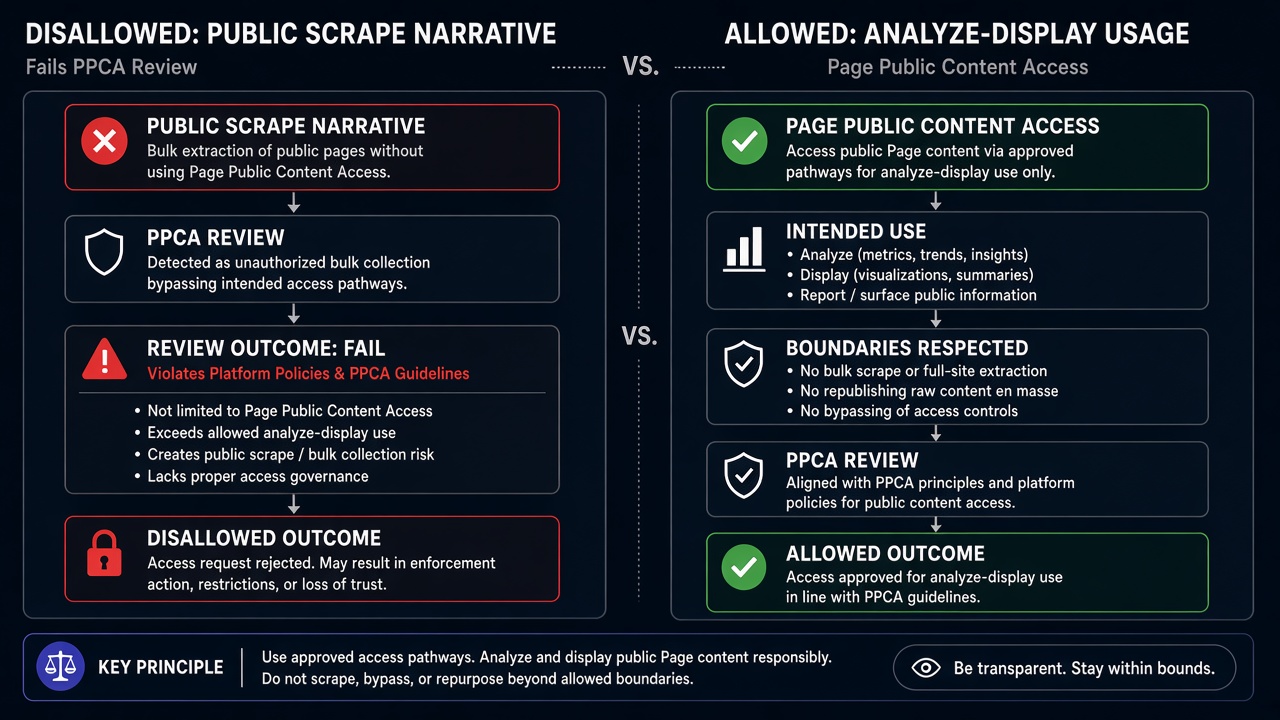
Blind resubmission risk: Practitioner experience across hundreds of apps shows teams often “fix” PPCA not-needed by lengthening the use-case paragraph or adding more public-data buzzwords while the live product still does not analyze/display Page posts and engagement. Those retries fail again and frequently contribute to automated submission cooldowns that can lock review buttons for up to 7 days. Align to allowed usage — or remove PPCA — once; do not burn cycles on essay inflation.
Expert Diagnosis framework (not a DIY paste template)
Every analytics surface and customer workflow is unique. There is no safe universal “approved PPCA paragraph.” Specialists diagnose first:
Decide if PPCA is truly required
If Live Mode only needs Pages you manage with pages_read_* permissions, drop PPCA. Requesting unused features is a policy risk.
Map the UI to “analyze and/or display”
Line-item where posts and engagement appear for the end user. If that screen does not exist, PPCA is not ready — or not allowed as framed.
Separate role-linked testing from Live Mode need
Show why public content on other Pages matters after go-live, not only why your tester’s Page works in Development Mode.
Resubmit once with matched evidence
Notes, screencast, and product must recite the same allowed usage. One coherent package beats three frantic retries that invite cooldowns.
Managed help: Facebook App Review service. Patterns: case studies. Related: Human Agent Permission, incentivizing unapproved actions, rejection reasons hub.
Free 15-Minute Meta Rejection Audit
Share your PPCA rejection note, the feature list you submitted, and a screenshot of any Page posts/engagement UI. We will tell you whether to redesign for allowed usage or remove PPCA before the next cycle.
Strategy second.
What not to do after this rejection
- Do not inflate the essay with “social listening,” “OSINT,” or competitor surveillance framing.
- Do not keep PPCA “just in case” when pages_read_* on managed Pages already covers the product.
- Do not resubmit a screencast that only opens your own admin Page and never analyzes public posts.
- Do not confuse this with a pure credentials failure — fixing Test Users alone does not create allowed usage.
Match analyze/display — or drop PPCA. Then submit once.
Need Us to Get Your Meta App 100% Approved?
Stop losing weeks to repeated rejections. With 500+ apps approved, we handle your entire submission from start to finish. You get 100% Approval or a 100% Refund — and for your complete safety, you can hire us directly through Upwork or Fiverr Escrow (or use the WhatsApp / Calendar buttons in the header & footer).
Chat on WhatsAppFAQ
What does “Page Public Content Access not needed based on your submission details” mean?
Per Meta’s Rejection Guide, PPCA can only be used in an allowed manner. If your submission does not show that allowed use, Meta rejects with this message. Remediation is to ensure your app’s use of PPCA is allowed before resubmitting — or remove the feature.
What is the allowed usage for PPCA?
The Rejection Guide lists Allowed Usage as: analyze and/or display posts and engagement on Pages. PPCA also covers Pages Search API and reading public Page data (business metadata, public comments and posts) when you lack pages_read_engagement and pages_read_user_content.
Can I test public Page content without PPCA in Development Mode?
Yes, with limits. The Rejection Guide notes that while testing — before review — your app can only access content on a Page where the Page admin also holds an admin, developer, or tester role on the app. Live Mode needs approved PPCA to see public content on other Pages.
Do blind PPCA resubmits risk cooldowns?
Yes. Lengthening the use-case essay without an analyze/display product path often fails again, and rapid retries can lock App Review submission controls for up to 7 days.
Amandeep Singh — Meta API Expert
10+ years helping product teams through Meta App Review, Business Verification, and Advanced Access. 500+ apps guided; 10,000+ permissions handled across Facebook, Instagram, WhatsApp, and Marketing API surfaces. Focus: policy-aligned proof, not hype.
Still stuck on PPCA not needed? Get a focused read on your rejection before the next submit.
Book Free 15-Minute Meta Rejection Audit on WhatsApp