App Rejected: Disallowed Use Case Details — Expert Diagnosis
When Meta App Review returns Disallowed Use Case Details, the rejection is not primarily about a missing Test User password or a blank screen. It is a signal that reviewers concluded your described — or demonstrated — use of a permission or feature does not align with Meta’s allowed purposes for that capability, or that the feature could be misused even if you claim it will not be. This article explains what that rejection means, how it differs from recreateability failures, how it maps to allowed-usage rules in Developer Docs and related Rejection Guide outcomes, and why blind resubmission with a broader essay often makes cooldowns more likely.
What this rejection actually means
Across practitioner submissions, Disallowed Use Case Details surfaces when App Review treats your justification as out of bounds for the permission or feature you requested. Wording precision matters as much as technical correctness. A vague or overly broad use-case description is frequently treated the same as a prohibited one: if Meta cannot map your claim to a documented allowed usage, the submission fails for that permission.
This sits next to — but is not identical with — recreateability failures such as Unable to Verify Use Case Experience in App and Unable to Verify Permission(s) Requested. Those mean reviewers could not follow the path. Disallowed Use Case Details more often means they followed enough of the path (or read enough of your notes) to decide the purpose itself is not allowed, not minimal, or not safe as framed.
WHAT failed
The described or demonstrated use case for one or more permissions/features does not match Meta’s allowed usage — or is too broad / misuse-prone as written.
WHY it matters
Allowed usage is how Meta protects Platform Data. Approval is not a prize for clever copy; it is confirmation that the product stays inside documented purposes.
WHAT they expected
A narrow, permission-specific purpose that matches Developer Docs, is visible in the product, and cannot reasonably be read as scraping, surveillance, or “just in case” data collection.
Reviewer psychology: allowed usage beats ambition
App Review is not a pitch meeting. Reviewers compare your notes and UI against permission documentation — including explicit allowed-usage lists where Meta publishes them. The classic Rejection Guide example is Page Public Content Access (PPCA): Meta documents a narrow allowed usage — analyze and/or display posts and engagement on Pages — and rejects submissions that do not demonstrate that exact use case, regardless of how polished the rest of the package looks.
That psychology scales. If you request publishing, messaging, ads, or Instagram scopes with language like “full social CRM,” “growth hacking,” or “any Page data we might need later,” reviewers hear risk, not roadmap. Ambition without a one-to-one mapping to allowed usage reads as a disallowed use case — not as strategic foresight.
Related policy pressure often co-travels with Platform Policy 8.9 (requesting data without meaningful user-experience improvement). Disallowed purpose and unused data are different labels for overlapping trust problems.
Technical nuances that trip capable teams
Across hundreds of Meta apps, the same patterns appear under Disallowed Use Case Details even when engineering quality is high:
- Broad narrative, narrow permission — one paragraph trying to justify five scopes with one “platform integration” story.
- Future-feature padding — requesting permissions for roadmaps that the live app never shows today.
- Allowed-usage mismatch — product works, but the purpose (archiving, wholesale export, competitor monitoring, unverified profiling) sits outside documented allowed usage.
- Misuse surface — UI that could exfiltrate or republish Platform Data at scale, even if your intended customer is “legitimate.”
- Screencast of a different story — video shows analytics tiles while notes claim messaging automation (or the reverse), which also collides with Inadequate Demonstration.
- PPCA / public-content traps — treating public Page crawls as general research tools instead of the analyze/display engagement path Meta documents.
Official references worth reading before any resubmit:
- Meta App Review Rejection Guide — especially PPCA allowed usage and related policy rejections
- Meta Developer Policies — Build a trustworthy product / follow allowed usage in Developer Docs
- Permission-specific allowed-usage pages in Developer Docs for each scope you still need
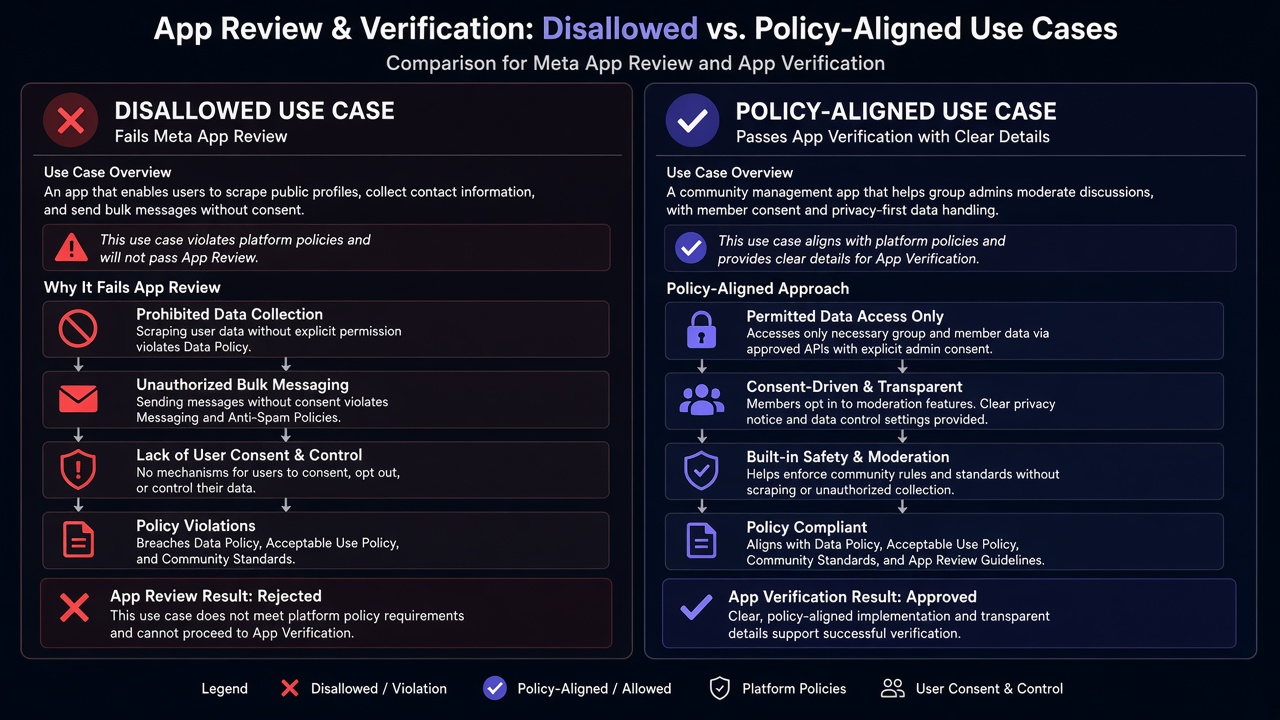
Blind resubmission risk: Practitioner experience across hundreds of apps shows that teams often “fix” Disallowed Use Case Details by expanding the essay — adding more permissions, more hypothetical customers, or more buzzwords. That pattern frequently deepens the policy mismatch and, when paired with rapid retries, triggers automated submission cooldowns that can disable review buttons for up to 7 days. Narrow the purpose and the live product first; volume does not create allowed usage.
Expert Diagnosis framework (not a DIY paste template)
Every app’s data model, customer type, and permission set is unique. A pasteable “approved use-case paragraph” from a forum is either wrong for your product or dangerously generic. Specialists diagnose first:
Map each permission to documented allowed usage
Line-item every requested scope against Meta’s Developer Docs. Drop anything without a clear, current product path.
Separate recreateability from purpose risk
If reviewers cannot open the feature, fix proof issues first. If they can open it but the purpose is out of bounds, redesign or remove — do not inflate the story.
Narrow the live experience
Ship the minimal UI that shows one coherent, allowed purpose per permission. Hide or delete misuse-prone export/scrape surfaces before resubmit.
Resubmit once, with aligned evidence
One coherent package — notes, screencast, and live app saying the same narrow thing — beats three frantic retries that invite cooldowns.
If you need a managed path rather than another self-guided rewrite, see the Facebook App Review service. For patterns from real submissions, browse the case studies hub. Neighboring rejections worth comparing: Unable to Approve Permission Request and Developer Policy 1.7.
Free 15-Minute Meta Rejection Audit
Share your rejection note, permission list, and a one-line product description. We will tell you whether this looks like a disallowed-purpose problem, a recreateability gap, or both — before you burn another review cycle.
Strategy second.
What not to do after this rejection
- Do not widen the use-case essay hoping a different reviewer will approve the same risk surface.
- Do not add more permissions “to look complete” while the core purpose is already disallowed.
- Do not confuse this with a pure credentials failure — fixing Test Users alone will not create allowed usage.
- Do not paste a competitor’s approved wording; Meta evaluates your live product, not borrowed language.
Align purpose to Developer Docs. Demonstrate that purpose only. Then submit. Anything else is gambling with cooldown risk and a deeper policy record.
Need Us to Get Your Meta App 100% Approved?
Stop losing weeks to repeated rejections. With 500+ apps approved, we handle your entire submission from start to finish. You get 100% Approval or a 100% Refund — and for your complete safety, you can hire us directly through Upwork or Fiverr Escrow (or use the WhatsApp / Calendar buttons in the header & footer).
Chat on WhatsAppFAQ
Is “Disallowed Use Case Details” the same as a broken screencast rejection?
Not always. Screencast failures (Unable to Verify Use Case / Permissions) mean reviewers could not recreate the path. Disallowed Use Case Details usually means they understood the path — and decided the described purpose is outside allowed usage, too broad, or misuse-risky for that permission or feature.
Can I fix this by rewriting only the use-case paragraph?
Only if the live product already matches a narrower, documented allowed usage. Changing marketing copy while the app still scrapes, aggregates, or exposes data outside allowed purposes will fail again.
Does this relate to Page Public Content Access (PPCA)?
Sometimes. Meta’s Rejection Guide states PPCA has a narrow allowed usage — analyze and/or display posts and engagement on Pages. Similar allowed-usage constraints apply to many permissions. Treat each permission’s Developer Docs, not a generic essay.
Will rapid resubmits with a broader story help?
No. Broader wording usually worsens disallowed-use judgments, and rapid retries without real product changes frequently trigger automated cooldowns that can lock review controls for up to 7 days.
Amandeep Singh — Meta API Expert
10+ years helping product teams through Meta App Review, Business Verification, and Advanced Access. 500+ apps guided; 10,000+ permissions handled across Facebook, Instagram, WhatsApp, and Marketing API surfaces. Focus: policy-aligned proof, not hype.
Still stuck on Disallowed Use Case Details? Get a focused read on your rejection before the next submit.
Book Free 15-Minute Meta Rejection Audit on WhatsApp