Pages_manage_posts App Review Rejection? Proven Fix Guide 2026
A denied pages_manage_posts app review blocks scheduler founders before customers can publish to a Facebook Page. Stackposts, Postiz, and ChatPion need this exact permission when they publish through the Graph API. Meta’s Permissions Reference, updated 29 September 2026, says pages_manage_posts lets an app create, edit, and delete posts on a Page the user manages. Rejections cluster when that use is invisible, when the video looks like unattended spam, or when the demo only opens a hosted share window. Treat this as a pages_manage_posts rejection fix on the way to pages_manage_posts approval, not a guaranteed approval. No internal templates and no approval recipe.
WHAT failed
Reviewers never saw a Page admin grant pages_manage_posts, then create, edit, and delete a Page post in the scheduler.
WHY it matters
This is a write permission. A calendar with no live post on the Page is a claim, not proof.
WHAT they expected
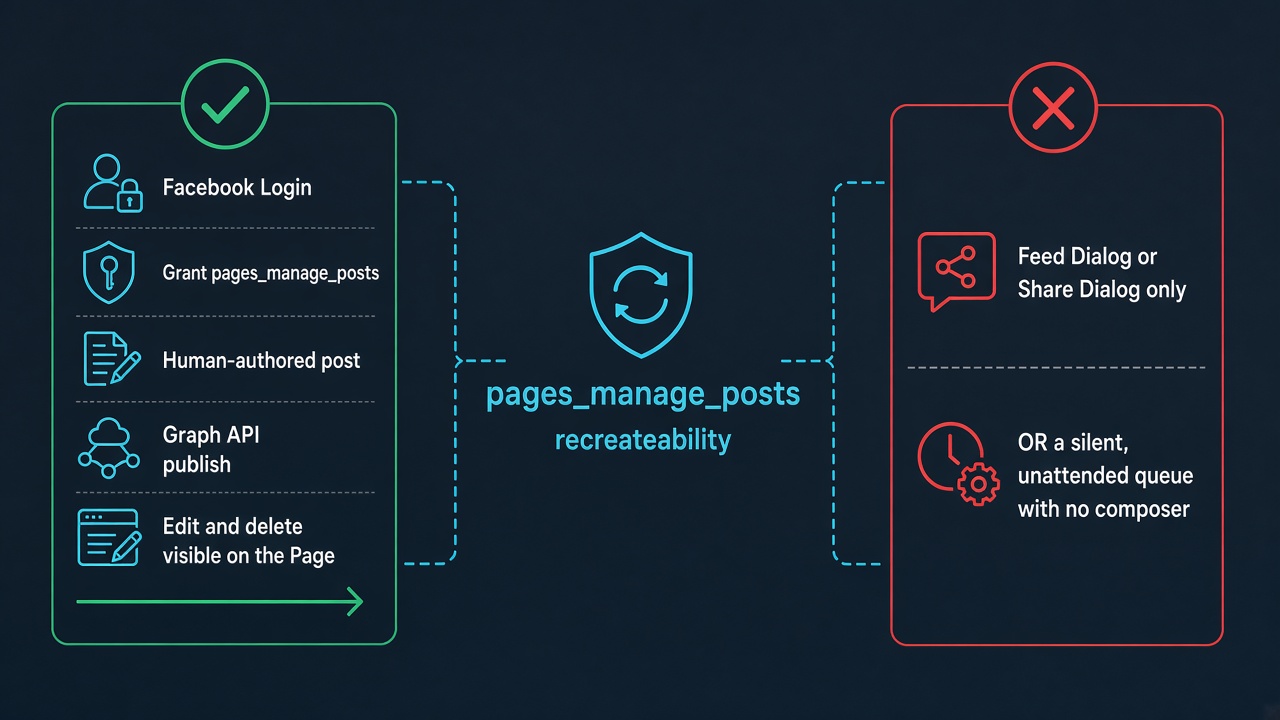
Login, a grant, a human-authored post, an edit, a delete, and that post visible on the Page.
What this Facebook Page publishing permission covers
Allowed usage on a pages_manage_posts app review is to publish, update, and delete a post, photo, or video on a Page. Meta asks why the app must do that for other people on Pages they own, not why you posted once to your own company Page. Dependencies are pages_show_list, so the person can see Pages they manage, and pages_read_engagement, so the app can read content the Page published. The Permissions Reference also treats Advanced Access as access to data you do not own, with Business Verification, and treats extra permissions as a common rejection cause.
A pages_manage_posts app review still allows a queue when a Page admin wrote or approved the post in your app. A silent job that invents copy and fires it at many Pages, with no composer on screen, reads as automated spam. The Feed Dialog, and the Share Dialog that replaced much of that hosted flow, is a different mechanism: the person confirms the post inside Meta’s UI, and your server never uses a Page access token. That is not Graph API publishing and does not demonstrate pages_manage_posts. If your product publishes only after the customer approves a draft, the recording must show that path and the post on the Page.
Use the current policy text. Meta Developer Policies, last updated 3 February 2026, put “follow Developer Docs, including allowed usage” in section 1, item 6. Older enforcement mail sometimes called “Developer Policy 1.9” the case where permission use was not visible in the app. That number is not in the current text. Do not cite it as a live section. Page rules are section 11, Pages API, on the same page. App Review is how Meta checks that publishing follows the docs.
Why Does Meta Reject pages_manage_posts?
Most pages_manage_posts app review rejections mean the reviewer could not verify the permission. A smaller set mean the use, as shown, is not approvable. Mixing those diagnoses wastes the next submission.
- No user-authored post. The video shows a queue and never a person writing, approving, or editing. An unattended blast looks like spam.
- Dialog instead of the Graph API. The Feed Dialog or Share Dialog does not prove your app creates, edits, or deletes Page posts.
- The Page never changes. A “scheduled” toast is not enough. Meta asks you to showcase the updated post on the Page.
- Wrong asset or missing Page list. A profile, a group, or your agency Page is not the customer’s Page. If login never offers Page selection,
pages_show_listis missing. - Extra permissions or a dead app. Reviewers test every request. If they cannot open the app, the package fails. Leave
pages_messagingfor its own review, covered in the pages_messaging app review guide.
Stackposts, Postiz, and ChatPion can all show a Facebook button and a calendar. That screen does not show whether a human approved the post or a cron job sent it, or whether publish uses the Graph API or a share dialog. A copied vendor reply does not transfer. New adjectives will not fix a use Meta called unapprovable. “Could not verify” means the recording and the live path disagree.
What Screencast Proof Does Meta Expect for pages_manage_posts?
For a pages_manage_posts app review, the Permissions Reference is direct. Show the full Facebook login and the grant. Show the app user creating, editing, and deleting a post on their Page inside your app. Showcase the newly updated post on that Page. Recording guidance adds the same beats: select the Page, create, publish, and view the post on the Page. The video maps the test.
A pages_manage_posts app review for a scheduler needs both a human beat and a Page beat. The admin signs in, grants pages_manage_posts, sees the Page list, and composes or approves one post. That post appears on Facebook. An edit in your app shows on the Page. A delete removes it. A future queue slot with nothing published is not proof. Do not swap in analytics, Messenger, or a Share Dialog, and do not reuse notes for pages_read_engagement or pages_manage_engagement. Reading is not creating, and commenting is another permission.
The Risk of Blind Resubmissions (7-Day Cooldown Warning)
The usual pages_manage_posts app review loop is a rejection, a rewritten paragraph, the same calendar video, and another submit before lunch. Meta’s App Review FAQ says to read the feedback first. If the use is not approvable, do not resubmit it. Cleaner copy will not change the mechanism.
7-day cooldown warning: Resubmitting pages_manage_posts while create, edit, and delete are still unrecreateable usually fails again. Repeated failures are widely reported to trigger an App Review cooldown of about 7 days. Sending the same proof twice is what creates that lock.
If a cold viewer of this pages_manage_posts app review cannot grant the permission, select a Page, publish one human-approved post, see the edit, and see the delete, the next try fails the same way. If you only open a share dialog, stop requesting this permission until Graph publishing exists. If the API path is real but the test Page or the instructions were wrong, fix that evidence first. Case studies on this site show different products needing different diagnoses.
How to Appeal a Rejected pages_manage_posts Submission
A pages_manage_posts app review has two public paths, and they are not the same form. For an App Review decision, fix the issue, then comment on the app dashboard or resubmit. Resubmit with clearer instructions only when a working path was missed. If feedback says the use is not approvable, do not send it again. Enforcement is separate: a revoked permission, or a policy-violation mail, is handled by replying to that mail or through Meta’s developer appeals process, often after the app changes. A first Advanced Access denial of pages_manage_posts is usually App Review, not enforcement.
On a pages_manage_posts app review, a stranger should see login, the grant, Page selection, one user-authored post, that post on the Page, an edit, and a delete. Instructions must match the recording, the login must work, and the app must be reachable. Notes should follow section 1, item 6: follow the Developer Docs, including allowed usage. Do not cite “1.9” as a current section, and do not call a Feed Dialog demo Graph API publishing.
There is no fill-in template here and no universal click-path. Some products publish only after a human clicks Schedule. Some run a cron job on a token. Some still open a dialog and label it API mode. A rejection audit compares the rejection line, the recording, and the live app, then says whether to repair proof, narrow the request, or wait out a cooldown. Start from the build you actually run.
Also see: pages_manage_posts approved after repeated rejections (2026 case study) — what changed in the recording before Meta approved it.
Need Us to Get Your Meta App 100% Approved?
Stop losing weeks to repeated rejections. With 500+ apps approved, we handle your entire submission from start to finish. You get 100% Approval or a 100% Refund — and for your complete safety, you can hire us directly through Upwork or Fiverr Escrow (or use the WhatsApp / Calendar buttons in the header & footer).
Chat on WhatsAppFAQ
What is pages_manage_posts allowed to do?
On a pages_manage_posts app review, Meta says it lets your app create, edit, and delete Page posts: publish, update, and delete a post, photo, or video. It depends on pages_show_list and pages_read_engagement, and only for Pages the app user manages.
Does the Feed Dialog or Share Dialog replace pages_manage_posts?
No. On a pages_manage_posts app review, those dialogs ask the person to confirm a post inside Meta’s UI. Graph API publishing after the customer approves a draft is the use this permission covers. A dialog-only demo does not prove it.
Can I appeal by resubmitting the same screencast?
On a pages_manage_posts app review, only if that path already works and the reviewer missed it. Otherwise fix the cited problem first. If the use is not approvable, do not resubmit. Rapid repeats are a common way to hit a cooldown of about 7 days.
Amandeep Singh — Meta API / App Review Specialist
Meta App Review specialist. Policy-aligned diagnosis, not resubmit templates.
Free 15-Minute Rejection Audit
Send your pages_manage_posts rejection note, whether the recording showed a human-authored Graph publish or a Feed Dialog, and one still of the post on the Page. We separate missing proof from a use Meta will not approve.
Strategy second.