leads_retrieval App Review Rejection: Expert Diagnosis
A denied leads retrieval app review usually means Meta could not verify that your app retrieves and reads information captured by a Lead Ads form — and uses that data inside the allowed purpose of contacting people who completed the form (or syncing leads for advertiser-authorized CRM platforms). This is not generic ads reporting, and it is not Page messaging. This guide grounds diagnosis in Meta’s Permissions Reference (updated Sep 29, 2026) plus Lead Ads retrieval guidance: exact allowed usage, official dependencies, App Review packaging with pages_manage_ads, recreateability failures, 7-day cooldown risk, and when a specialist audit helps.
WHAT failed
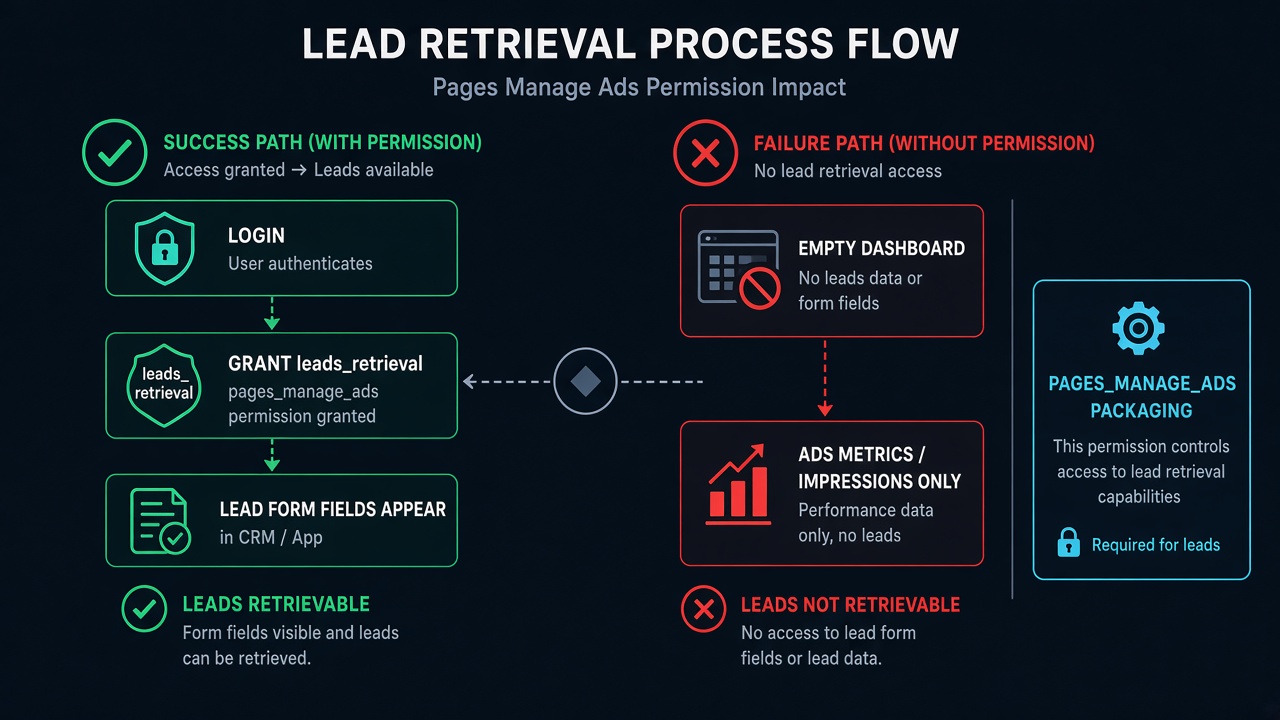
Reviewers could not recreate Login → grant → a real lead appearing in your CRM/app UI under leads_retrieval.
WHY it matters
Lead form fields are personal customer data. Unverified retrieval looks like unverified PII access.
WHAT they expected
A recreateable path where lead data from a Lead Ad form is retrieved and shown for follow-up — not an empty CRM shell or Ads Manager tab alone.
A second pass on the same leads_retrieval app review should change the proof, not the marketing paragraph. If the lead never appears in the product, another essay will not.
What this permission is (official framing)
Meta states that leads_retrieval allows your app to retrieve and read all information captured by a lead ads form associated with an ad created in Ads Manager or the Marketing API. Official allowed usage is to contact people who completed your lead ad form requesting more information. This permission can also be used by advertiser-authorized CRM platforms to pull the lead data on behalf of the advertisers.
Official allowed usage examples from the Permissions Reference:
- Reach out to people who followed up your lead ad form requesting more information (for example, an auto dealer quoting a potential customer).
- For advertiser-authorized CRM platforms to pull lead data on behalf of advertisers so those advertisers can reach out to the user.
Official dependencies listed on the Permissions Reference include Ads Management Standard Access, ads_management, ads_read, business_management, pages_manage_ads, pages_read_engagement, and pages_show_list. Lead Ads product docs additionally stress that retrieving lead data for production use requires App Review that includes leads_retrieval and pages_manage_ads, with Business Verification afterward for Advanced Access realities.
Allowed usage + what Meta wants in App Review
Keep notes inside contacting leads / CRM pull-on-behalf-of-advertisers — not “we build dashboards” or “we sync everything from Meta.” Meta asks for specific examples of why your app needs to access leads for the pages that grant you access. Permissions Reference screencast guidance for this permission points to the general App Review / screen recordings documentation: show Login (or Business Login), grant, then the functionality that actually uses lead data.
In practice, cold reviewers need to see a lead object travel into your product. An Ads Insights chart, a Page picker, or a settings page that never displays form fields fails the recreateability test even when your Marketing API calls work for the owner in Development Mode.
Most leads_retrieval app review denials cluster on the same recreateability gap: the recording never shows retrieved lead fields.
Why a leads retrieval app review gets rejected
- No lead on screen — recording shows OAuth and an empty “Leads” menu; no form fields, no lead ID, no CRM row.
- Ads performance demo substituted — team demos impressions/spend under
ads_read/ads_managementwhile claiming lead retrieval. - Missing companion permissions honesty — Lead Ads guidance expects
pages_manage_ads(and related Page/ads scaffolding) in the same submission story; orphanleads_retrievalwith no Page/ad context confuses reviewers. - Webhook or test-lead path dead — product claims real-time CRM sync, but reviewer cannot trigger or fetch a test lead during review.
- Development Mode confusion — owner sees leads as an app role user; stranger Test User / live path fails. Meta notes you cannot retrieve leads the same way for unrestricted production use while stuck in Development-only patterns.
- Use case too vague — “sync to CRM” without naming why contact/follow-up happens, who sees fields, or that advertisers authorized the pull.
Generic banners often wrap this same failure. Cross-read Unable to Verify Permissions when the rejection email is nonspecific. Related ads packaging: ads_management App Review.
What reviewers look for (psychology)
Reviewers treat lead fields as sensitive. They need a story that matches allowed usage: follow-up contact or authorized CRM pull — not silent data warehousing, not scraped Page comments, not Messenger inbox history. They will not fill your CRM with imaginary leadgen forms mid-review. In a leads_retrieval app review, missing lead UI is the failure, even when Ads Manager itself looks fine. If Leads Access Manager / Page admin lead access is restricted on the test Page, “permission approved on app” still fails in the UI.
Official dependencies and Lead Ads packaging
The Permissions Reference dependency list is long because lead retrieval sits on ads + Page scaffolding. Marketing API retrieval docs commonly require a Page or User token from someone who can advertise on the ad account and Page, plus combinations including ads_management, leads_retrieval, pages_show_list, pages_read_engagement, and pages_manage_ads (and pages_manage_metadata when webhooks are in play). Do not invent extra permissions your CRM never calls — but do not pretend leads_retrieval stands alone if your product story needs pages_manage_ads in the same App Review package.
Business Verification is separate from a leads_retrieval app review. BV documents do not replace a lead appearing in your app. App Review approval for lead retrieval is typically followed by BV expectations for Advanced Access — mixing those queues into one panic resubmit is a common cooldown driver.
Common demo gaps
- Screencast of native Ads Manager lead download while your app never shows the API/CRM result.
- Instructions that require the reviewer to already own a live spend campaign you never provisioned for testing.
- Webhook URL on localhost / private VPS with no public HTTPS callback.
- Use case that never states advertiser-authorized CRM pull vs first-party follow-up contact.
- Notes pasted from
ads_managementwithout naming lead form fields or contact purpose.
Use them to sort a leads_retrieval app review, not as a portable “how to pass” script. Specialists map whether the failure is empty lead UI, wrong ads-permission substitution, Leads Access Manager blocks, webhook reachability, or BV/App Review queue confusion.
7-day cooldown risk: Teams often resubmit after rewriting CRM marketing copy or uploading BV documents while the in-app lead retrieve/display path stays unrecreateable. Those blind retries fail and can trigger App Review submission cooldowns of up to about 7 days.
When a specialist audit helps
Bring a specialist when you cannot tell whether Meta denied missing lead UI, dependency packaging with pages_manage_ads, webhook/test-lead reachability, or BV confusion; when Development Mode works for admins only; or when ads metrics demos keep getting filed under leads_retrieval. For a stuck leads_retrieval app review, the audit separates those tracks — without a fake universal “download CSV” click path that ignores your CRM.
Need Us to Get Your Meta App 100% Approved?
Stop losing weeks to repeated rejections. With 500+ apps approved, we handle your entire submission from start to finish. You get 100% Approval or a 100% Refund — and for your complete safety, you can hire us directly through Upwork or Fiverr Escrow (or use the WhatsApp / Calendar buttons in the header & footer).
Chat on WhatsAppFAQ
What is leads_retrieval used for?
Per Meta, it retrieves and reads all information captured by a Lead Ads form. Allowed usage is contacting people who completed the form, and advertiser-authorized CRM platforms pulling lead data on behalf of advertisers.
Which permissions are commonly packaged with it?
The Permissions Reference lists dependencies including ads_management, ads_read, business_management, pages_manage_ads, pages_read_engagement, and pages_show_list (plus Ads Management Standard Access). Lead Ads docs emphasize including leads_retrieval and pages_manage_ads in App Review.
Is an ads insights demo enough?
No. A leads_retrieval app review is about retrieved form fields, not charts. Ads performance data belongs to ads_read / ads_management stories. leads_retrieval requires showing retrieved lead form data used for follow-up or authorized CRM sync.
Can blind leads_retrieval resubmits cause cooldowns?
Yes. Essay or BV-document churn that leaves lead retrieve/display unrecreateable often fails again and can lock App Review submissions for multiple days (commonly discussed as about a 7-day cooldown).
Why is leads_retrieval missing from my App Dashboard?
In the use-case based App Dashboard, a permission only appears after you add a use case that contains it. The leads_retrieval permission sits under the lead ads use case for capturing and managing ad leads. If you only added a Pages or Marketing API use case, the permission will not be listed. Add the right use case, then request it in App Review.
Does leads_retrieval need Advanced Access to receive live leads?
Yes, when the leads come from Pages owned by your customers. With Standard Access only people who have a role on your app can grant the permission, which is fine for testing on your own Page. A CRM or lead-sync product used by other businesses needs Advanced Access through App Review, and Advanced Access requires Business Verification.
Should lead retrieval use a Page access token?
For Lead Ads webhooks, yes. Meta's leadgen webhook guide asks for a Page access token from someone who can perform the ADVERTISE task on the Page, with leads_retrieval, pages_manage_metadata, pages_show_list, pages_read_engagement and ads_management. If that person lacks lead access on the Page, calls fail even after App Review is approved.
Amandeep Singh — Meta API / App Review Specialist
10+ years helping product and agency teams through Meta App Review, Advanced Access, and Business Verification. 500+ apps guided and 10,000+ permissions handled across Facebook, Instagram, WhatsApp, Ads, and Threads surfaces. Focus: policy-aligned diagnosis — not generic resubmit templates.
Free 15-Minute Meta Permission Audit
Share your leads_retrieval app review rejection note, whether a test lead appears in your CRM UI, and which companion permissions (pages_manage_ads, ads scopes) you requested. We will separate ads-metrics confusion from true lead-retrieve proof gaps.
Strategy second.