MagicAI App Review Guide: Social Suite Permissions, Cron & Rejection Patterns
A MagicAI app review is Meta Advanced Access for the Facebook app behind your MagicAI (MagicProject AI SaaS) install — not MagicAI’s own license screen, and not X / LinkedIn / TikTok / YouTube developer setup. MagicAI’s Social Media Suite generates and schedules posts; the DM & Comment Automation child extension adds comment-triggered Messenger/IG private replies. Meta only cares about the Meta scopes you request and whether a cold reviewer can recreate each Advanced Access path.
This guide diagnoses common MagicAI App Review failures using official MagicAI docs (docs.magicproject.ai) plus Meta’s Permissions Reference — without inventing ads or lead permissions MagicAI does not document. Diagnosis only — not a DIY secret-sauce checklist. Teams looking up a MagicAI Meta App Review usually need this same split: Social Suite posting versus optional DM automation.
WHAT breaks
Owner can AI-write and schedule while reviewers never see Login → Page/IG connect → publish (and, if requested, messaging/webhook) proof per scope.
WHY MagicAI differs
It blends scheduler scopes (pages_manage_posts, UGC/insights helpers) with optional automation scopes (pages_messaging, pages_manage_metadata, IG comment/message perms).
WHAT Meta expects
Recreateable flows for every Advanced Access permission you requested — not an AI content tour that barely shows Facebook.
What MagicAI typically needs from Meta (from official docs)
Exact scopes depend on which MagicAI extensions and platforms you enable. This MagicAI permissions list is the documented Facebook set for posting and connect, not every Meta product:
pages_manage_posts— publish Page posts from the suitepages_show_list— list Pages (/me/accountswith a user token; called out as required to list pages)pages_read_user_content— UGC/read surfaces the suite expectspages_read_engagement— Page engagement/content scaffoldingread_insights— insights integration documented alongside the suite
Official DM & Comment Automation docs add Facebook permissions on top of posting:
pages_messaging— send DMs via Messengerpages_manage_metadata— subscribe to webhook events (feed field on the Page object; webhook path/social-media/webhook/facebook)
For Instagram automation, MagicAI docs list instagram_manage_comments and instagram_manage_messages (Private Reply within a 7-day comment window), with Business/Creator IG linked to a Facebook Page, Facebook Login for Business, and correct OAuth redirect URIs. Do not paste ads, Lead Ads, or WhatsApp Business scopes into Meta App Review “because MagicAI is AI SaaS” — those are not in the Social Media Suite / automation docs cited here. Sister publishing guides: Stackposts, Postiz. Messaging-adjacent scripts: ChatPion, BotSailor.
VPS, cron, OAuth, and webhooks (why MagicAI “works for me” fails review)
MagicAI docs are explicit: scheduled posts and automations need cron on the server; without cron, comments may be stored but DMs/replies never send. Automation also needs a publicly accessible HTTPS domain for webhooks. Reviewers are not your sysadmins — but broken infra still kills recreateability:
- OAuth redirect mismatch — Valid OAuth Redirect URIs in Facebook Login do not match MagicAI’s Social Media Platform Settings redirect URL (www vs bare, http vs https, subdirectory installs).
- Cron not running — suite schedules look fine; live publish or automation fire never happens during review.
- Webhook verify token mismatch — Instagram/Facebook callback URL or verify token in Meta App Dashboard ≠ MagicAI admin secret.
- Missing reconnect after new scopes — docs warn that if Facebook was connected without
pages_manage_metadata, disconnect/reconnect is required. - Self-hosted VPS / reverse proxy — App domains, data deletion callback, and privacy/terms URLs incomplete while Live mode is requested.
A MagicAI app review still fails if those three are broken. Fix reachability (OAuth + cron + HTTPS webhooks) before rewriting permission essays. MagicAI setup service work is the same diagnosis: prove the path, do not add undocumented scopes. That is the MagicAI app review bar. Deep UGC permission diagnosis: pages_read_user_content. Messaging packaging: pages_messaging.
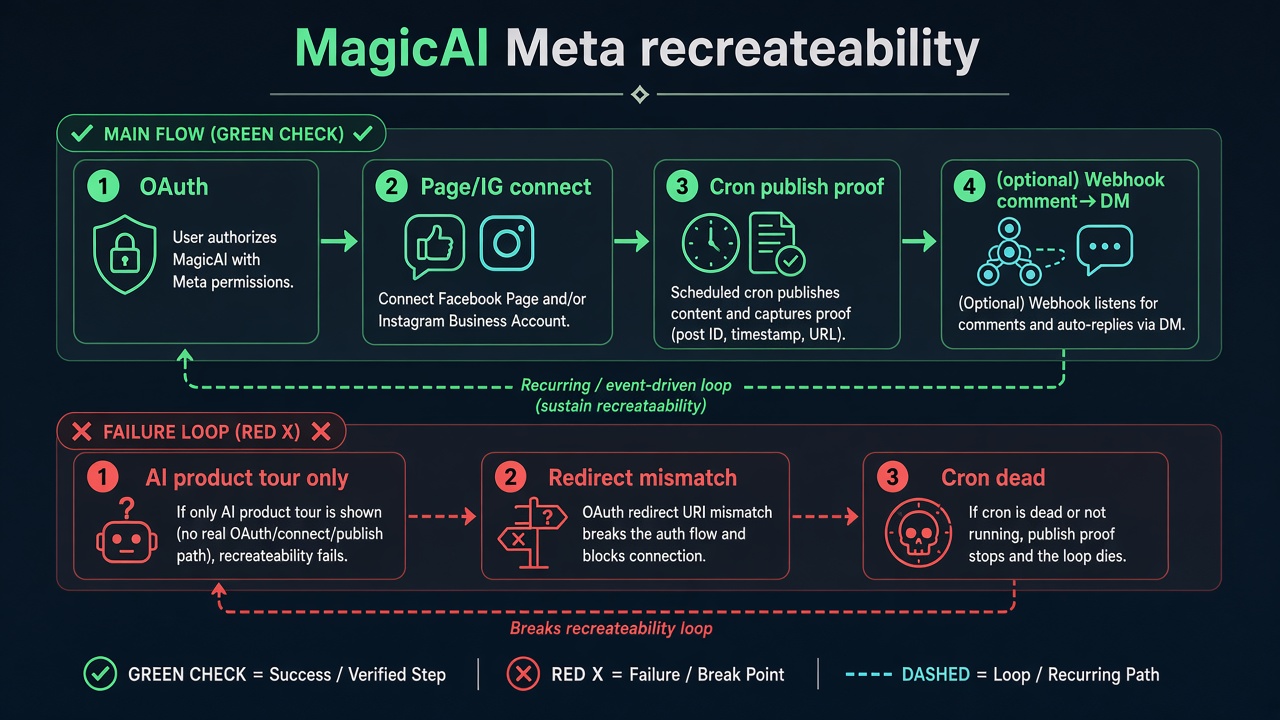
MagicAI Facebook App Approval stalls when the video is an AI writing tour and Facebook is only a settings screenshot. The MagicAI app review has to show the scope you asked for.
Why MagicAI app review gets rejected
- AI tour without Meta proof — captions, templates, and multi-network calendar shown; no Facebook Login grant + Page publish for
pages_manage_posts. - Scope inflation — messaging/automation scopes requested while the live demo only schedules a Page photo (or the reverse: publish scopes while only showing chat).
- UGC/insights requested, never shown —
pages_read_user_content/read_insightson the form, screencast never displays a user comment or insights metric in MagicAI. - Automation without webhook proof —
pages_messaging+pages_manage_metadataclaimed; no inbound comment → DM/private reply recreateable path. - Instagram Private Reply window ignored — demo uses stale comments outside the documented 7-day private-reply window.
- Non-Meta networks mixed into Meta notes — X/LinkedIn/TikTok/YouTube setup pasted into Facebook App Review fields.
Common rejection patterns (diagnosis categories)
Treat these as failure modes to map — not copy-paste reviewer answers:
- Publish scope package incomplete vs MagicAI’s documented list (especially
pages_show_list+ manage posts). - Automation package requested without feed webhook subscription / metadata grant.
- Test User or reviewer cannot attach a Page / IG professional account MagicAI will post to.
- Data deletion callback / privacy URLs missing while Advanced Access is requested.
- Blind resubmit after changing AI marketing copy only.
7-day cooldown risk: Teams often resubmit MagicAI App Review after regenerating AI sample posts or fixing brand copy while OAuth, cron, webhook, or per-permission demo beats stay unrecreateable. Those blind retries fail and can trigger App Review submission cooldowns of up to about 7 days.
How to scope MagicAI App Review without over-requesting
Start from which MagicAI surfaces are actually live for customers on the app under review. If only Social Media Suite publishing is sold, keep Advanced Access requests aligned to the documented publish list and prove Page connect + scheduled/instant publish.
If DM & Comment Automation is sold, add pages_messaging and pages_manage_metadata (and Instagram comment/message scopes when IG automation is live) and prove webhook-backed comment → reply — not a second AI caption tour. If a permission is in MagicAI’s install checklist but unused in your tenant, either enable a recreateable demo for it or remove it from the submission. Meta rejects unneeded permissions; MagicAI’s full capability matrix is not a mandate to request every scope on day one.
Also separate Business Verification and App Review queues. Completing BV documents does not fix a dead cron, a mismatched redirect URI, or a missing user-generated comment / insights beat for scopes you already listed. Treat each Advanced Access line as its own recreateability contract.
When a specialist audit helps
Bring a specialist when you cannot tell whether Meta denied publish recreateability, UGC/insights honesty, automation webhook gaps, or VPS/cron reachability; when Social Media Suite and DM automation were requested as one messy bundle; or when Instagram Private Reply failures are being misread as Facebook messaging issues. The audit separates those tracks for your MagicAI tenant — without a fake universal “pass App Review” script that ignores which extensions you actually sell.
Need Us to Get Your Meta App 100% Approved?
Stop losing weeks to repeated rejections. With 500+ apps approved, we handle your entire submission from start to finish. You get 100% Approval or a 100% Refund — and for your complete safety, you can hire us directly through Upwork or Fiverr Escrow (or use the WhatsApp / Calendar buttons in the header & footer).
Chat on WhatsAppFAQ
Which Facebook permissions does MagicAI document for Social Media Suite?
Official suite setup lists pages_manage_posts, pages_show_list, pages_read_user_content, pages_read_engagement, and read_insights. pages_show_list is called out specifically for listing Pages.
What extra permissions does DM & Comment Automation need?
Official automation docs add pages_messaging and pages_manage_metadata for Facebook (webhook feed subscription). Instagram automation docs add instagram_manage_comments and instagram_manage_messages.
Do I need ads or leads_retrieval for MagicAI?
Not according to the Social Media Suite and DM/Comment Automation docs cited here. Do not invent ads or Lead Ads permissions for a publishing/chat automation story MagicAI does not document.
Can blind MagicAI resubmits cause cooldowns?
Yes. Essay or AI-demo churn that leaves OAuth/cron/webhook or per-scope proof unrecreateable often fails again and can lock App Review submissions for multiple days (commonly discussed as about a 7-day cooldown).
Amandeep Singh — Meta API / App Review Specialist
10+ years helping product and agency teams through Meta App Review, Advanced Access, and Business Verification. 500+ apps guided and 10,000+ permissions handled across Facebook, Instagram, WhatsApp, Ads, and Threads surfaces. Focus: policy-aligned diagnosis — not generic resubmit templates.
Free 15-Minute Meta Permission Audit
Share your MagicAI rejection note, which extensions are live (Social Media Suite vs DM/Comment Automation), and whether cron/webhooks are reachable on your VPS/domain. We will separate publish, UGC, and messaging proof gaps.
Bring the MagicAI app review rejection note, not a feature wishlist. Strategy second.