Meta Rejection: Test Credentials Do Not Work — Expert Diagnosis
When Meta App Review returns The test credentials that you provided do not work, the review never reached your use case. Reviewers could not log in with the credentials in App Verification Details — so permission proof and screencast recreateability never got a fair test. This article covers Meta’s Rejection Guide wording, why Meta Test Users differ from real Facebook accounts (and why 2FA locks kill submissions), how this differs from Unable to Verify Use Case, Inadequate Demonstration, and unable to verify permissions requested while testing, and why password swaps without diagnosis often burn a 7-day cooldown.
What this rejection actually means
Meta’s App Review Rejection Guide is explicit: apps that do not rely on Facebook Login for authentication must include login credentials for a test account reviewers can use. If they cannot log in with those credentials, the submission is rejected with “The test credentials that you provided do not work.”
The same outcome appears when teams need a Facebook identity for OAuth or Business Login, but ship a real personal login, 2FA-locked founder account, expired password, or internal-only staging user. The reviewer never enters the product — everything after login is invisible.
WHAT failed
Reviewers could not authenticate into your app (or required Facebook/Business Login path) using the credentials you included.
WHY it matters
Without a working entry path, Meta cannot verify any permission, feature, or use case — the submission fails before product proof begins.
WHAT they expected
Externally reachable credentials: a provisioned test account (Meta Test User when a Facebook identity is required) with no 2FA lockouts and clear login steps.
Reviewer psychology: no login, no review
App Review is not a white-glove onboarding call. Reviewers will not wait for OTPs, device approvals, or invented recovery flows. Incorrect password, checkpoint, CAPTCHA, geo friction, or “confirm it’s you” ends the submission.
That is why a use case can “look valid” and still fail on credentials — testing never starts. Ambiguity defaults to rejection. Pasting a Gmail recovery path into notes is fragile; Meta’s remediation centers on a test user you verified externally, not third-party mailboxes.
Technical nuances: Meta Test User vs real credentials and 2FA
Across hundreds of Meta apps, the same credential failure modes appear under this label:
- Real Facebook account instead of a Meta Test User — Platform Policy restricts fake accounts for app management. Meta’s guide: do not create a new Facebook user as a “test user”; if a Facebook identity is required, create a Facebook Test User.
- 2FA / checkpoint locks — founder or shared real accounts with two-factor auth, login alerts, or device confirmation block unfamiliar reviewer locations.
- Credentials never verified externally — works on VPN/allowlisted IP, fails outside the internal network. Meta asks you to verify sign-in externally before resubmitting.
- Wrong identity layer — product email/password and Facebook OAuth both required, but only one layer was provided.
- Stale or rotated secrets — password changed after the screencast, or Test User reset without updating App Verification Details.
- Server-to-server (S2S) mishandled — when login credentials cannot be supplied, Meta expects a clear description of how the app uses data from each requested permission/feature (see S2S sample guidance) — not an empty field.
Official remediation: finish development; create a test user and verify external sign-in; include credentials in App Verification Details; resubmit. When a Facebook identity is required, that means a Facebook Test User — not a fabricated personal profile.
Policy grounding: trustworthy access, not fake accounts
Under Meta Developer Policies section 1. Build a trustworthy product, developers must follow Developer Docs instructions, including Platform allowed usage. Credential failures sit upstream: reviewers cannot evaluate trustworthy Platform use if they cannot enter the app.
Meta’s Rejection Guide also warns against creating new Facebook user accounts as test users — Platform Policy restricts fake accounts for app management. A Meta-provisioned Test User (when a Facebook identity is needed) is the compliant path; a 2FA-locked personal login is fragile and strategically wrong.
Official references worth reading before you rotate another password:
- Meta App Review Rejection Guide — “The test credentials that you provided do not work”
- Meta Developer Policies — Build a trustworthy product
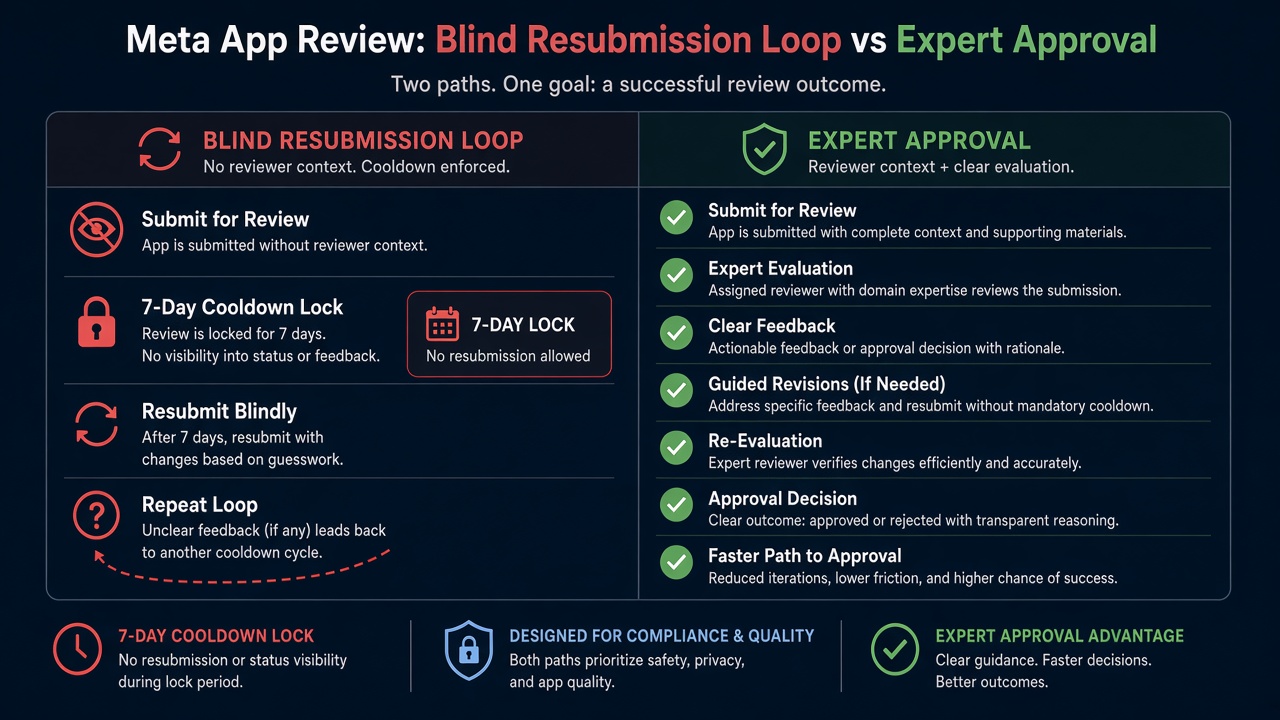
Blind resubmission risk: Practitioner experience across hundreds of apps shows that rapid password swaps — same 2FA-locked real account, same internal-only staging user, same incomplete notes — frequently trigger automated submission cooldowns. Those locks can disable review buttons for up to 7 days. Meta adjusts thresholds over time, but the pattern is stable: volume without an externally verified login path wastes calendar time while the credentials failure remains.
Expert Diagnosis framework (not a DIY paste template)
Every app’s auth stack is unique: some need product email login only; some need Facebook Login; some need both plus Business assets. A full copy-paste “credentials block” would either mislead your team or violate policy. Specialists diagnose first:
Classify the identity layers reviewers must pass
Product login only, Facebook/Business Login, or both — then decide whether a Meta Test User is required versus a non-Facebook test account.
Prove external sign-in from a cold device
Use only the credentials and steps you will paste into App Verification Details. Failures here are review failures waiting to happen.
Remove 2FA and checkpoint friction for the test identity
Prefer Meta Test Users for Facebook identities. Do not ship founder accounts that demand device approval, OTP email, or geo challenges.
Resubmit once with matching instructions
One coherent credentials package — verified externally, documented clearly — beats three frantic password rotations. Cooldowns punish volume.
If login works but permissions fail after entry, see unable to verify permissions requested while testing. If the video is weak, see Inadequate Demonstration. Managed help: Facebook App Review service and case studies.
Free 15-Minute Meta Rejection Audit
Share your rejection note and how you currently provide test login (product credentials, Meta Test User, or both). We will tell you whether this looks like a 2FA lock, wrong identity layer, external-access gap, or S2S documentation issue — before you burn another review cycle.
Strategy second.
What not to do after this rejection
- Do not create a fake personal Facebook account to “act as” a test user — Meta’s guide forbids that pattern under Platform Policy.
- Do not hand reviewers a 2FA-protected founder login and hope they can clear checkpoints.
- Do not resubmit without verifying the exact credentials from outside your internal network.
- Do not assume a working screencast login substitutes for credentials printed in App Verification Details.
Provision the right test identity. Verify it externally. Document it clearly. Then submit once. Anything else is gambling with cooldown risk.
Need Us to Get Your Meta App 100% Approved?
Stop losing weeks to repeated rejections. With 500+ apps approved, we handle your entire submission from start to finish. You get 100% Approval or a 100% Refund — and for your complete safety, you can hire us directly through Upwork or Fiverr Escrow (or use the WhatsApp / Calendar buttons in the header & footer).
Chat on WhatsAppFAQ
Should I give reviewers my personal Facebook login?
No. Meta’s Rejection Guide says not to create a new Facebook user account as a test user, and Platform Policy restricts fake accounts for app management. If a Facebook identity is required, create a Facebook Test User. Prefer identities without 2FA checkpoints.
Our app uses only email/password — do we still need a Meta Test User?
If authentication does not rely on Facebook Login, Meta’s guide requires login credentials for a test account reviewers can use. That may be a non-Facebook product test user. Provide Facebook Test User credentials only when a Facebook identity is actually required for the flows under review.
What if we are a server-to-server app with no login UI?
Meta’s Rejection Guide has an S2S path: if you cannot supply login credentials, complete development and describe how the app ultimately uses all data each requested permission and feature allows — following Meta’s Server-to-Server sample submission guidance. Empty credentials without that description still fail.
Can repeated “credentials do not work” retries lock App Review?
Yes. Rapid resubmissions with still-broken or 2FA-locked credentials frequently trigger automated cooldowns that can lock review submission controls for up to 7 days. Thresholds change; the delay cost is real.
Amandeep Singh — Meta API Expert
10+ years helping product teams through Meta App Review, Business Verification, and Advanced Access. 500+ apps guided; 10,000+ permissions handled across Facebook, Instagram, WhatsApp, and Marketing API surfaces. Focus: policy-aligned proof, not hype.
Still stuck on meta rejection test credentials do not work? Get a focused read on your login path before the next submit.
Book Free 15-Minute Meta Rejection Audit on WhatsApp