WhatsApp Cloud API Phone Number Already Registered or Certificate Error: Expert Diagnosis
WhatsApp phone already registered is the short diagnosis to confirm before another register attempt.
When WhatsApp phone already registered errors appear during Cloud API onboarding, a certificate or registration mismatch, or Embedded Signup errors that say the number exists on WhatsApp Messenger, the WhatsApp Business app, or another Business API host, you are not facing a classic Meta App Review essay rejection. You are hitting Cloud API phone lifecycle rules: a number can only be registered for Cloud API messaging after ownership is clear, consumer WhatsApp is removed where required, and two-step verification PIN handling is correct. This article diagnoses the WhatsApp Cloud API phone number already registered error using Meta’s Cloud API phone-number and registration documentation.
When a WhatsApp phone already registered message persists, separate mobile occupancy from a PIN or migration issue before changing the WABA.
A WhatsApp phone already registered diagnosis also checks the current BSP, consumer app session, and two-step verification state.
Use the phrase WhatsApp phone already registered when documenting the incident so support can match the lifecycle error to the correct path.
After the WhatsApp phone already registered cause is cleared, register once and validate send and receive.
What this error actually means
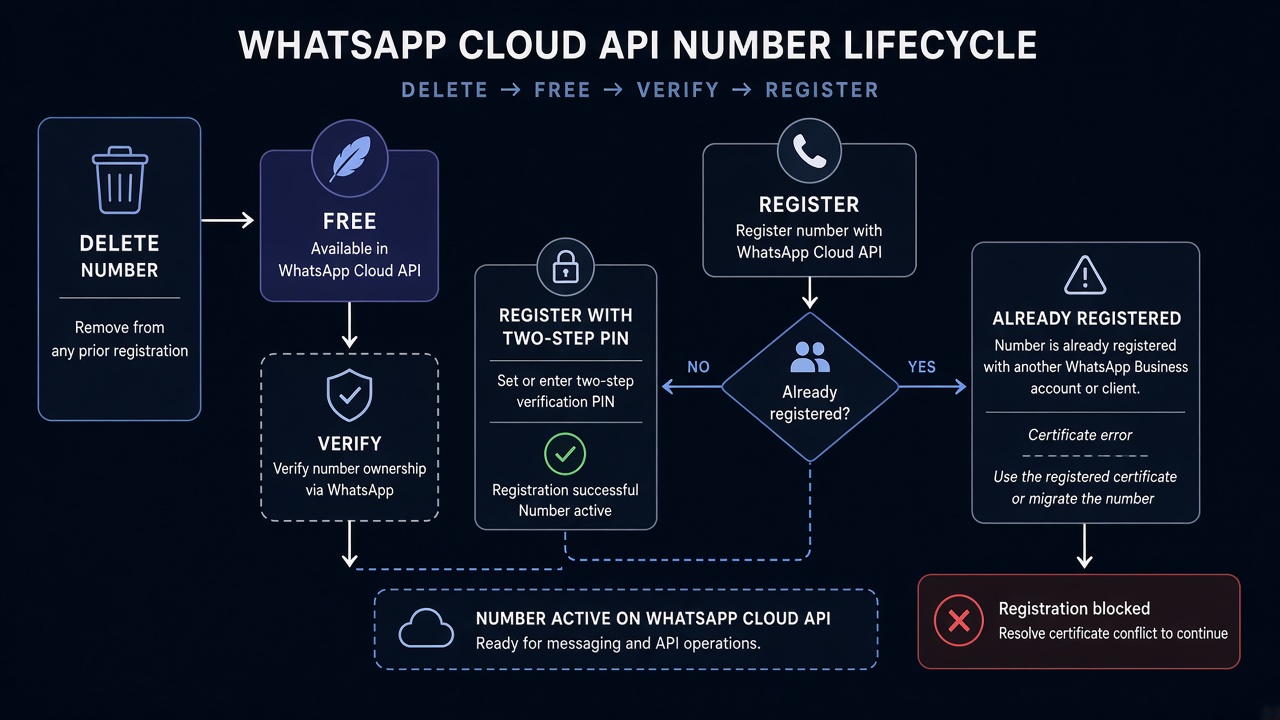
Cloud API requires a business phone number to be added to a WhatsApp Business Account, ownership-verified by SMS or voice, then registered via POST /{PHONE_NUMBER_ID}/register with messaging_product: whatsapp and a six-digit two-step verification pin. Registered Cloud API numbers can still be used for ordinary calling and SMS, but they cannot remain active on WhatsApp Messenger in the classic exclusive model. Embedded Signup and phone-number docs surface variants such as already registered with the product, already exists in your list of phone numbers, or instructions to disconnect from a connected business platform and wait before retrying.
Teams migrating from the WhatsApp Business app, from an old On-Premises host, or between Solution Partners often misread the failure as Meta hates our WABA. It is usually occupancy: the MSISDN is still claimed somewhere else. Related setup context: WhatsApp App Review service when permissions are also blocked, and case studies.
WHAT failed
Registration or Embedded Signup could not claim the number because it is tied to WhatsApp consumer or Business app use, another host, or a PIN/certificate mismatch.
WHY it matters
Cloud API messaging identity is exclusive in the standard model. Partial deletes and wrong PINs leave the number in a half-migrated state that retries cannot brute-force.
WHAT they expected
Number free of conflicting WhatsApp registration, verified on the WABA, then register with the correct two-step PIN.
Operator psychology: occupancy beats optimism
Support and platform systems assume one primary WhatsApp identity per number. If the handset still runs WhatsApp or WhatsApp Business with that SIM, Cloud API registration will refuse or instruct you to disconnect or deregister first. If the number sits on a partner WABA you no longer control, try again does nothing until migration or release completes. Certificate-era language from older On-Premises setups still appears in tribal knowledge; modern Cloud API registration centers on the register endpoint and PIN.
That is why deleting the WhatsApp mobile account, or disconnecting Business Platform links as Meta’s error text instructs, waiting the documented cool-off such as about 15 minutes in Embedded Signup guidance, then re-adding and registering is the real path.
Technical nuances that trip capable teams
Across hundreds of WhatsApp Cloud API onboardings, already-registered and certificate-adjacent failures cluster around:
- Number still on WhatsApp or WhatsApp Business app — the consumer session holds the MSISDN; Cloud API cannot exclusive-register it.
- Two-step verification PIN mismatch — register called with a wrong PIN, a 133005-class failure.
- Forgot PIN, skipped reset — change two-step verification through documented WhatsApp Manager or API flows first.
- Already on another WABA or BSP — needs deregister or partner migration, not a new random WABA.
/register succeeds.Official references:
- WhatsApp Cloud API — Business phone numbers
- Register a business phone number — PIN / two-step verification
- Embedded Signup flow errors — already registered / disconnect guidance
Retry / cooldown note (not App Review submit-button cooldown): This is usually not the Meta App Review “buttons locked for up to 7 days” pattern. Spamming register, OTP, or Embedded Signup after an occupancy failure triggers phone-level waits, PIN lockouts, and attempt caps. Clear the conflicting registration once, wait the documented interval, then register with the correct PIN — do not burn the number into a rate-limit hole.
Expert Diagnosis framework (not a DIY paste template)
Every SIM, BSP, and WABA topology is unique. There is no safe universal “delete WhatsApp and pray” checklist that fits coexistence, partner migration, and greenfield Cloud API alike. Specialists diagnose first:
Identify where the number is occupied
Consumer WhatsApp, WhatsApp Business app, prior Cloud API WABA, or Solution Partner host — the remediation differs for each.
Resolve occupancy with the matching Meta path
Disconnect / delete from mobile where required, or follow partner migration / deregister docs — then wait before retrying Embedded Signup or add-number.
Align two-step verification before /register
Use the existing six-digit PIN or set/change it through documented flows. Do not guess PINs in a tight loop.
Register once, then validate send/receive
Confirm WhatsApp Manager status and a test message path. Only then layer template or App Review work.
Managed help: WhatsApp App Review service, Facebook App Review service. Patterns: case studies. Related when review is also blocked: test credentials failures, rejection reasons hub.
Free 15-Minute Meta Rejection Audit
Share the exact Cloud API / Embedded Signup error text, whether the number is still on WhatsApp mobile, and whether two-step PIN is known. We will separate occupancy from PIN/register mistakes before another attempt loop.
Strategy second.
What not to do after this error
- Do not keep calling
/registerwith guessed PINs every few seconds. - Do not assume a certificate paste from an old On-Premises runbook fixes modern Cloud API occupancy.
- Do not delete the wrong WABA asset hoping the MSISDN frees without following migration docs.
- Do not treat this as an App Review essay problem while the number is still on the consumer app.
Free the number correctly. Verify. Register with the right PIN. Then proceed.
A whatsapp phone already registered error usually means the number is still occupied by the consumer WhatsApp app or another Cloud API / On-Premises registration—not that App Review failed. Clear mobile occupancy, confirm Business Manager ownership, then complete Cloud API register with the correct two-step verification PIN. Certificate and display-name mismatches are separate from occupancy; fix the matching failure mode before you retry. Blind retries burn time and can hit temporary registration locks, so diagnose first, then register once with clean state.
If WhatsApp Manager keeps returning already-registered after you deleted the phone from the wrong WABA, check Embedded Signup vs manual register paths and wait out any short retry window before the next attempt. A specialist audit is safer when multiple Business Managers claim the same number.
Why a whatsapp phone already registered loop is not an App Review cooldown
Teams often confuse a whatsapp phone already registered Cloud API failure with a Meta App Review seven-day cooldown. They are different systems. Phone registration locks and occupancy conflicts live in WhatsApp Manager and Embedded Signup. App Review cooldowns apply after permission rejections such as instagram_content_publish or login demo failures like a broken Facebook Login button. Treating registration errors like review cooldowns wastes days.
Before the next register attempt, confirm: (1) the number is removed from consumer WhatsApp, (2) no other WABA still lists it, (3) Business Manager ownership matches the app, and (4) the two-step verification PIN used at register is current. Certificate and display-name errors need their own fixes; retrying occupancy against a certificate mismatch will not clear a whatsapp phone already registered state. See Meta's official WhatsApp Cloud API getting-started guide for the supported registration path.
If you also need template categorization help after the number is live, see the companion guide on Facebook App Review services or start with a free 15-minute audit on WhatsApp.
Occupancy, certificate, and two-step PIN: separate the fixes
A whatsapp phone already registered message is an occupancy problem: Meta still associates the number with another WhatsApp account or WABA. A certificate or display-name mismatch is different; it concerns credentials or profile configuration and needs the documented Cloud API setup checks. Two-step verification adds a third layer: the current PIN protects the number and can block registration even after the old account is removed. Check each layer in order, record the WABA and business that owns the number, and make one clean registration attempt. This avoids repeated retries that create confusing cooldowns.
If the number is still occupied, resolve ownership first; if the certificate is rejected, replace or verify the certificate; if the PIN is unknown, use the approved recovery path.Need Us to Get Your Meta App 100% Approved?
Stop losing weeks to repeated rejections. With 500+ apps approved, we handle your entire submission from start to finish. You get 100% Approval or a 100% Refund — and for your complete safety, you can hire us directly through Upwork or Fiverr Escrow (or use the WhatsApp / Calendar buttons in the header & footer).
Chat on WhatsAppFAQ
What does WhatsApp Cloud API “phone number already registered” mean?
It means Meta still sees the MSISDN claimed by WhatsApp Messenger, the WhatsApp Business app, another Business API / Cloud API host, or an existing entry in your phone list — so a new exclusive Cloud API registration cannot complete until that occupancy is cleared or migrated.
Do I need to delete the number from WhatsApp mobile?
Often yes for exclusive Cloud API registration: if the number is active on WhatsApp or WhatsApp Business, Meta’s flows typically require disconnect/delete or the specific Business Platform disconnect path named in the error, then a short wait before retrying.
What is the two-step verification PIN used for?
Cloud API registration requires a six-digit PIN. If two-step verification is already enabled, you must supply that PIN; if not, the PIN you send becomes the number’s two-step PIN.
Is this the same as a 7-day App Review cooldown?
No. Phone already-registered failures are Cloud API lifecycle / Embedded Signup issues. Rapid retries can still force waits and attempt caps, but they are not the App Review submit-button cooldown used for permission packages.
Amandeep Singh — Meta API Expert
10+ years helping product teams through Meta App Review, Business Verification, and Advanced Access. 500+ apps guided; 10,000+ permissions handled across Facebook, Instagram, WhatsApp, and Marketing API surfaces. Focus: policy-aligned proof, not hype.
Still stuck on WhatsApp Cloud API phone number already registered? Get a focused read before the next register attempt.
Book Free 15-Minute Meta Rejection Audit on WhatsAppFor a WhatsApp phone already registered incident, record the exact error before retrying.
The WhatsApp phone already registered path differs from App Review permission work.
Document whether the WhatsApp phone already registered number is on a mobile account or partner WABA.
Specialists resolve WhatsApp phone already registered cases by matching occupancy, migration, and PIN state.
Resolve each WhatsApp phone already registered alert with an ownership check before changing credentials.
A precise WhatsApp phone already registered report should include the WABA, BSP, and current consumer account.
Do not confuse a WhatsApp phone already registered response with a temporary App Review decision.
For every WhatsApp phone already registered case, verify the number status in Business Manager.
Once the WhatsApp phone already registered blocker is removed, complete one controlled registration.
This WhatsApp phone already registered checklist helps prevent repeated certificate errors.
Start with a WhatsApp phone already registered check before deleting a business asset.
The right WhatsApp phone already registered fix depends on whether the number is active in WhatsApp Messenger.
Capture screenshots for the WhatsApp phone already registered support case and note the last successful attempt.
A WhatsApp phone already registered error can persist when the old provider still owns the number.
After migration, retest the WhatsApp phone already registered workflow with a clean session.
Keep the WhatsApp phone already registered troubleshooting notes separate from App Review notes.
Use one final WhatsApp phone already registered registration attempt after the cooldown.
Confirm messaging after the WhatsApp phone already registered error is resolved.