Your App's Facebook Login Button Is Broken: Expert Diagnosis
When Meta App Review returns Your app's Facebook Login Button is broken, reviewers found the control — then failed to complete sign-in. That is different from Unable to locate Facebook Login Button, where the button never surfaces. This article explains Meta’s Rejection Guide remediation, how SDK init and Valid OAuth Redirect URI mismatches show up as a “broken” button, how Developer Policies expect a correctly integrated Login experience, and why blind resubmits after a quick CSS tweak often burn a 7-day cooldown.
What this rejection actually means
Meta’s App Review Rejection Guide is explicit: submission reviewers use your testing instructions and screencast as a guide and attempt to sign into your app using the Facebook Login button. If they are able to locate the Facebook Login button but are unable to use it to log into your app for any reason, the submission is rejected with “Your app's Facebook Login Button is broken”.
Official remediation is equally concrete: complete development; create a Test User and verify you can locate and log in with the Facebook Login button; update the screencast so it clearly shows that path; update App Verification Details with instructions for locating the button; then resubmit with the updated screencast, verification details, and Test User email and password.
In other words, visibility is not enough. The OAuth dialog must open, complete, and return the reviewer into a working authenticated session — the same end-to-end path your screencast claims.
WHAT failed
Reviewers found Facebook Login, clicked it, and still could not complete login into your app for any reason Meta records under this label.
WHY it matters
Without a working Login path, Meta cannot verify permissions, features, or use cases that depend on an authenticated session.
WHAT they expected
A finished Login: button → consent → successful return into the app, recreatable with your Test User and instructions.
Reviewer psychology: found it, still failed
App Review is not a debugging partnership. Once reviewers see a Login control that errors, hangs, loops, or dumps them on a blank callback page, the submission fails — even if your engineering team can reproduce success on a VPN, a different domain, or an admin-role account.
That is why “it works on my machine” notes rarely help. Reviewers follow your App Verification Details and screencast under cold conditions. Ambiguity defaults to broken. If your notes say “click Continue with Facebook on the hero,” but that click opens a misconfigured OAuth dialog, Meta still records a broken Login button — not a configuration nuance.
Related failures often co-travel: test credentials do not work, app not loading during testing, and unable to verify permissions when Login never finishes.
Technical nuances: SDK init, redirect URIs, and quality Login
Across hundreds of Meta apps, the same technical gaps appear under this rejection label even when the UI button looks fine:
- JavaScript SDK never initializes — missing or late
FB.init, wrong App ID, blockedconnect.facebook.net, or XFBML markup added after init without a re-parse so the button appears but cannot start a real Login dialog. - Valid OAuth Redirect URI mismatch — callback host, path, or scheme not allowlisted under Facebook Login settings; reviewers land on Facebook’s error page or a dead redirect after consent.
- Client OAuth / Web OAuth settings misaligned — Client OAuth Login or Web OAuth Login disabled while the product still uses a web dialog; or embedded-browser settings that conflict with how your surface actually authenticates.
- Domain and platform config gaps — App Domains, Site URL, iOS bundle ID, Android key hashes, or package name out of sync with the build reviewers install.
- Popup blockers and broken return handling — dialog opens then never posts a token back; SPA route ignores the response; session cookie never sticks for the Test User path.
- Role-only success — Login works for admins/developers but fails for a standard Test User in Development Mode, which is exactly how reviewers authenticate.
Meta’s Developer Policies under Encourage proper use require developers to verify that Login is integrated correctly and that the app should not crash or freeze during testing. Under Build a trustworthy product, apps must follow instructions in the Developer Docs, including allowed usage for Platform. A Login control that cannot complete authentication fails that quality bar before permission nuance is even judged.
Official references worth reading before another submit:
- Meta App Review Rejection Guide — “Your app's Facebook Login Button is broken”
- Facebook Login Best Practices
- Meta Developer Policies — Encourage proper use (correct Login integration) and Build a trustworthy product
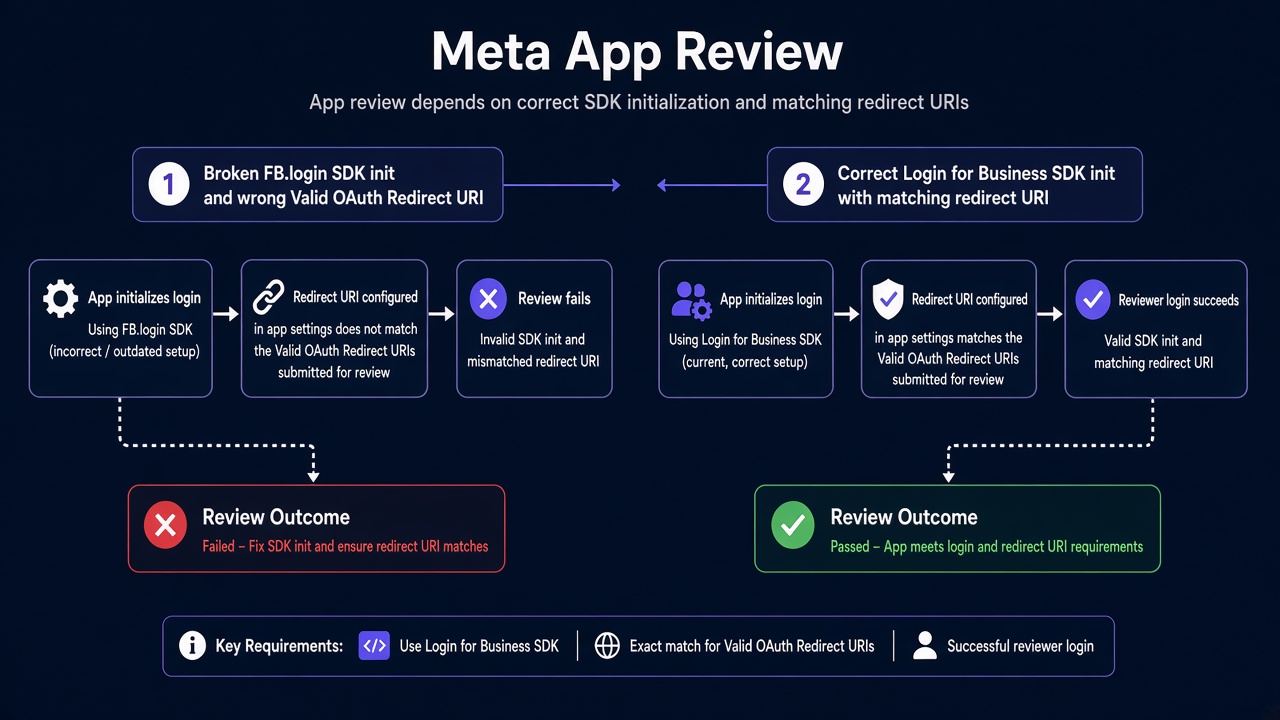
Blind resubmission risk: Practitioner experience across hundreds of apps shows that rapid resubmits — same App ID, same redirect allowlist gap, same SDK init race — frequently trigger automated submission cooldowns. Those locks can disable review buttons for up to 7 days.
Expert Diagnosis framework (not a DIY paste template)
Every stack’s Login failure mode is unique: SPA callback routing, native SDK versions, multi-tenant domains, or Business-owned Test Users. A full copy-paste “OAuth snippet” would either be wrong for your product or dangerously generic. Specialists diagnose first:
Reproduce as a cold Test User
Walk the exact App Verification Details path from a clean session — not an admin browser profile — and capture where the dialog fails.
Separate SDK/config failures from product bugs
Redirect URI errors, disabled Client OAuth, and init races need Dashboard/SDK fixes; crash-on-callback needs app code. Mixing them burns cycles.
Align screencast and instructions to the working path
Only after Login succeeds end-to-end, recapture the video and rewrite locate-and-sign-in steps so a stranger can repeat them.
Resubmit once with intact evidence
One coherent package beats three frantic “we moved the button” retries. Cooldowns punish volume; reviewers reward a working Login.
If reviewers cannot find the button at all, see Unable to locate Facebook Login Button. If Login opens inside a custom webview, see Facebook Login embedded in a custom webview. Managed help: Facebook App Review service and case studies. Also related: Unable to Verify Use Case, Inadequate Demonstration, and final UX readiness.
Free 15-Minute Meta Rejection Audit
Share your rejection note, platform (Web / iOS / Android), and whether the dialog opens at all. We will tell you whether this looks like an SDK init issue, redirect URI mismatch, Test User role gap, or a product callback bug — before you burn another review cycle.
Strategy second.
What not to do after this rejection
- Do not resubmit after only restyling the button while OAuth still fails for a Test User.
- Do not test exclusively as an app admin and assume reviewers will see the same success path.
- Do not paste a forum redirect URI without verifying host, path, and HTTPS scheme against your live callback.
- Do not treat a successful screencast filmed weeks ago as proof if the Dashboard settings changed since.
Finish Login for a cold Test User. Prove it in instructions and video. Then submit once. Anything else gambles with cooldown risk.
Need Us to Get Your Meta App 100% Approved?
Stop losing weeks to repeated rejections. With 500+ apps approved, we handle your entire submission from start to finish. You get 100% Approval or a 100% Refund — and for your complete safety, you can hire us directly through Upwork or Fiverr Escrow (or use the WhatsApp / Calendar buttons in the header & footer).
Chat on WhatsAppFAQ
How is “Login Button is broken” different from “Unable to locate Facebook Login Button”?
Locate failures mean reviewers never found the control. Broken means they found it but could not complete login for any reason. Fixes differ: discoverability versus end-to-end OAuth success.
Can a Valid OAuth Redirect URI mismatch alone trigger this rejection?
Yes in practice. If consent succeeds but the return URL is not allowlisted, reviewers cannot finish signing into your app — which Meta’s Rejection Guide covers under a broken Login button.
Will swapping the App ID and resubmitting the same day help?
Usually not. Rapid retries without fixing the underlying Login path frequently trigger automated cooldowns that can lock review controls for up to 7 days.
Should every team hire a specialist for a broken Login button?
Not always — simple SDK init or redirect allowlist gaps are sometimes in-house fixes. When multi-platform SDKs, SPA callbacks, and Test User roles interact, a specialist diagnosis is usually safer than another blind cycle.
Amandeep Singh — Meta API Expert
10+ years helping product teams through Meta App Review, Business Verification, and Advanced Access. 500+ apps guided; 10,000+ permissions handled across Facebook, Instagram, WhatsApp, and Marketing API surfaces. Focus: policy-aligned proof, not hype.
Still stuck on Your app's Facebook Login Button is broken? Get a focused read on your rejection before the next submit.
Book Free 15-Minute Meta Rejection Audit on WhatsApp