Your App Does Not Accurately Reflect the Final User Experience: Expert Diagnosis
When Meta App Review returns Your app does not accurately reflect the final user experience, reviewers judged the product unfinished — not merely under-documented. App Review is for apps ready to switch to Live Mode. Placeholder UI, unfinished flows, and “demo only” shells fail that bar.
This article covers Meta’s Rejection Guide, Development Mode versus Live Mode readiness, how this differs from app not loading during testing, Inadequate Demonstration, Unable to Verify Use Case, unable to verify permissions, and test credentials do not work, and why polishing copy while the product still looks like a WIP often burns a 7-day cooldown. A clear diagnosis starts by asking why the app does not accurately reflect the final user experience and what a reviewer can actually complete.
Why Your App Does Not Accurately Reflect the Final User Experience
Meta’s App Review Rejection Guide is explicit: App Review should only be requested for apps ready to be switched to Live Mode. Submission reviewers reject any submission with “Your app does not accurately reflect the final user experience” for any app still under development.
Official remediation is short and firm: complete all development and verify that your app is ready to be switched to Live Mode before resubmitting. This is not a request for a prettier screencast alone — it is a readiness gate on the product reviewers actually touch. When an app does not accurately reflect the final user experience, the fix is product readiness—not cosmetic notes.
If the app is already Live and you are adding new functionality, Meta’s guidance is different: do not flip the live app back to Development Mode. Create a Test App from the live app for development and testing, then follow Meta’s App Review for Live Apps path.
WHAT failed
Reviewers concluded the experience under test still looked incomplete — placeholder UI, unfinished flows, or a product not ready for Live Mode. If a product does not accurately reflect the final user experience, that conclusion is predictable.
WHY it matters
Meta will not grant Advanced Access against a half-built surface when the app does not accurately reflect the final user experience. Permission review assumes the end-user experience is shippable. An app that does not accurately reflect the final user experience is not ready for that review.
WHAT they expected
A coherent final UX: real screens, working permission paths, no “coming soon” shells — ready to go Live (or a proper Test App path if already Live).
Use this rejection as a product signal: if your app does not accurately reflect the final user experience, reviewers will see the gap in the first flow they test.
Reviewer psychology: Live-ready or reject
App Review is not a design critique salon. If an app does not accurately reflect the final user experience, reviewers focus on the gap they can test. Reviewers will not approve “the real UI ships next sprint.” Lorem ipsum dashboards, broken navigation, feature flags that hide the submitted permission path, and staging banners that scream incomplete all signal the same thing: this is not the final user experience.
That is why a polished use-case essay can still fail — the live product looked unfinished. If the app does not accurately reflect the final user experience, ambiguity defaults to rejection. Asking reviewers to “imagine production chrome” in notes is fragile; Meta’s remediation centers on completing development first.
Technical nuances: Development Mode, Live Mode, and placeholder UI
Across hundreds of Meta apps, the same readiness failure modes appear under this label. The does not accurately reflect finding usually points to one of these concrete gaps:
- Development Mode product still mid-build — teams submit for Advanced Access while core screens, auth, or permission-consuming features are unfinished. Meta expects Live Mode readiness before review.
- Placeholder and prototype UI — wireframe leftovers, “TODO” buttons, empty states that never resolve, mock charts, or demo data that never maps to a real permission flow.
- Feature-flagged paths reviewers cannot see — production code exists, but the review build still hides the submitted feature behind an internal flag.
- Screencast ahead of product — video shows a finished flow; the live URL or APK still shows scaffolding. That mismatch often co-travels with Inadequate Demonstration or use-case verification failures.
Official remediation: finish development; confirm Live Mode readiness (or use a Test App when already Live); then resubmit. Do not treat this as a notes-only fix.
Policy grounding: trustworthy, expected experiences
Under Meta Developer Policies section 1. Build a trustworthy product, apps should provide the experience users would reasonably expect — without confusing or surprising people who use them. A product that still reads as under construction fails that trust bar before permission nuance is even evaluated.
Meta’s App Review submission guidance reinforces the same gate: only submit when you have completed app development and the app is ready for end users. If the app appears incomplete or still changing, the submission will be rejected. Final UX readiness is a policy-aligned prerequisite, not a cosmetic preference. A product that does not accurately reflect the final user experience cannot yet meet that trust bar.
Official references worth reading before you ship another “demo polish” pass:
- Meta App Review Rejection Guide — “Your app does not accurately reflect the final user experience”
- Meta Developer Policies — Build a trustworthy product
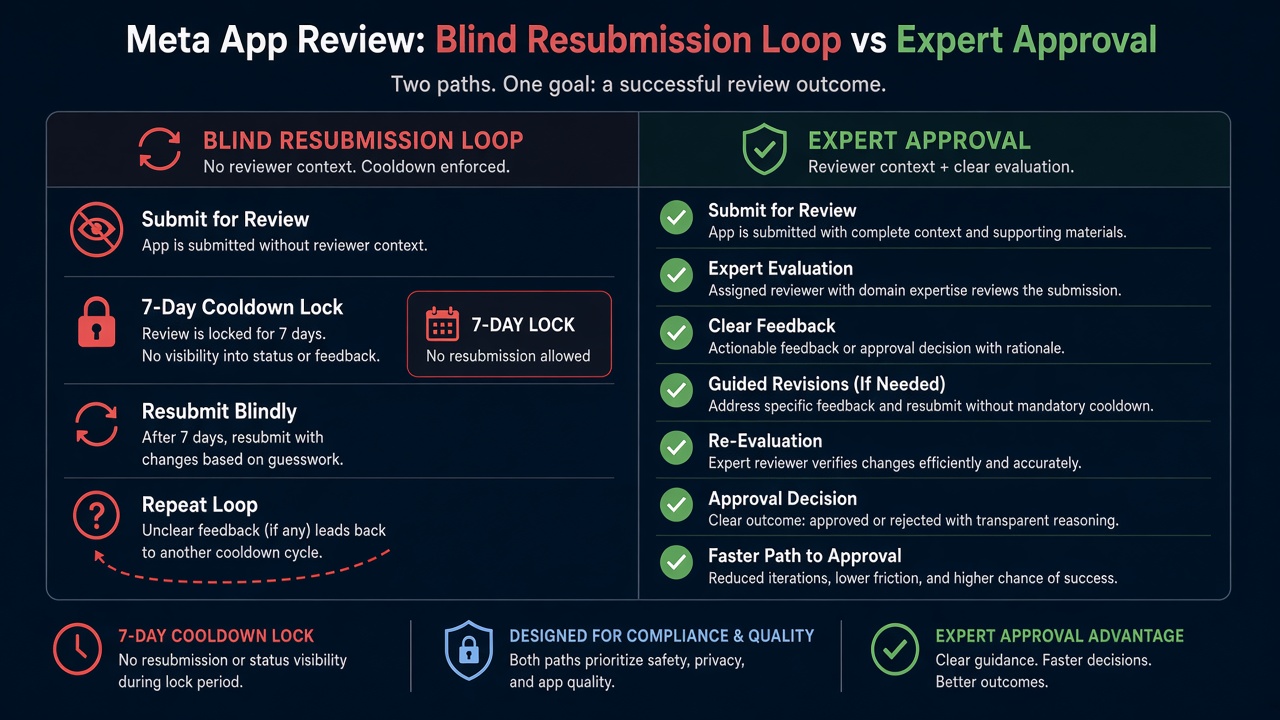
Blind resubmission risk: Practitioner experience across hundreds of apps shows that rapid resubmits — same placeholder dashboard, same unfinished permission path, same Development Mode WIP — frequently trigger automated submission cooldowns. Those locks can disable review buttons for up to 7 days. Meta adjusts thresholds over time, but the pattern is stable: volume without Live Mode readiness wastes calendar time while the final-UX failure remains. If your app does not accurately reflect the final user experience, another resubmit only repeats the same risk.
Expert Diagnosis framework (not a DIY paste template)
Every product’s readiness gap is unique: real UI replacing wireframes, a finished permission-consuming screen, or a Test App workflow instead of a mode flip. A full copy-paste “mark as complete” checklist would mislead your team or encourage cosmetic theater. Specialists diagnose first: determine exactly why the app does not accurately reflect the final user experience before changing the submission.
Separate incomplete product from incomplete notes
If reviewers saw placeholders, broken nav, or missing feature surfaces, this is a build-completion problem — not a paragraph rewrite in App Verification Details. That is the practical meaning of does not accurately reflect here.
Map Development Mode vs Live Mode correctly
New apps: finish development until Live Mode ready. Already Live apps adding features: create a Test App — do not yank the live app back to Development Mode.
Align screencast and live surface to the same final UX
Remove feature flags that hide the submitted path. Retire lorem and demo shells. Confirm a cold Test User can walk the real end-user experience.
Resubmit once when the product is actually shippable
One coherent Live-ready package beats three frantic “we polished the banner” retries. Cooldowns punish volume.
If the product is complete but the video is weak, see Inadequate Demonstration. If reviewers cannot load the app at all, see app not loading during testing. Managed help: Facebook App Review service and case studies.
Free 15-Minute Meta Rejection Audit
Share your rejection note plus whether the app is still in Development Mode or already Live. We will tell you whether this looks like placeholder UI, unfinished permission surfaces, a wrong Live/Test App workflow, or a notes-vs-product mismatch — before you burn another review cycle.
Strategy second.
What not to do after this rejection
- Do not resubmit with the same “Coming soon” screens and hope better notes will override what reviewers see.
- Do not flip an already Live app back to Development Mode just to iterate — use a Test App instead.
- Do not hide the submitted feature behind an internal flag the reviewer cannot enable.
- Do not treat a polished screencast as a substitute for a finished live UX.
Finish the product. Align it to Live Mode readiness. Match the screencast to that final experience. Then submit once. Anything else gambles with cooldown risk.
Need Us to Get Your Meta App 100% Approved?
Stop losing weeks to repeated rejections. With 500+ apps approved, we handle your entire submission from start to finish. You get 100% Approval or a 100% Refund — and for your complete safety, you can hire us directly through Upwork or Fiverr Escrow (or use the WhatsApp / Calendar buttons in the header & footer).
Chat on WhatsAppFAQ
Does this mean we must switch to Live Mode before submitting?
Meta’s Rejection Guide says App Review should only be requested for apps ready to be switched to Live Mode, and to complete development and verify Live Mode readiness before resubmitting. Readiness is required; blindly flipping Live without a finished UX still fails.
Our app is already Live — how do we add new features safely?
Do not switch the live app to Development Mode. Meta’s guide: create a Test App from your live app for developing and testing, and follow App Review for Live Apps. That keeps production stable while you prove new permission paths.
Is placeholder UI enough to trigger this rejection?
Yes. Reviewers reject apps that still look under development — wireframes, unfinished flows, demo shells, and incomplete permission-consuming screens all signal that the submission does not reflect the final user experience.
Can repeated “final user experience” retries lock App Review?
Yes. Rapid resubmissions with still-incomplete or placeholder UX frequently trigger automated cooldowns that can lock review submission controls for up to 7 days. Thresholds change; the delay cost is real.
Amandeep Singh — Meta API Expert
10+ years helping product teams through Meta App Review, Business Verification, and Advanced Access. 500+ apps guided; 10,000+ permissions handled across Facebook, Instagram, WhatsApp, and Marketing API surfaces. Focus: policy-aligned proof, not hype.
Still stuck on your app does not accurately reflect final user experience? Get a focused read on Development vs Live readiness before the next submit.
Book Free 15-Minute Meta Rejection Audit on WhatsApp