Meta Platform Policy 8.9 Violation Explained: Expert Diagnosis
When Meta App Review returns Your app violates Platform Policy 8.9, the rejection is about data minimalism and user value — not about whether your OAuth dialog technically appears. Meta’s App Review Rejection Guide states that submissions for apps that request an app user’s data without using that data to meaningfully improve the quality of the app user’s experience violate section 8.9 of Platform Policy and will be rejected with that exact wording. This article explains what reviewers look for, how 8.9 relates to “just in case” permission stacking, and why blind resubmits without removing unused scopes often trigger cooldowns.
Policy 8.9 violation: what this rejection actually means
A policy 8.9 violation requires clear user value. Official Rejection Guide remediation is blunt:
- Redesign your app so that it uses requested data in a way that meaningfully improves the app user’s experience, or
- Stop requesting that data from app users and remove any permission or features that provide access to this data from your submission — then resubmit.
In practitioner language, a policy 8.9 violation reflects the minimum-permissions principle: if Meta cannot see a clear, demonstrated user benefit for each permission inside the app, that permission is rejected. Requesting scopes “just in case,” for planned future features, for internal analytics with no user-facing value, or for data you only store is a consistent failure pattern.
WHAT failed
One or more permissions/features request user data that is not used to meaningfully improve the quality of the user’s experience in the live product.
WHY it matters
Platform Data access is earned by user value. Unused scopes expand breach and misuse surface without helping the person who clicked Allow.
WHAT they expected
Each requested permission powers a visible, beneficial workflow the reviewer can complete — or the permission is removed from the submission entirely.
Reviewer psychology: every scope needs a job
Reviewers do not approve aspiration. They approve demonstrated benefit. If your screencast shows Login and a homepage, but notes request pages_read_engagement, instagram_manage_comments, and ads_read “for the roadmap,” Policy 8.9 is the natural outcome — even when credentials work and the app loads.
That psychology differs from pure recreateability failures (Unable to Verify Permissions) where the feature might exist but is unreachable. Under 8.9, reviewers may reach the app and still reject because the data path does not improve the user’s experience in a meaningful way. It also differs from Disallowed Use Case Details, which focuses on purpose outside allowed usage; 8.9 focuses on unused or low-value data requests. Real submissions often show both labels across successive retries.
Login and UX neighbors matter too: a broken or incomplete product (final UX, app not loading) makes “meaningful improvement” impossible to prove.
Technical nuances that trip capable teams
Across hundreds of Meta apps, Policy 8.9 failures cluster around:
- Permission bundling — copying a competitor’s full Advanced Access list into one submission.
- Backend-only consumption — tokens used in ETL jobs with no user-visible benefit in the tested experience.
- Admin convenience vs. user value — scopes that help your support team but never improve the end user’s product quality.
- Decorative dashboards — charts that display data without enabling a decision, action, or workflow the user cares about.
- Leftover scopes after pivots — messaging APIs still requested after the product became a scheduler-only tool.
- Screencast that skips the value moment — consent shown, data never applied on screen (overlaps Inadequate Demonstration).
Minimum permissions also intersect with Tech Provider and multi-tenant products. If your customers each connect their own Pages or Instagram Professional accounts, reviewers still need to see why the end user benefits from each scope — not only why your ops team prefers a wider token. A permission that only exists to power an internal admin console, a dormant “Phase 2” module, or a nightly warehouse sync without a user-facing workflow is a Policy 8.9 candidate even when Business Verification is complete. The Rejection Guide’s fork is intentional: either the data meaningfully improves the experience, or it leaves the submission. There is no third path of “keep the scope and explain harder.”
Official references:
- Meta App Review Rejection Guide — “Your app violates Platform Policy 8.9”
- Meta Developer Policies — Build a trustworthy product; follow allowed usage in Developer Docs
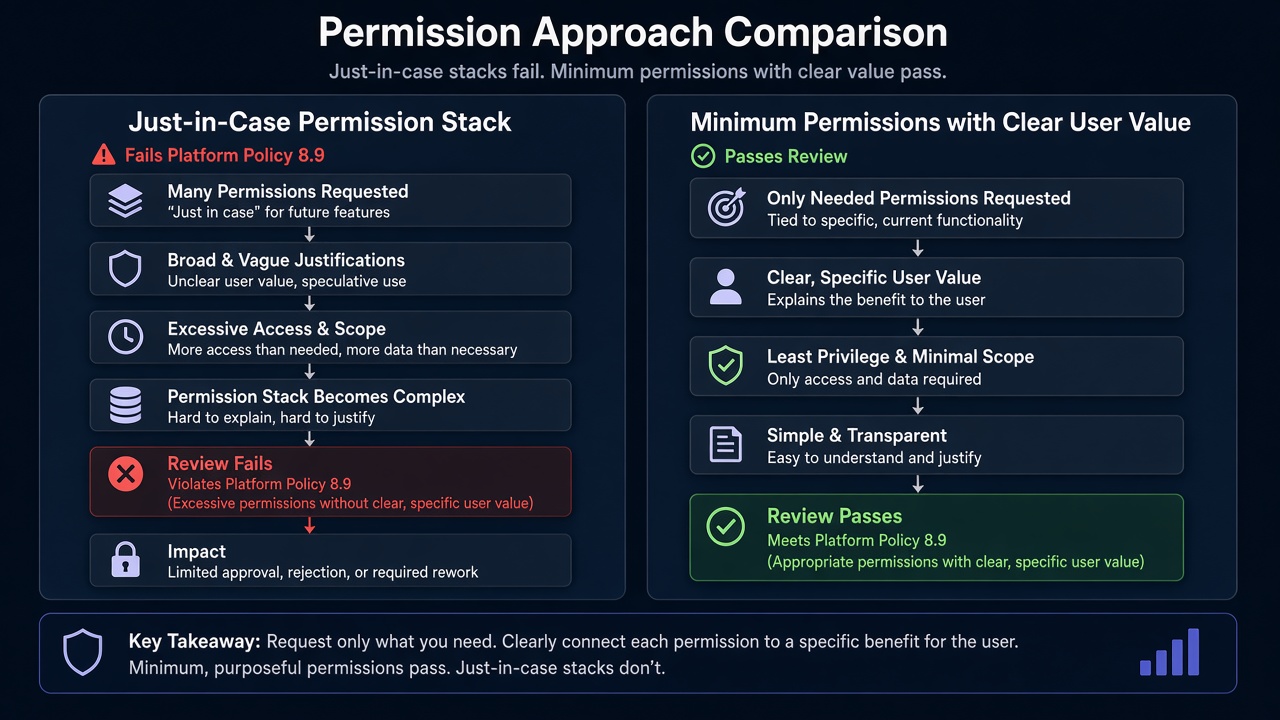
Blind resubmission risk: Practitioner experience across hundreds of apps shows that teams often resubmit the same permission set after adding a paragraph that claims “we use all data to improve UX” — without changing the product. Meta’s guide requires redesign or removal. Rapid retries of an unchanged stack frequently trigger automated submission cooldowns that can disable review buttons for up to 7 days. Cut unused scopes before you rewrite marketing language.
Expert Diagnosis framework (not a DIY paste template)
Every product’s “meaningful improvement” looks different: inbox triage for agencies is not the same as creative approvals for brands. There is no universal widget template that satisfies 8.9. Specialists diagnose first:
Inventory scopes vs. user-visible outcomes
For each permission, write the single user action it enables on screen. If you cannot, it is a removal candidate.
Cut first, then prove
Remove speculative scopes from the submission. Rebuild screencast and notes only for what remains and actually improves UX.
Make the benefit undeniable in the walkthrough
Reviewers should see data arrive and immediately power a clearer, faster, or safer user workflow — not a hidden API call.
Resubmit once with a minimum set
A smaller, honest package outperforms a maximalist retry loop that invites cooldowns and deeper scrutiny.
Managed path: Facebook App Review service. Evidence patterns: case studies. Compare: Unable to Approve Permission Request, Developer Policy 1.7.
Free 15-Minute Meta Rejection Audit
Share your rejection note and the list of permissions still in the submission. We will mark which look like 8.9 unused-data risk versus recreateability gaps — before another cooldown cycle.
Strategy second.
What not to do after this rejection
- Do not keep unused permissions and only rewrite the “user benefit” paragraph.
- Do not add more scopes to “look enterprise” after an 8.9 denial.
- Do not hide data use entirely in backend jobs with no reviewer-visible outcome.
- Do not confuse 8.9 with a pure Test Credentials failure — working login does not prove meaningful use.
When you do cut scopes, update privacy policy language and any Advanced Access checklists so they no longer claim data you stopped requesting. Inconsistency between the live permission set and public disclosures creates a new trust gap on the next review — even if the 8.9 surface itself is gone.
Use the data to improve the user’s experience, or stop requesting it. Then submit once.
Need Us to Get Your Meta App 100% Approved?
Stop losing weeks to repeated rejections. With 500+ apps approved, we handle your entire submission from start to finish. You get 100% Approval or a 100% Refund — and for your complete safety, you can hire us directly through Upwork or Fiverr Escrow (or use the WhatsApp / Calendar buttons in the header & footer).
Chat on WhatsAppFAQ
What does Meta’s Rejection Guide say about Platform Policy 8.9?
Submissions that request an app user’s data without using that data to meaningfully improve the quality of the app user’s experience violate section 8.9 and are rejected with “Your app violates Platform Policy 8.9.” Remediation is redesign so the data improves UX — or stop requesting it and remove those permissions/features from the submission.
Is requesting a permission “for later” enough to fail 8.9?
Often yes. If reviewers cannot see an active, user-visible benefit today, the permission looks like data collection without meaningful improvement — a classic 8.9 pattern.
How is 8.9 different from Disallowed Use Case Details?
Disallowed Use Case Details emphasizes purpose outside allowed usage or misuse risk. Policy 8.9 emphasizes requesting data you do not use to improve the user experience. Many apps fail both when they request broad scopes for thin UI.
Can I keep the permission if I add a one-line dashboard widget?
Only if the widget honestly uses the data to improve a real user workflow. Decorative tiles that never help the user still fail the “meaningfully improve” standard. Unique products need diagnosis, not a paste template.
Amandeep Singh — Meta API Expert
10+ years helping product teams through Meta App Review, Business Verification, and Advanced Access. 500+ apps guided; 10,000+ permissions handled across Facebook, Instagram, WhatsApp, and Marketing API surfaces. Focus: policy-aligned proof, not hype.
Still stuck on Platform Policy 8.9? Get a focused read on your rejection before the next submit.
Book Free 15-Minute Meta Rejection Audit on WhatsApp