pages_messaging App Review Rejection: Expert Diagnosis
If your pages_messaging app review was denied, Meta usually could not recreate a clear, allowed Page messaging experience matching your use case, screencast, and live app — not that Messenger is broken. This guide diagnoses pages_messaging failures against Meta’s Permissions Reference (updated Sep 14, 2026), reviewer psychology, recurring demo gaps, and cooldown risk from blind resubmits.
What this permission is (official framing)
Per Meta’s Permissions Reference, pages_messaging lets your app manage and access Page conversations and calling in Messenger. Official allowed usage covers interactive experiences initiated by a user, confirming customer interactions such as purchases, orders, and bookings, sending customer support messages, and handling inbound and outbound calls between businesses and customers. In plain terms, it is the Advanced Access gate between a Page inbox / calling surface and your products conversation UI, webhooks, and send APIs.
For a pages_messaging app review rejection, use this expert fix before you resubmit.
Without Advanced Access approval, you stay limited to roles, development, or incomplete live paths — which is why inbox products stall at App Review even when internal testing works for admins.” Official dependencies are pages_manage_metadata and pages_show_list. Those are not filler scopes; Meta lists them as required companions for this permission.
WHAT failed
Reviewers could not verify a recreateable Page messaging or calling path that proves why Advanced Access to pages_messaging is required.
WHY it matters
Messaging and calling touch private user conversations. Weak proof reads like unverified access to inbox data.
WHAT they expected
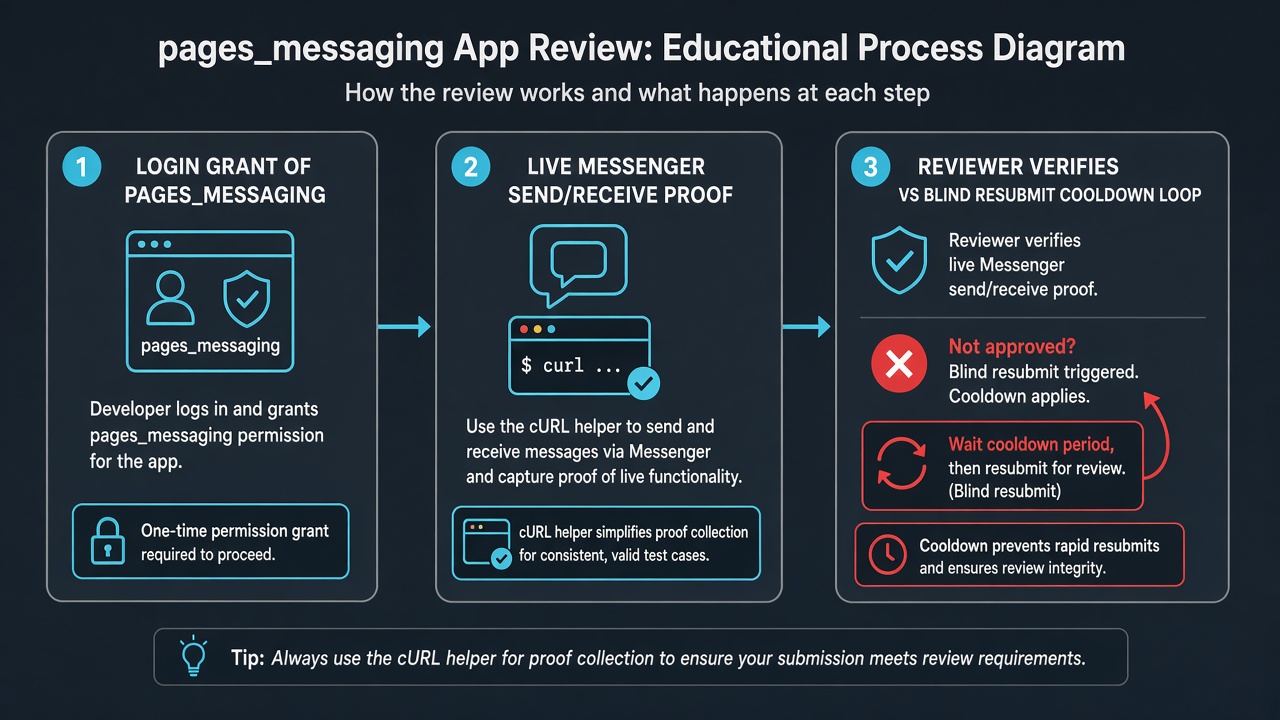
Facebook Login grant → then inbound/outbound calls or send message with Messenger client delivery proof (recording, not screenshots only).
Allowed usage + what Meta wants in App Review
Stay inside Meta’s allowed usage when you write notes: user-initiated interactive experiences, support messages, booking/purchase confirmations, and business–customer calling. Stretching the permission toward cold spam, scraping, or unsolicited blasts is a policy problem, not a better screencast problem.
For App Review submission and screencast, Meta’s own table asks you to demonstrate the complete Facebook Login process showing how the user grants this permission, then demonstrate one of: receipt of inbound calls from customers; outbound calls to customers; or your app sending a message to a Messenger user with the Messenger inbox client (web or mobile) receiving and displaying it. Meta also expects you to generate a cURL request you can integrate into your app (you may use the API Integration Helper under App Dashboard Messenger). Critically, it must be a recording of the message being sent from the app to the user not screenshots of messages already sitting in the Messenger client.
Why Meta rejects pages_messaging
Most rejections cluster into patterns grounded in that official proof bar:
- Use case vs product mismatch — notes describe support automation; live UI never shows a Page conversation or call being handled.
- Screenshot theater still images of an inbox while Meta explicitly requires a recording of send/delivery (or a call flow).
- Missing Page connection proof OAuth completes, but no Page appears, wrong roles, or the reviewer cannot grant Page access with the credentials you supplied (
pages_show_listpath invisible). - Dependency unused you request
pages_manage_metadata(webhooks/settings) but never show subscribe/update settings, or you omit it while your product only works with webhooks. - Policy-sensitive flows — aggressive outbound messaging, unclear opt-in, or behavior that looks like cold outreach rather than user-initiated conversation handling.
Banner text may land as unable to verify the permission(s) requested,” inadequate demonstration, or unable to approve permission request.” The label varies; the underlying failure is recreateability plus allowed usage. See also Unable to Verify Permissions and Inadequate Demonstration in the rejection series.
What reviewers look for (psychology)
App Review is not a sales pitch. A stranger with limited time must follow your instructions and see the permission do real work. They are auditors, not co-founders. If the screencast shows a reply from a Page inbox inside your product, but the live credentials never reach a connected Page, the video does not count. If notes claim omnichannel support” but the only clickable path is a marketing dashboard, ambiguity becomes rejection.
Reviewers also weigh honesty of scope. Asking for messaging just in case while the product only needs Page insights or publishing creates distrust. Narrow, visible messaging or calling proof beats a long feature warehouse essay. Related Page permission patterns are covered in Facebook Page API permissions App Review.
If the same product also automates Instagram DMs, diagnose that scope separately in the instagram_manage_messages App Review guide — Messenger proof does not substitute for Instagram inbox proof. White-label bot stacks that bundle Messenger with WhatsApp or multi-channel modules are covered in the BotSailor app review guide rather than in this pages_messaging-only diagnosis.
Related permissions: pages_manage_metadata + pages_show_list
Meta lists pages_manage_metadata and pages_show_list as official dependencies of pages_messaging. pages_manage_metadata is for subscribing to Page webhooks and updating Page settings — the plumbing most messaging products need. pages_show_list is how the app shows and verifies Pages the person manages.
In diagnosis terms, treat dependencies as part of the same story, not as random add-ons. If your product subscribes webhooks or manages Page messaging settings, the submission package should make that relationship obvious — not as a DIY script, but as coherent purpose. If you do not truly need metadata management, dropping unused scopes often strengthens pages_messaging more than adding paragraphs. Bundling a dependency you never demonstrate is a frequent silent killer: reviewers grant nothing when any linked permission path is unverifiable.
Common demo gaps (not a secret sauce checklist)
Teams that ship solid messaging products still fail App Review when the demo package has gaps like:
These are diagnosis categories, not a pasteable approval recipe. Token models, Page ownership, and inbox UX differ copying someone elses screencast usually creates a new mismatch Meta will catch.
pages_messaging vs adjacent rejection labels
Developers often search only for the exact banner text and miss that pages_messaging failures travel under several Meta labels. Inadequate demonstration usually means messaging or calling was not shown clearly. Unable to verify permissions usually means the reviewer never saw the permission’s effect. Unable to approve permission request often means Login, Page roles, or credentials blocked the test. Map your banner to missing evidence — not marketing adjectives.
7-day cooldown risk: Blind resubmits rewriting the essay, swapping one screenshot, or “trying again tomorrow without fixing recreateability frequently fail again. Rapid retries can trigger automated App Review submission cooldowns that lock controls for up to about 7 days. That pause does not fix a broken Page messaging path; it only delays the next honest attempt.
When a specialist audit helps
A specialist audit helps after one or two rejections when engineers insist the API works but you still cannot see what a cold reviewer would miss. The value is mapping rejection language to evidence gaps Page grant, inbox or call surface, official dependency proof, use-case honesty — then deciding whether to narrow scopes or rebuild the proof package.
It is not useful if you only want a guaranteed approval script or one-size recording template. Those rarely survive unique product flows and can increase cooldown risk.
Need Us to Get Your Meta App 100% Approved?
Stop losing weeks to repeated rejections. With 500+ apps approved, we handle your entire submission from start to finish. You get 100% Approval or a 100% Refund — and for your complete safety, you can hire us directly through Upwork or Fiverr Escrow (or use the WhatsApp / Calendar buttons in the header & footer).
Chat on WhatsAppFAQ
What is pages_messaging used for in App Review?
Per Meta, it manages and accesses Page conversations and calling in Messenger. Allowed usage includes user-initiated interactive experiences, support messages, booking/purchase confirmations, and inbound/outbound calls. Reviewers expect Login grant plus message delivery or call proof.
Why was pages_messaging rejected if my bot works for admins?
Admin/dev role success is not Advanced Access proof. Reviewers need Test User or external instructions that reach a Page connection and a visible messaging or calling action without insider shortcuts ideally a recording of send, not screenshots only.
Do I always need pages_manage_metadata with pages_messaging?
Meta lists pages_manage_metadata and pages_show_list as official dependencies. If your product truly manages Page messaging metadata or webhook subscriptions, show that relationship. Unused helper scopes without a visible purpose can weaken the whole submission.
Can blind pages_messaging resubmits cause a cooldown?
Yes. Essay-only or cosmetic changes that leave the Page messaging path unverifiable often fail again and can contribute to multi-day App Review submission locks.
Official reference: Meta Permissions Reference.
10+ years helping product and agency teams through Meta App Review, Advanced Access, and Business Verification. 500+ apps guided and 10,000+ permissions handled across Facebook, Instagram, WhatsApp, Ads, and Threads surfaces. Focus: policy-aligned diagnosis — not generic resubmit templates.
Free 15-Minute Meta Permission Audit
Share your pages_messaging rejection note, whether pages_manage_metadata / pages_show_list were bundled, and a still from your screencast showing Page connect or Messenger delivery. We will separate evidence gaps from scope bloat before your next submit.
Strategy second.