Unable to Locate Facebook Login Button While Testing Your App: Expert Diagnosis
When Meta App Review returns Unable to locate Facebook Login Button while testing your app, reviewers never found a usable Facebook Login control — so they never authenticated. That is different from Your app's Facebook Login Button is broken, where the button exists but fails mid-flow. This article covers Meta’s Rejection Guide, hidden Login flows behind paywalls or onboarding walls without reviewer credentials, when to remove unused Facebook Login from the App Dashboard, and why blind resubmits after a vague “it’s on the login page” note often trigger a 7-day cooldown.
What this rejection actually means
Meta’s App Review Rejection Guide states: if an app uses Facebook Login, submission reviewers will attempt to locate the button in the app and use it to log in. If a reviewer is unable to locate the Facebook Login button, the submission is rejected for “Unable to locate Facebook Login Button while testing your app”.
Official remediation includes: follow Facebook Login Best Practices; complete development; create a Test User and verify you can sign in with the Facebook Login button; update the screencast so it clearly shows locating and signing in; update App Verification Details with instructions for locating the button; then resubmit with the updated screencast, verification details, and Test User credentials.
The same guide adds two critical forks: if your app does not use Facebook Login on any platforms (iOS, Android, Web), remove it from the App Dashboard before resubmitting. If the app only uses the Share Button or other Social Plugins to publish content, you do not need to submit for App Review for Login.
WHAT failed
Reviewers could not find a Facebook Login control to begin authentication in the product under test.
WHY it matters
Without locating Login, Meta cannot verify any permission or feature path that depends on Facebook authentication.
WHAT they expected
A discoverable Login button (or clear instructions to reach it), proven with a Test User and an accurate screencast — or Login removed if unused.
Reviewer psychology: they will not hunt forever
App Review is not exploratory QA. Reviewers work from your screencast and App Verification Details under time pressure. They will not invent a deep-link, guess a promo code, or email your sales team for a “reviewer unlock.” If Login is buried behind a paywall, invite-only gate, multi-step corporate SSO, or a feature flag that never enables for Test Users, the outcome is locate-failure — not a polite request for more access.
That psychology is why “Facebook Login appears after you subscribe” without providing a working bypass for reviewers is fragile. Meta’s common submission mistakes guidance also notes that if Facebook Login cannot be located or used, the entire submission can be rejected. Ambiguity is treated as unavailable Login.
Co-traveling rejections include test credentials do not work, app not loading during testing, Unable to Verify Use Case, and Inadequate Demonstration when the video never shows where Login lives.
Technical nuances: hidden flows, paywalls, and unused Login products
Across hundreds of Meta apps, the same discoverability gaps appear under this label:
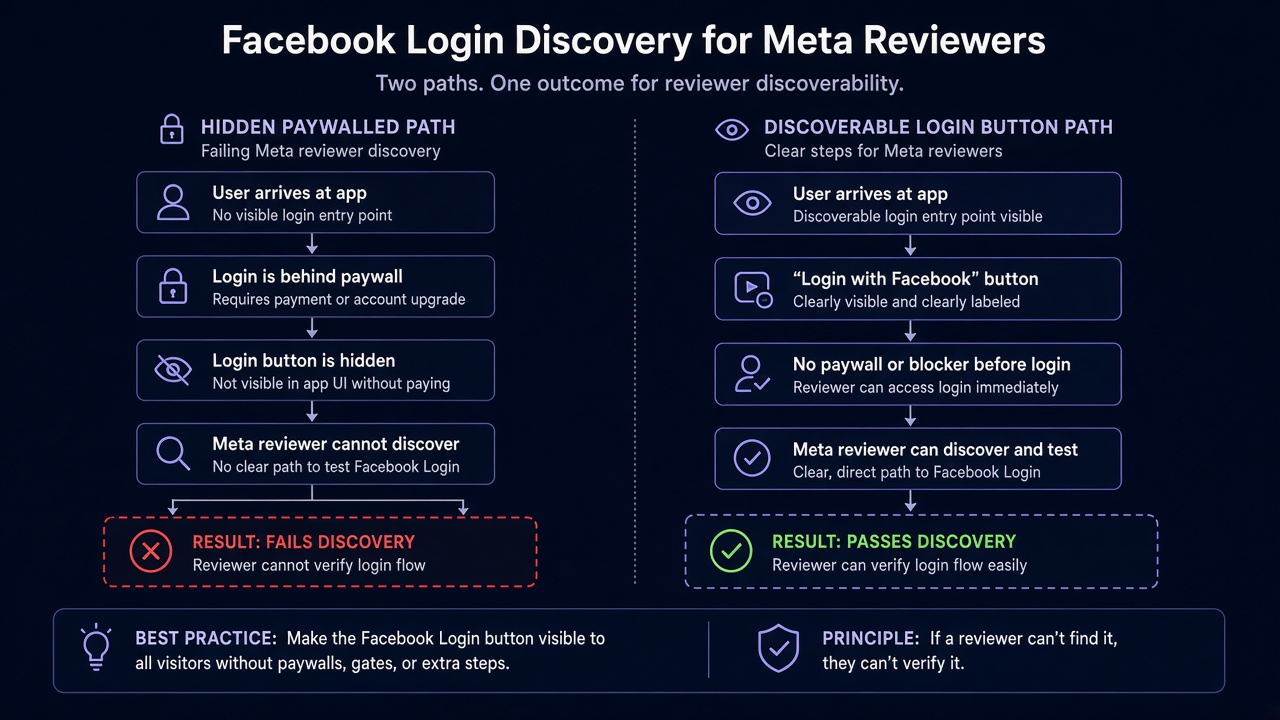
- Login behind paywalls or gated onboarding — Facebook Login only appears after paid signup, waitlist approval, or sales-qualified access, with no reviewer credentials or bypass described in App Verification Details.
- Buried navigation — Login lives three menus deep, only on a secondary locale, or only after dismissing a non-optional product tour that reviewers abandon.
- Email/password primary with Facebook Login demoted — custom auth fills the hero; Facebook Login is a tiny text link that never appears in the screencast or notes.
- Role- or cohort-gated UI — button renders for admins or specific Workspaces but not for the Test User reviewers must use.
- Facebook Login product still enabled while unused — Dashboard still lists Facebook Login, so reviewers hunt for a button your product never ships; Meta’s guide says remove it if you do not use Login on any platform.
- Screencast skips the locate step — video starts already authenticated, so reviewers have no map for where the control lives in a cold session.
Meta’s Rejection Guide remediation centers on Best Practices, a finished product, a Test User proof path, an accurate screencast, and explicit locate instructions — not on rewriting marketing copy alone. Developer Policies under Build a trustworthy product expect apps to follow Developer Docs and provide experiences users would reasonably expect; a Login product reviewers cannot find fails that recreateability bar.
Official references:
- Meta App Review Rejection Guide — “Unable to locate Facebook Login Button while testing your app”
- Facebook Login Best Practices
- App Review common mistakes — Facebook Login not working or can't be located
Blind resubmission risk: Practitioner experience across hundreds of apps shows that rapid resubmits — same buried button, same paywall without credentials, same unused Login product left enabled — frequently trigger automated submission cooldowns. Those locks can disable review buttons for up to 7 days. Meta updates thresholds over time, but the delay cost is real while discoverability remains unsolved.
Expert Diagnosis framework (not a DIY paste template)
Every product’s locate failure is unique: SaaS billing gates, white-label tenants, or a Dashboard Login product that should not exist. A pasteable “put the button on the homepage” checklist would mislead half of teams. Specialists diagnose first:
Confirm whether Facebook Login is actually required
If no platform uses Facebook Login, remove it in the App Dashboard before resubmitting. If you only Share via Social Plugins, Login review may not be needed.
Cold-start as a Test User through every gate
Document every wall — paywall, SSO, invite, locale — and provision reviewer credentials or a bypass so Login is reachable without insider knowledge.
Make locate steps explicit in video and notes
Recapture a screencast that shows finding the button from a signed-out state. Put menu paths and URLs in App Verification Details.
Resubmit once when a stranger can find Login
One coherent discoverability package beats three “we enlarged the icon” retries. Cooldowns punish volume.
If the button is findable but OAuth fails, see broken Facebook Login button. If Login is forced into a custom webview, see embedded custom webview rejection. Also: unable to verify permissions, final UX, Facebook App Review service, and case studies.
Free 15-Minute Meta Rejection Audit
Share your rejection note and whether Login is behind a paywall, invite gate, or unused Dashboard product. We will tell you whether this looks like a discoverability gap, a credentials/bypass problem, or Login that should be removed — before you burn another review cycle.
Strategy second.
What not to do after this rejection
- Do not resubmit with the same buried menu path and hope a different reviewer will hunt harder.
- Do not leave Facebook Login enabled in the Dashboard if no platform actually uses it.
- Do not hide Login behind a paywall without giving reviewers working credentials or a documented bypass.
- Do not film a screencast that starts already logged in and call that “locating” the button.
Make Login findable — or remove unused Login. Prove the path. Then submit once. Anything else gambles with cooldown risk.
Need Us to Get Your Meta App 100% Approved?
Stop losing weeks to repeated rejections. With 500+ apps approved, we handle your entire submission from start to finish. You get 100% Approval or a 100% Refund — and for your complete safety, you can hire us directly through Upwork or Fiverr Escrow (or use the WhatsApp / Calendar buttons in the header & footer).
Chat on WhatsAppFAQ
We use email login primarily — why does Meta still look for Facebook Login?
If Facebook Login is enabled as a product on your app, reviewers will try to locate and use it. If you do not use it on any platform, Meta’s Rejection Guide says to remove it from the App Dashboard before resubmitting.
Can a paywall alone cause “Unable to locate Facebook Login Button”?
Yes in practice. If Login only appears after payment or invite approval and reviewers lack credentials or a bypass, they never locate the button — which matches this Rejection Guide outcome.
Will adding a longer screencast without changing the UI fix this?
Only if the recording clearly shows locating Login from a cold state and the live app still exposes that same path. A longer video of a hidden control still fails.
Can repeated locate failures trigger a cooldown?
Yes. Rapid retries without fixing discoverability frequently trigger automated cooldowns that can lock review submission controls for up to 7 days.
Amandeep Singh — Meta API Expert
10+ years helping product teams through Meta App Review, Business Verification, and Advanced Access. 500+ apps guided; 10,000+ permissions handled across Facebook, Instagram, WhatsApp, and Marketing API surfaces. Focus: policy-aligned proof, not hype.
Still stuck on Unable to locate Facebook Login Button? Get a focused read on your rejection before the next submit.
Book Free 15-Minute Meta Rejection Audit on WhatsApp